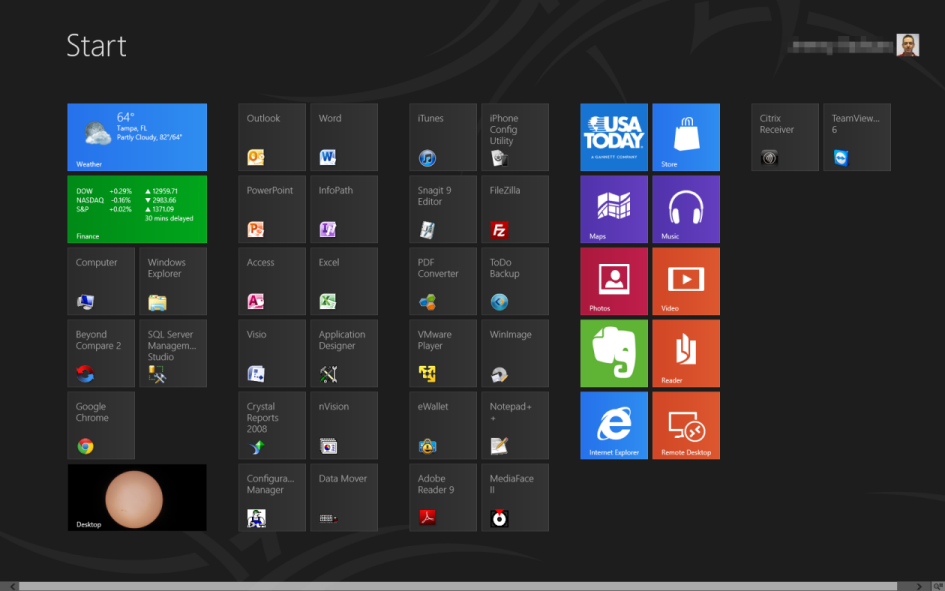
When Microsoft released the Developer Preview of Windows 8 last fall, I played around with it a briefly in a virtual machine but tired of it quickly. Well, now that the Consumer Preview is available for download I decided to give it a serious shot and get a jump on learning my way around Microsoft’s upcoming OS. For the past week I’ve been using it as my main OS at work and here are some of my observations.
tech
Security vulnerability in TRENDnet cameras – update now!
If you have a TRENDnet webcam that is accessible over the internet, a serious security vulnerability has been discovered that allows anyone to access the video stream without having to login/authenticate! I got an e-mail from TRENDnet about this earlier in the week, but not everyone registers their products so not everyone may be aware of the problem. Be sure to download the latest firmware update for your camera and apply it ASAP!
Eye-Fi Mobile X2
Since my new Canon PowerShot Elph 300HS required a Class 6 SDHC card to record 1080p HD video and also included native support for the Eye-Fi series of wireless-enabled SD cards, I decided to pick up a new Eye-Fi Mobile|X2 SDHC memory card.
Let’s be up-front about this: you pay a premium for the convenience of built-in WiFi. A regular 8gb Class 6 SDHC card runs about $10 on Amazon whereas the 8gb Mobile|X2 is 8 times that (although keep an eye out for price drops, I got mine for $60). On top of the higher price, you’ll get poorer battery life in your camera (unless your camera supports Eye-Fi cards in their menu system which lets you turn off the wireless sync to save battery life).
iOS5’s new features
It’s been about a week since I upgraded to iOS5 on my iPhone 3GS (and performed the untethered jailbreak) and I’ve since been learning my way around some of its new features.
- Twitter: don’t use it
- Newsstand: don’t use it (I use MegaReader)
- iCloud: don’t use it (except for Find My iPhone)
- WiFi iTunes sync: only works when the device is plugged into power, so I might as well just connect it via the USB cable to my PC
- Reminders: I was excited to learn that iOS5 finally added support for synchronizing my Tasks in Microsoft Exchange via ActiveSync. However, the lack of categories, no sorting by priority (or any sorting at all!), and no way to easily clear all Completed entries quickly led me to dump Reminders and go back to iMExchange 2. Nice first try Apple, but this still needs work. π
- iPad multi-tasking gestures: don’t work on my iPad 1
Ok, now for the stuff I actually do use (why did I upgrade again?). π
- iMessage: being able to chat other iOS users without using my AT&T text messaging plan (the no-longer-available 200 messages/month for $5) is nice. It’s even nicer that biteSMS seamlessly takes over the the built-in Messages app and supports iMessage too.
- Notification Center: it’s not perfect, but it is a huge improvement over the previous notification system. I like that SBSettings can integrate with it since I’m already used to swiping down from the top of the screen. I’m still configuring all of my different app notifications but for the most part I’m happy with this new feature. I do wish it was wider on the iPad when in landscape mode, however.
Unfortunately, I have run into some problems since upgrading. Slow/sluggish performance and poor battery life were the initial indicators. Sometimes the phone is so slow it takes one of my taps as a tap-and-hold, or just ignores the tap altogether so I end up tapping multiple times on the same element. I’ve gone through some of the tips to improve battery life, which did help, but it still seems like my battery drains faster than it did on iOS 4.3.3. I’m going to stick with it, though (I don’t feel like attempting to downgrade back to 4.3.3 and setting up everything again). There may be a new iPhone in my near future anyway …
iOS5 untethered jailbreak arrives, I take the plunge (again)
The iOS jailbreaking community got a nice holiday/new year’s gift the other week from pod2g and the dev-team: the untethered iOS 5.0.1 jailbreak for the iPhone 3GS, iPhone 4, and original iPad (iPad 2 and iPhone 4S users might get their own jailbreak soon too). I’d been running iOS 4.3.3 on my iPhone 3GS since last May so I decided to take the plunge to upgrade to Apple’s latest software and then re-apply the jailbreak.
Canon PowerShot Elph 300HS
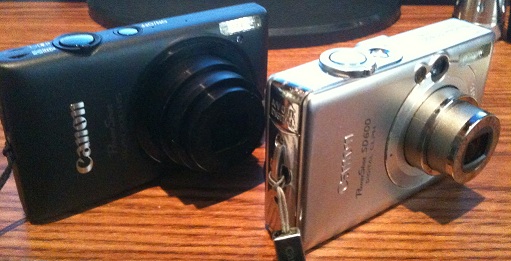
Six years after buying me a Canon PowerShot SD600, my wife got me a new Canon PowerShot Elph 300HS for Christmas. I’d been having battery issues with my old camera, and even the cheap replacements I had bought were starting to wear out, causing frustration when I’d miss shots due to “low battery” messages.
The 300HS is a 12.1MP camera with 5x optical zoom, a 2.7″ LCD screen (no viewfinders anymore!), and shoots 1080p HD video. The controls are almost identical to my SD600, so the learning curve was pretty flat and I was almost immediately comfortable with using the camera. It’s slightly thinner and wider than the SD600 and I like the matte black, textured metal casing.
HD video is recorded in MOV (QuickTime) format, which is a pain since I like to keep all of my video in MP4 (but it’s nothing WinFF can’t take care of, just an extra step). My only gripe with video recording is that the microphones are on t
he top of the case (near the power button) so you tend to hear more audio closer to the camera than what you’re actually pointing at. The video quality, however, is excellent. I don’t see why I would use my mini DV camcorder anymore when I have HD video capabilities in such a small, portable package (and no tapes!).
This is now the third Canon PowerShot model I’ve owned in a row and it seems like every time I get a new one the megapixels have doubled: my A70 was 3.2MP, the SD600 was 6.0MP, and now the 300HS is 12.1MP. I guess that means around 2017 or so I should be getting a new 24.0MP PowerShot. π (Update:Β actually, at the end of 2015 I ended up with a 20.3MP Canon SX710 HS, close!)
I do need to get a new SD card now, however, because the old 2gb one I had isn’t a Class 6 so it can’t handle the recording of HD video. It’ll do about 45 seconds and then stop as it can’t keep up with the amount of data being thrown at it.
Home automation with Z-Wave
A few weeks ago we upgraded our home security system and added ADT’s Pulse service. In addition to the remote security features (such as being able to monitor, arm, and disarm the system from a browser or an app on my iPhone), Pulse also introduced us to home automation via Z-Wave devices.
Amazon Kindle Keyboard (WiFi + 3G)
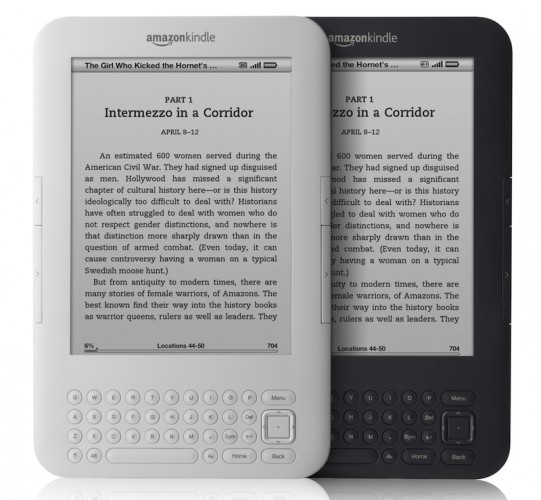
Six months ago I got my daughter a refurbished 2nd generation Amazon Kindle from woot! and she has been inseparable from it. Thus, it was a distressing day for her this past Thanksgiving weekend when she turned it on and found just a series of black lines on the screen. None of the reset methods I tried would restore the screen to its former working state. The USB connection to my laptop still worked, however, so I was able to backup all of her files/books.
woot! had indicated the Kindle had a 1-year warranty from Amazon, so I called up Kindle Support (or rather, they called me once I initiated the request from their support site, which is pretty cool). The support rep (an extremely friendly, American gentleman) told me refurbished devices only have a 90 day warranty, not a year, and the warranty on my particular device expired in July 2011 (a month after I got it, so that must have been tied to the original warranty before the unit was refurbished and then purchased by me).
WIJFR: Zero Day
A plane over the Atlantic suddenly needs to reboot its computer to stay in the air, and the pilots barely avert disaster. A hospital network mixes up patient information, resulting in the death of several people. A law firm, which has lost all of its clients’ data and can’t get its system running again, turns to Jeff Aiken, a former government analyst and computer expert. He discovers that all of the crashes are insidiously connected, and an even greater disaster is coming.
I just finished reading “Zero Day” by Mark Russinovich, a cyber-thriller on par with Daniel Suarez’s “Daemon” or “FreedomTM.” At its core, “Zero Day” addresses a real-world, incredibly difficult to solve dilemma: with so many unprotected/unpatched computers in the world today, could a well-crafted virus potentially wreak havoc on the global economy?
The plot: an insidious computer virus, masked by different rootkits, multiple variants, and seemingly multiple authors, is secretly infecting computer systems all over the world, with a trigger date of 9/11. The virus is only noticed ahead of time because some of the computers it infected had incorrect system clocks which caused it to trigger a month early, completely crashing them. Jeff Aiken, a computer security expert, and his former colleague Daryl Haugen, the Assistant Director Computer Infrastructure Security Unit at the Department of Homeland Security, are on the trail of the virus, trying to track it back to its source before the zero day strikes. Who is behind the virus? How long has it been propagating? How widespread is it? Can it be stopped? Will anyone believe them?
We’re all familiar with the concept of viruses and malware and the importance of running anti-virus software and firewalls and keeping our computer systems patched. The reality is, however, that there are a lot of machines complete unprotected or unpatched, which opens a lot of vulnerabilities for the bad guys to exploit. Russinovich, a Technical Fellow at Microsoft, is well-versed in the topic at hand, and so I found his novel to be a little more realistic than the Suarez books I referenced above.
The book is fast-paced and a good read even for those of us in the computer industry. For more information about “Zero Day,” check out the book’s website.
Obtaining the Oneiric Ocelot
I learned my lesson last time and decided to hold off a few days before upgrading to the new release of Ubuntu 11.10, Oneiric Ocelot.
That was a smart decision since the upgrade took just under two hours this time instead of over eight. I did have one (self-induced) snag during the ‘do-release-upgrade’ step. I was trying to copy some text and accidentally used Control-C in my screen session which killed the process! Luckily I was able to resume it with a ‘dpkg –configure -a’ command and I haven’t noticed any problems due to my screw-up (yet, whew!).
I also had fewer post-upgrade problems this time than with Natty. In fact, both issues were related to the newer version of Perl in Oneiric. They were easily fixed by re-building ZoneMinder and MRTG so I was back in business relative quickly.
Since I run Ubuntu on my server I don’t normally see (or care about) any of the user-facing changes like the Unity interface so I can’t comment on those features. The only real change for me is the new 3.0 Linux kernel.
Up next in April? Precise Pangolin.