Virtual Console and WiiWare games through a USB loader

[ I apologize for using the term “rabbit hole” three posts in a row! -windracer ]

Apparently I have a thing for doing homebrew stuff in April: almost exactly two years after softmodding my Wii so I could load my games from a USB hard drive instead of discs, I found myself wondering if I could do the same for Virtual Console and WiiWare content. Well, of course you can! The path can be confusing and frustrating, but the destination … well, it’s a cool destination.

Read more

Nintendo announces next-gen (strangely named) console

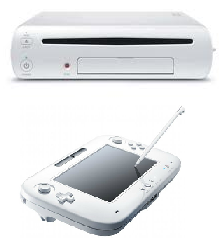
Today at E3, Nintendo announced their next generation game console, the Wii U. The console itself looks pretty much the same but boasts (presumably) increased specs, including HDMI for full HD output (no more 480p!).

The real news, though, was the new controller: along with the standard D-pad, buttons, and motion control it sports a 6.2″ color touchscreen (and stylus) and can stream games from the console to the screen (sound and all), no TV required. That’s a cool feature when Junior wants to play Mario Kart but Mom and Dad want to watch TV. I wonder, too, if that would make the Wii U a more portable entertainment system (think: in the car on road trips).

The Wii U will be backwards compatible with all Wii games and controllers, another smart step, similar to how the Wii can read GameCube discs.

What to say about the name? At first glance it looks like some sort of video game school. I can see where they’re going with the “we” (console) and “you” (controller), and everyone got used to saying “Wii” eventually, but now we’ll have to go through all of that again. Oh well.

Would I get one to replace my Wii? Probably not right away. The Wii U won’t be out until 2012 and the pricing has yet to be announced. Since I’m a casual gamer the lack of HD output hasn’t really bothered me and I’m sure the new controller is not going to be cheap. For playing Mario Kart online with my siblings, or Lego Harry Potter with my daughter, the current console works just fine.


More Wii homebrew: running games from a USB hard drive

I dabbled in Wii homebrew last year but didn’t do much beyond getting the Homebrew Channel working and messing around with a few apps. Then last week I saw this post on Lifehacker and thought, I have got to try this. The Lifehacker tutorial is pretty straightforward … the Wii hacking community has done some amazing work to make the soft modding process easy and (almost) risk-free. At least I haven’t bricked my own Wii, which is running the latest 4.2 firmware, yet.

I already had the HBC installed and working, but the first problem I encountered was during the DOP-Mii step. For some reason my Wii wasn’t able to download the IOS updates/patches from NUS (Nintendo’s Update Servers), the same issue as described here (even though wireless connection was working). I wasn’t able to figure out how to get the required WADs onto my SD card for a local install, and trying to re-run the DOP-Mii step was now causing scary crash messages, so I gave up. I noticed that after attempting this, when my daughter went to play Wii Sports Resort, the Wii re-downloaded a system update, so luckily that seemed to reverse whatever the failed DOP-Mii patcher had done to the IOS.

A few days later I found another guide at WiiHacks.com and decided to give this another shot. This time I had the required WAD patches downloaded locally on my SD card so the DOP-Mii step worked as expected. But then I ran into a problem trying to install the cIOS. After some more Google searching I figured out I had to use the AnyTitle Deleter to clear out IOS249 before the new custom IOS would load properly (it’s possible that this was something left over from my last experiment with homebrew). After getting past all of that, though, I was able to complete the rest of the Lifehacker guide as documented.

For my initial testing, I used an old 40gb laptop hard drive I had laying around connected to a barebones USB adapter (pictured to the left) but I’ve since switched to a 320gb WD Elements drive split into two 160gb partitions (one WBFS, one exFAT).

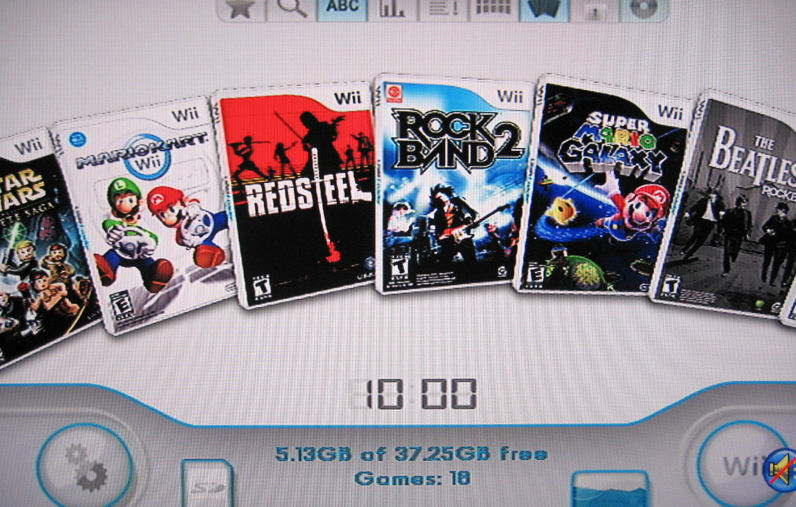
Using the amazing USB Loader GX app, I backed up all of my games to the hard drive and then had it download the various box and CD cover art. It looks fantastic:

I tested running a few games from the hard drive and they worked just fine (even the online ones like Mario Kart). Sweet! Check out this little video I made to see it in action.

A helpful note: I kept having problems where the USB Loader would crash. It turned out that while moving the SD card back and forth between my PC and Wii, at some point the lock switch moved down slightly so the card was effectively read-only. Fixing the switch resolved the crashes. Just something to keep an eye out for!

Wii Fit “is a very, very mild workout”

This is really no surprise to me, but an American Council of Exercise study on the effectiveness of Wii Fit determined it to be “underwhelming” (found via Joystiq).

I’ve always said it was a combination of Wii Fit and changing my eating habits that made it possible for me to drop 40lbs. Just playing Wii Fit alone wouldn’t have really done much, but it was responsible for getting me into a habit of an (almost) daily exercise routine … and it’s fun. Going running outside for 20 minutes does not sound like fun to me, but I can do that easily in front of the TV with Wii Fit. I think everyone agrees that fun exercises will keep you coming back and those that aren’t fun turn into the dusty, unused Soloflex sitting in the corner of your den. πŸ˜€

The article does concede that some exercise is better than none, and that Wii Fit Plus might be better due to the customization of routines with less lag time in between (which I agree with). It’s an interesting read.

If you already own Wii Fit, get Wii Fit Plus

While I continue to wait for the delivery of my FitBit I picked up Wii Fit Plus last weekend.

Wii Fit Plus is basically an upgrade to the original Wii Fit that came with the balance board: it contains all of the original games and activities, then adds a bunch of new games (Training Plus) and features. It will automatically import all of your data from Wii Fit so you won’t even need your old disc anymore. So, what’s new and cool?

First off, you can now create profiles for babies and pets. Why? Well, I guess if you want to be able to track the weight of those smaller members of your household it can come in handy. Like in Wii Fit, the balance board weighs you first, and then you holding your dog, cat, or baby to calculate the difference. It’s kinda cute to see our dogs in the Wii Fit Plaza.

A new “multi-player” feature is available from the Wii Fit Plaza which allows a bunch of people to alternate playing the mini-games, but none of it counts towards Wii Fit credits. I guess it’s just a way to allow your guests to try out the games without needing to create a profile, get weighed in, etc.

One new feature I was looking forward to was the addition of routines, basically “playlists” of activities that was supposed to streamline performing multiple exercises in a row without all of the pausing and clicking. Unfortunately, you can only add Strength Training and Yoga activities to a routine, not any of the Aerobics or Balance activities. Also, you’re limited to a certain number of reps. For example, instead of having the option to add 5, 10, or 20 push-up and side-plank reps, you can only choose 6 at a time. To work around this you’d have to add multiples of the 6-rep activities in a row:

Once you do have the routine set up, though, it definitely makes performing multiple activities more efficient. You don’t need to keep clicking the A button a bunch of times to move on, you just see a brief checklist and then the next activity starts.

Wii Fit Plus also assigns METs (Metabolic Equivalents) to activities so in addition to showing you the number of minutes you’ve exercised (Wii Fit credits) it will also calculate the number of calories you’ve burned. New options in the Activity Log also let you track your waist size and the number of steps you’ve taken during the day (assuming you have a pedometer to track that data for you … this is where my FitBit will eventually come into play).

The new Training Plus games are a lot of fun too! Cycling, Segway riding, snowball fights, the obstacle course, and many more new additions can really get you back into Wii Fit if you’ve been getting bored with the old activities.

So, if you bought Wii Fit give Wii Fit Plus a try … it’s definitely worth the $20 (or less, if you shop around).
What’s your favorite Wii game? Here’s how to check …

Hey kids, don’t show your parents this one! πŸ˜‰

I came across this post on Kotaku that describes how to find your play/usage statistics on the Wii through the Nintendo Channel. Curious, I of course had to check my own:

Yikes! I think we may have left the Wii on accidentally a few times, which may account for that incredibly high usage time for Wii Fit. πŸ˜€ I noticed that not every game seems to be listed (but even virtual console games are channels present), but the top 10 seems to be accurate. It’s not surprising that Wii Sports is up there since it’s the number one selling video game of all time and still one of our multi-player family favorites.

Wii puns go mainstream, still not funny

As investigators searched the home near Lakeland for drugs, some drug task force members found other ways to occupy their time. Within 20 minutes of entering the home, some of the investigators found a Wii video bowling game and began bowling frame after frame.

I saw this headline on the local paper this morning: “A Wii bit distracted.” Yes, I’ve done this twice myself (here and here), but that last one was over a year ago. This is the first time I’ve see the use of “Wii” in a major print publication in place of “we” or “wee.” I’ve never claimed to be a good (or proper) writer, but I guess I expect more from the professionals.

All that being said, the headline did what it was supposed to: grabbed my attention and made me read the article.

Cookin’ up some Wii homebrew

I saw this post on Lifehacker yesterday about installing homebrew on the Wii without needing to use the Twilight Princess hack and decided, what the heck, let’s give it a try!

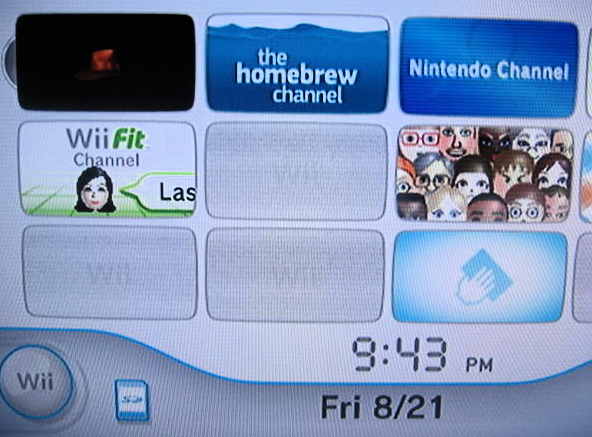
Wow, talk about amazingly simple. Only minutes after downloading the necessary files, I had the Homebrew Channel running on my Wii.

Homebrew Channel

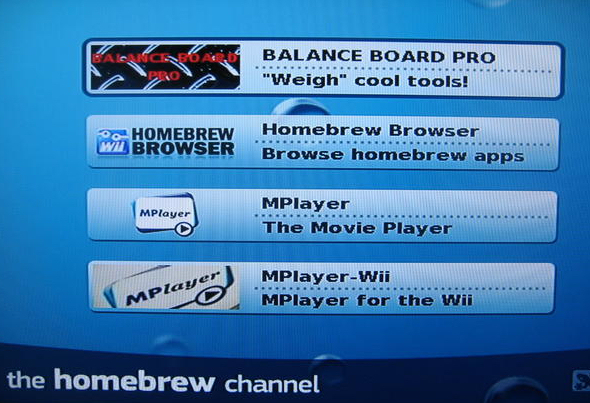
After doing a little more browsing and downloading, I had a few homebrew apps to play with.

homebrew apps

Pretty slick. Using MPlayer I was able to play both a commercial and self-created DVD using the Wii remote for the basic controls. I’ll be honest, DVD playback on the Wii isn’t going to replace a standalone DVD player yet, but for a homebrew app, it’s pretty cool. Nintendo really should just build that functionality in! With MPlayer-Wii I was able to stream an .AVI video off of my NAS (via samba) for playback through the Wii. I hard to hardcode the filename in the configuration file, so this isn’t a complete video library solution (like what I do with my TiVos) but the possibility is there.

I played around with a few homebrew games like Duck Hunt, and plan to check out Quake and Doom. For now, as you can see from the screenshot above I’ve kept the Homebrew Browser (which allows you to install apps right from the Homebrew Channel instead of having to use your PC to download and then copy them to the SD card) and Balance Board Pro which shows off some of the features of the Wii Balance Board.

Cool stuff!

Indiana Jones Wii is fun, but annoying

Since we finished Lego Star Wars last month, my daughter and I have moved onto Lego Indiana Jones on the Wii. It’s a fun two-player cooperative game just like the Star Wars version, but just going through the first two sections (“Raiders of the Lost Ark” and “Temple of Doom”) we’ve run into quite a few annoying problems.

Twice we hit a spot where we were unable to continue and had to start the entire level over: The first was during the chase of the ark on the military trucks near the end of “Raiders.” You have to jump from truck to truck, fighting the soldiers until the driver of the truck hops out. Once you beat him, you jump in the truck (using the C button) and drive forward to the next set of trucks. Well, on the first set of trucks we defeated the driver but the prompt to press the C button would not appear, so we couldn’t get into the truck. It just kept driving on, without a driver. Since we couldn’t get in to accelerate up to the next set of trucks, we had to start all over (and that second time, the C button worked). The next time we got stuck was near the beginning of “Doom” when you’re working your way up to the palace from the devastated village. You need all three characters (Indy, Short Round, and Willie) to step on switches at the end to open the palace doors. The problem was, we accidentally moved Willie (who was riding an elephant) into a pit she could not get out of. She kept re-spawning and then immediately dying over and over again. So we had the start that level over as well. Apparently we’re not the only ones who have run into these glitches, and others.

Another annoying thing is that you can’t skip the long cutscenes. After you seen it once, you just want to get past it and start playing. Well, you can’t. The same goes for the Video Room in the college: once you start watching one of the cutscene videos, you’re stuck watching the whole thing. When you have to play a few levels over, this gets annoying very quickly. In a similar vein, the animations on the map as you switch from level to level take a long time, something else you can’t skip. Each movie has 6 levels. If you’re at the college and want to play level 5, you have to sit and wait for the little red travel line on the map to draw its path through levels 1 to 5 first.

Oh well, it’s still a fun game to play …

Do I still want (or need) a FitBit?

Back in September, when I was in the middle of my weight-loss regiment, I pre-ordered a FitBit. At that time, the little gadget was supposed to be shipping in January. Well, it’s now August and it looks like I might actually finally have my FitBit this month (they hope to start shipping on August 10).

But the question is: do I still need, or even want, it?

When I pre-ordered it almost a year ago I had lost about 20 pounds (via Wii Fit and my new eating habits) and was still trying to lose more. By January of this year I had lost another 20 pounds and have been keeping my weight steady at around 160lbs for the past 8 months.

My gadget addiction is still telling me I want it just for the coolness factor (a little wearable wireless device that tracks my steps and sleeping habits), but the my reasonable side is saying I don’t need this kind of information anymore. Given that a gadget (Wii Fit) kick-started my weight loss in the first place, I’m leaning towards giving the FitBit a fair shake. I could always sell it if I don’t think it’s doing anything for me … stay tuned.