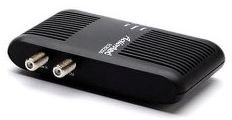
 I’ve been having issues with my Netgear MoCA adapters lately and since they are now out of warranty (no more free replacements) I decided to look into other manufacturers. I picked up two used ActionTec ECB2200 adapters on eBay for a good price, figuring this way I would have spares if (when) these Netgear units die again.
hardware
Amazon Kindle (2nd gen)
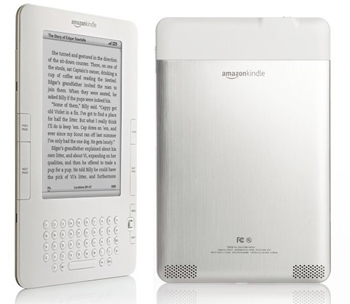 Back in May I spotted a woot! deal for Amazon’s second-generation Kindle e-reader and jumped on it, not for myself (I do my reading on my iOS devices), but as an end-of-the-school-year present for my daughter. We gave it to her on the last day of school in celebration of her straight As report card and she freaked. Her best friend had gotten a Nook for her birthday and she’d been asking for an e-reader ever since. She loves to read (we find open books scattered all over the house face down), so being able to put a bunch of books on a tiny device she can take with her anywhere was an appealing idea.
This was the first time I’d laid hands on, and actually used, a Kindle! Hard to believe, given my fondness for gadgets, but I’ve been reading books on small LCD screens since my Palm/iPAQ days so I never felt the need for a dedicated e-book reader.
Nintendo announces next-gen (strangely named) console
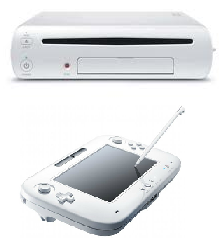 Today at E3, Nintendo announced their next generation game console, the Wii U. The console itself looks pretty much the same but boasts (presumably) increased specs, including HDMI for full HD output (no more 480p!).
The real news, though, was the new controller: along with the standard D-pad, buttons, and motion control it sports a 6.2″ color touchscreen (and stylus) and can stream games from the console to the screen (sound and all), no TV required. That’s a cool feature when Junior wants to play Mario Kart but Mom and Dad want to watch TV. I wonder, too, if that would make the Wii U a more portable entertainment system (think: in the car on road trips).
The Wii U will be backwards compatible with all Wii games and controllers, another smart step, similar to how the Wii can read GameCube discs.
What to say about the name? At first glance it looks like some sort of video game school. I can see where they’re going with the “we” (console) and “you” (controller), and everyone got used to saying “Wii” eventually, but now we’ll have to go through all of that again. Oh well.
Would I get one to replace my Wii? Probably not right away. The Wii U won’t be out until 2012 and the pricing has yet to be announced. Since I’m a casual gamer the lack of HD output hasn’t really bothered me and I’m sure the new controller is not going to be cheap. For playing Mario Kart online with my siblings, or Lego Harry Potter with my daughter, the current console works just fine.
TiVo Slide remote
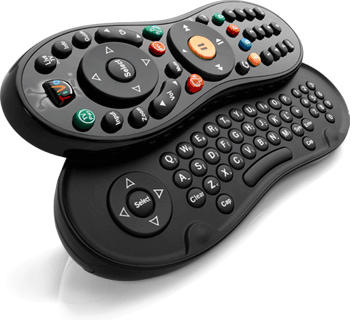 I guess I didn’t write about the TiVo Slide remote when I first got it last October but after going without it for a few days recently I realized how much I like it.
The Slide is a combination infrared and Bluetooth remote that works with the TiVo Premiere, TiVo HD, and TiVo Series 3 (OLED) boxes. The remote is the same familiar peanut shape as TiVo’s previous remotes, but smaller and heavier. Its shorter length allows for easier operation without having to shift the remote up and down in your hand to switch between the navigation D-pad and number buttons (my daughter thinks it’s a “cute” baby TiVo remote). The back of the remote is textured so you can figure out which way is “up” by feel. It comes with a small Bluetooth USB dongle that you plug into the back of your TiVo and then pair it with the remote.
The primary feature of the Slide is the slide-out QWERTY keyboard, as shown in the photo. The keyboard makes it a snap to enter long strings of text when searching for shows, creating WishLists, etc. The fact that the remote uses Bluetooth also means it’s more responsive (read: faster!) than the IR remotes. This is great for me because I was able to stop using my slow (but functional) IR extender since my TiVo is in an enclosed media cabinet (no line of sight for infrared signals). The Slide is a learning remote, like the Glo remotes, so you can program it to control other components like your TV, receiver, etc. It obviously uses IR for that, not Bluetooth. The little LED on the top of the remote above the TiVo button flashes orange when sending IR and blue when sending Bluetooth.
If you don’t want to get a whole new remote but still would like easier text entry on your TiVo, try a wireless USB keyboard! There are quite a few shortcuts available for navigating the TiVo interface with a keyboard. Or, of course, there’s TiVo’s own iPad app (which currently works with the Premiere only).
So, why was I without my Slide for a few days? Let’s just say it took a few too many accidental drops on the tile floor and had to be replaced. 🙁
MacBook Air(port) cleared by TSA
The original MacBook Air confused the TSA when it was introduced two years ago.
Now, CNN is reporting that the TSA has cleared the new MacBook Air so you don’t have to take it out of your bag for screening:
Apple may wish to avoid comparisons of the MacBook Air to similarly compact but underpowered netbooks. However, like netbooks, Apple’s new laptop is “smaller than a standard-size laptop,” meaning it can stay in a bag, said TSA spokesman Nicholas Kimball.
When I still had my Eee PCs I always had to remove them from my bag when going through security and they were a lot smaller than the new Macbook Air. Granted, they were thicker and that probably affected the x-ray photos, but it’ll be interesting to see how this plays out at the airport checkpoints.
Apple iPad
About a month ago I got a 16gb (WiFi only) Apple iPad from work so I’ve had about 30 days to mess around with Apple’s “magical” tablet. If I had to sum the iPad up in one word?
Slick.
I’m not going to bother with the specs, or a general overview of the iPad here. It’s been out for about 8 months and you can certainly read/find all the technical details you want fairly easily (just typing ‘ipad’ into Google yields “about 123,000,000 results”). Instead, I’ll talk about how I’ve been using it, the apps I’ve installed, and my overall impressions.
Foscam FI8904W outdoor internet camera
I’ve been pleased so far with my in-house internet cameras and decided I’d like to be able to keep tabs on the outside of the house as well. TRENDnet sells weatherproof enclosures for their cameras but they won’t work with the night-vision models because the IR just reflects off of the glass. I started looking at other models of outdoor cameras and chose the Foscam FI8904W.
Netgear MCA1001 MoCA adapters
Since I was facing a re-org of my media cabinet to set up my new TiVo Premiere, I took the opportunity to make some network changes as well. I’m not quite ready to upgrade my wireless network to the N standard that was finally ratified last year but still wanted good throughput so I could stream and download HD video to the new Tivo box. After doing some research and reading good reviews, I decided to try out MoCA, or ethernet-over-coax.
TiVo Premiere
It’s been almost three years since I bought a new TiVo, so it was time. I’ve added the new TiVo Premiere to my main home theater setup, relegating my trusty, original Series3 box to home office duty.
I already had the 1TB WD Expander drive from the Series3, so rather than spend the extra cash on the Premiere XL, I went with the base 320gb model and then connected the Expander giving me 190 hours of HD recording capacity.
TRENDnet internet cameras
Another piece of tech I implemented before we went on our vacation roadtrip was a series of TRENDnet wireless internet cameras so we could keep an eye on the house while we were away.