Blogger’s site feeds are not working

A few days ago someone pointed out to me that the RSS feed of my blog was empty, throwing an error:

XML Parsing Error: no element found
Location: https://www.windracer.net/blog/atom.xml
Line Number 1, Column 1:

I checked the atom.xml file on my server (I host this blog myself, not on Google’s servers) and found that it was zero bytes (rss.xml was also empty). So basically, the feed was empty. My posts were still making it to my site (i.e., the index.html file) but the feed files were just blank. I tried republishing over and over and the files always came across empty.

So I started this thread over on the Blogger help forums and discovered that I wasn’t alone and quite a few other people were having the same problem. It seems to only be affecting people who use FTP (or sFTP, in my case) publishing. This has got to be a problem on Blogger’s side, but they’ve been conspicuously absent … not a single reply (unless you count this guy). There are lot of new threads in the help group now with the same problem, so maybe this will get some visibility with Blogger soon.

Back in December Blogger had strange java/FTP issues that completely prevented people from posting to their blogs. It took days to resolve. So far this feed issue has been going on for at least three days. Since I already host the blog on my server, maybe I should bit the bullet look into running my own blogging software as well. I’ve been using Blogger for a long time (since 2002) but it might be time to take a good look at something like WordPress or Movable Type.
A GUI timeline and OS retrospective

On one of the forums I frequent there’s been a recent thread about the evolution of the graphical user interface. In that discussion someone posted this link to a GUI timeline that shows screenshots of many of the UIs that evolved over the years. It’s a really cool walk through GUI history and made me recall (some fondly and some not so much) the operating systems behind those GUIs that I’ve used over my 25+ years of computing.

  • My Atari 800XL didn’t have a GUI at all, just a “friendly” text-based blue screen (not the bad kind that every Windows user is now familiar with).
  • I remember using an Apple Macintosh with System 6 at work and actually doing the upgrade to System 7 when it was released.
  • I also recall using a college friend’s IBM PC that could run Microsoft Windows/386.
  • The PCs in the computer lab at the university were all still DOS-based, but there was a “Windows” lab where you could use Windows 3.0 (and eventually 3.1).
  • I remember the “fun” my roommates and I had setting up a token-ring network in our apartment with Windows for Workgroups 3.11 (we had these thick cables running across and down the halls between our bedrooms and family room where all the computers were located … isn’t wireless networking fantastic?).
  • Really pushing my 386 to the limit, I would use Desqview (the text-based version) to run my Renegade-based BBS in the background and still be able to use the PC for other tasks even while someone was dialed into the system.
  • For a while I also ran OS/2 Warp on my 386 but then switched to Windows 95 when it was finally released.
  • For a time between Windows 95 and Windows 2000, I ran NT 4.0 as my main OS (not a good decision for gaming!) to avoid Windows 98 and ME.
  • I’ve run many of the various Linux distros like Red Hat, Mandrake/Mandriva, and Ubuntu (though never as my main OS, just on a “server” of some sort or in a dual-boot configuration).
  • And of course I’ve also gone through Windows 2000 to XP to Vista (and am now testing Windows 7 at work).

Whew.

Girl Scout Cookie sales in the internet era

This has been my daughter’s first year as a Brownie scout, so we’re currently experiencing first-hand the annual selling of the famous Girl Scout Cookies. She hit up the usual suspects (friends, neighbors, and family members) and we also spent time at our troop’s cookie booth the other weekend in front of a local grocery store.

During our troop’s cookie sale kick-off meeting back in mid-Feburary, we were specifically told that selling on the internet was a no-no. That apparently didn’t stop one 8-year old (and her dad) in North Carolina from setting up an online ordering system and raking in the sales, along with complaints from other cookie-selling families in the region. Newsweek has an interesting article on the story that also explores why the Girl Scouts haven’t made the transition to online sales, much like Avon did. My favorite quote from the article:

Michelle Tompkins, a spokeswoman, says, “Girl Scouts of the USA is not shunning the Internet … though we still have to figure out how to do this.”

The internet has been around for a while … maybe it’s finally time to figure it out.

Monty Python and the Holy … Gatorade?

Since I have TiVo, a commercial has to really catch my attention at 3x fast-forward in order for me to stop, rewind, and watch it. That’s exactly what Gatorade’s latest ad campaign, “The Quest for G,” did.

The film is a hilarious cinematic re-creation of “Monty Python and the Holy Grail” starring sports stars such as Kevin Garnett, Derek Jeter, and Jimmy Johnson as the trotting, questing knights seeking the grail, er, G. It even has the Gilliam-esque cutscenes and the same music (but no coconuts).

Even though it’s a commercial, it’s a must-watch for any Python fan. I’ve got to wonder if any of these athletes have ever seen the original movie. How do you pitch this concept to someone who doesn’t know what a shrubbery is? 😉

“It’s just a poodle.” 😀

Minor fixes for Galleon’s ToGo app

It’s been a while since I last posted but I’ve been sick for the last week with a really bad chest cold. I actually stayed home from work on Wednesday (taking the rare, for me, sick day), slept pretty much the entire day and still really didn’t feel any better. I’ve still got the cough, but the worst is behind me. I need to be 100% for my upcoming Arizona trip!

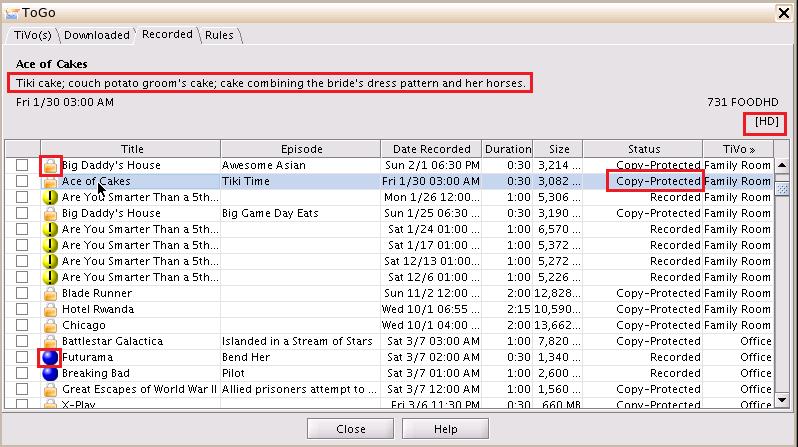
In my free time over the past few days, to keep my mind off of the coughing, the sneezing, the nose-blowing, etc. I’ve been tinkering with Galleon’s ToGo code, the app that lets you download recordings from your TiVo from your PC (the TiVo Desktop-ish way) or directly from the TiVo interface itself. I don’t use the app much, but there were a few minor bugs in it that were, uh, bugging me so I decided to take a crack at them and did a little cleanup along the way.

On the client side (mainly the ToGo tab):

togo-client-fixes-715676

  • fixed the bug that was causing the show description to not display.
  • added indication of [HD], DIGITAL, or UNKNOWN recording qualities to the existing analog ones (MEDIUM, HIGH, etc.).
  • displayed copy-protected recordings, indicated with lock icon (previously the app was just hiding these shows, which I thought was confusing and inconsistent with other downloading apps, like TiVo Desktop. I thought it better to see that the show is actually there, just copy-protected. This was also causing problems with the space calculation, see below).
  • re-instated the blue ball icon to indicate a TiVo Suggestion.
  • on the TiVos tab (not pictured) I fixed the space remaining calculation. Before it was just subtracting the size of all recordings (across all TiVos) from the capacity of each individual TiVo, which was resulting in negative, obviously wrong, numbers.

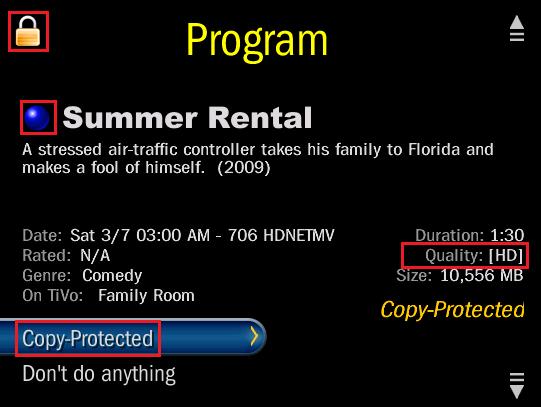
On the TiVo side, I made similar changes:

togo-tivo-fixes2-713129

  • added indication of [HD], DIGITAL, or UNKNOWN recording qualities to the existing analog ones (MEDIUM, HIGH, etc.).
  • displayed copy-protected recordings, indicated with lock icon.
  • re-instated the blue ball icon to indicate a TiVo Suggestion.
  • fixed display of total Length (hours:minutes) for statistics on main Now Playing screen (not pictured).

I’ve checked my changes into the SourceForge project’s CVS repository so they should be part of version 2.5.5, whenever that is finally released.

webOS on my Treo

It may be a while (if ever) before I get a Palm Pre, especially since Sprint has it exclusively for 2009. However, I don’t have to wait for the webOS experience.

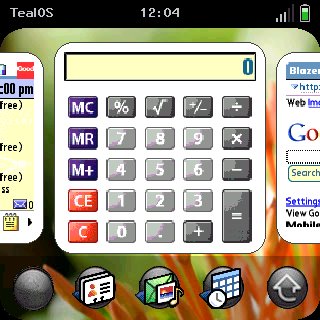
TealPoint software has released TealOS, an amazing piece of programming that duplicates the look-and-feel of webOS on the current Palm handhelds. Here’s a screenshot of it running on my Treo 680:

snap-c5c992da-738541

As you can see it gives you the card interface, where “running” applications appear as a scrolling list of cards on the home screen. You can use your finger to swipe the cards left and right and then tap on the one you want to “launch” (bring to the foreground). Now, PalmOS is not a true multi-tasking operating system so what TealOS is really doing is re-launching the application for you. Thus, I’ve found that the screenshots on the cards are not always accurate. If you’re not on the home screen, you can switch cards by swiping your finger along the bottom of the screen from either corner. To remove cards from the home screen list, just swipe them up and off. It’s pretty cool!

They’ve also included the “wave menu” where you swipe your finger up from the bottom of the screen to bring up a moving app menu for quick launching. My screen capture software (Snap) wasn’t able to capture the wave menu in action, but you can see shots of it on Engadget.

Underneath the pretty interface it’s still PalmOS, of course, so all of your existing apps look the same. Beware: after using TealOS for a while, those “old” apps start to look pretty tired and dated. Another side effect: more fingerprint smears on the screen. 🙂

I’m a long-time user of some of TealPoint’s other applications, mainly TealAuto and TealBackup. After playing with TealOS for a little while, I’ll have to decide if it’s worth the $15 for the pre-Pre experience.

Fire up the (new) grill!

We got our very first gas grill as a wedding shower gift over 12 years ago and it served us extremely well. As part of our backyard renovation project that we started last fall (and is almost done!) we decided to finally get a new one.

After shopping around and doing some research, I chose the Charbroil Infrared Commercial Quantum series. The model I got has four burners (40,000 BTUs), a side burner (13,000 BTUs), and 580 square inches of cooking space.

The manual estimated the assembly time at a mere 30-45 minutes, which turned out to be extremely optimistic. It took me about 4 hours to get the entire thing put together (including unpacking and cleanup time), but I also did it all by myself. You can see assembly pictures here.

After assembly, I fired it up at full power for about 20 minutes to burn it in, so to speak. 🙂 It can put out some serious heat! The metal grates shield the flames from the food, converting the convection produced by the gas flames into infrared (or radiant heat). I had all four burners up past 700 degrees in just a few minutes. The side burner also came with a griddle (pancakes, anyone?).

Tomorrow I’ll give it a shot with actual food and see how it comes out.

The DTV switchover in hurricane country

So the original February 17th deadline for the digital TV switchover has come and gone but only a handful of stations have shut off their analog signals thanks to the DTV Delay Act. Is everyone confused yet?

One thing I don’t think a lot of people here in hurricane country have thought of (even myself, until recently) is those battery powered TVs in their hurricane kits. I have a little 5″ B&W television in our supply kit that runs on 6 D-cell batteries … and it won’t work after the digital switchover in June without a converter box. The problem is: how do you power a converter box when you don’t have power?

One solution is a battery-powered converter box like the Winegard RCDT09A (which is also coupon eligible). Another possibility (and I have to give my local Fox news team credit for this one … can’t believe I didn’t think of it myself) is a USB TV tuner for your laptop.

I just happened to have the Happauge WinTV-HVR-950Q sitting in my computer parts box, unused. Since I have a bunch of TiVos in the house, I didn’t really need a TV tuner for my PC so I threw it in there several months ago and forgot about it. It makes sense, though, to put this little device in our hurricane kit.

I first tried to get the device working with my Eee PC. Ubuntu recognized the hardware right away (and it showed up in Totem, the media player), but I could not get w_scan to find any channels with neither the included antenna nor with the tuner directly connected to cable. I tried all sorts of other packages (xawtv, mythtv, dvb-utils, etc.) and just could not get it to work at all.

So I moved on to Windows Media Center on our Vista laptop and it worked perfectly. While the signal strength is poor in my area (we’re about 33 miles away from all the main antennas according to antennaweb.org), I can at least pick up the local ABC and (barely) CBS affiliates which is all we really need during a storm.

WIJFR: Martin the Warrior

Badrang the Stoat has his evil eyes set on ruling over his own empire, and will do anything to make sure that his ultimate fantasy is fulfilled. But little does he realize that the quiet, nameless mouse he is holding captive will one day turn out to be the heroic and fearless Martin the Warrior.

Martin the Warrior” is the sixth book of Brian Jacques’ Redwall series. The opening sequence takes place shortly after “Mariel of Redwall” but the actual story of Martin is the earliest so far in the series, placing it sequentially before “Mossflower.” The book also takes place in the far north lands, a new area of Jacques’ world.

Badrang the Tyrant, the ruler of Fort Marshank on the shores of the Eastern Sea, has captured a young mouse named Martin. Martin eventually escapes with Brome (another mouse) and Felldoh (a squirrel) from the fort and meets up with Brome’s sister Rose and her companion Grumm (a mole) who have come from Noonvale.

Separated during their escape, the remainder of the book follows the two parties in their respective quests: Martin, Rose, and Grumm attempt to return to Noonvale and raise an army to attack Marshank; Brome and Felldoh meet up with a travelling troupe of entertainers known as the Rosehip Players (which include a Badger named Rowanoak and a hare called Ballaw) and plan a series of missions to free the remaining Marshank slaves. Meanwhile, Badrang has to deal with both the outside attacks and inside subterfuge caused by an old “friend” (Tramun Clogg, a sea-faring stoat pirate) paying an unexpected visit.

As usual, the characters are varied, colorful, and entertaining and the story is easy to read. This volume, however, has the most sad and tragic turn of events in any of the books so far in the series. Suffice it to say that the ending plays an important role for the Martin we see at the beginning of “Mossflower” and explains his actions that carry on in the later Redwall novels.