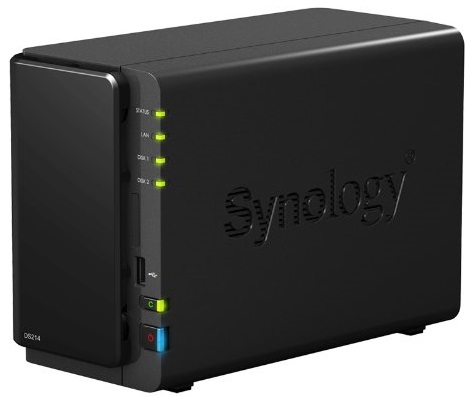
I was having way too many problems with my new Buffalo Linkstation LS420 so I sent it back and decided to give a different brand a try. It was slightly more expensive, but I selected the Synology DiskStation DS214 2-bay NAS, populated with two 3TB Western Digital Red NAS hard drives (purchased separately as the NAS itself comes without drives). Wow, am I impressed!
software
Back in “jail” (upgraded to iOS 7.1)
I ran into a problem last night where the Reminders app on my iPhone 4S stopped updating with the Reminders in iCloud. Figuring it was just a typical sync issue I turned off the Reminders syncing, planning on just turning it on again to fix the problem. When I turned them off, I let iOS delete the local reminders on my phone (since they were still up in iCloud).
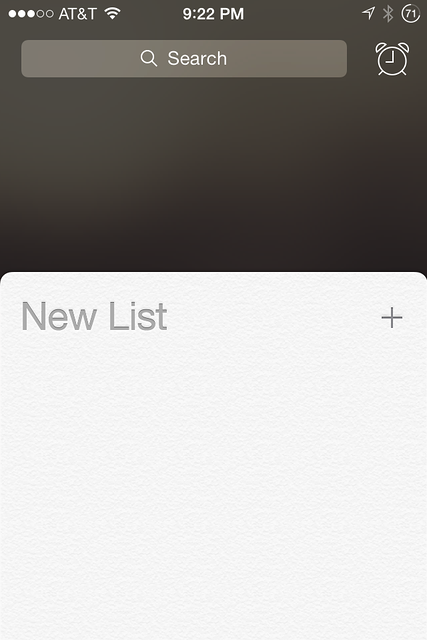
But after turning the sync back on, my Reminders app was completely broken: the default list was missing and I couldn’t add one because the plus (+) button was grayed out! The “Default List” under the Reminders settings was also missing, and Siri couldn’t add new reminders either.
Perusing Google and the Apple support forums, it appeared that of course, a complete reset of the phone might fix the problem. I didn’t want to do that, though, because I would lose my iOS 7.0.6 jailbreak when the phone would update itself to iOS 7.1.
Epson Expression Home XP-410 and Canon imageCLASS MF4890dw printers
Although there was nothing technically wrong with my trusty workhorse Epson AcuLaser CX11NF color laser printer/scanner/fax machine, it was over 7 years old and I was starting to be disappointed with its color quality, speed, and general noise. Rather than replace it with another color laser printer, I decided to go with dual printers: a monochrome laser for basic printing, and a color inkjet for photos. I ended up selecting the Epson Expression Home XP-410 and Canon imageCLASS MF4890dw.
Windows 8.1
Windows 8.1 has been out since last October and while I had upgraded my desktop PC at work and my Surface Pro tablet almost immediately, I had never gotten around to installing the update on my daughter’s laptop. It was time to give her the Start button back! 😀 As seems to the norm for me, the upgrade was not exactly smooth.
Jailbreaking iOS7
In a surprise pre-Christmas present to the anxious jailbreak community, the Evasi0n jailbreak for iOS 7.0.4 was released two weeks ago. I almost jumped on it immediately (I’ve been stuck on iOS 6.1.2 since my last jailbreak) but since I was heading out of town for Christmas and there was some controversy around the initial release I decided to wait it out. After I got back from our holiday travel, though, I had some free time before New Years’ and decided to go for it.
Switching to the Saucy Salamander
Ubuntu 13.10 (Saucy Salamander) was released this past Thursday. Normally I jump on the upgrade right away, but I was busy this week and finally got around to it over the weekend.
As with my past few upgrades, it was mostly a non-event: ‘do-release-upgrade -d’ from the command-line, answer a few prompts, and wait. I said mostly a non-event because I accidentally hit Ctrl-C in my screen session and killed the process during the configuration steps. Luckily I was able to run a ‘dpkg –configure -a’ to finish the process without any further problems.
After re-applying some of my customizations to config files (including learning Apache’s new authorization and access control setup in 2.4) and rebooting, I was running the new 3.11.0-12 kernel. I did run into an issue with the Gnome fallback desktop, however, seemingly related to a new “requirement” for accelerated graphics which my Acer “server” doesn’t have. So I switched to xfce4 and that seems to work just fine for the few times I need a GUI.
Version 14.04, Trusty Tahr, comes out in April next year.
Release of the Raring Ringtail
Ubuntu 13.04 (Raring Ringtail) was officially released today, although I was able to download and upgrade my server from Quantal last night, avoiding the rush.
Upgrading to the latest Ubuntu server release is really becoming a non-event for me, which is great news especially since support for non-LTS releases has been cut to 9 months. Starting with 12.04 (Precise Pangolin) I have had pretty much no issues to deal with after an upgrade. Just run ‘do-release-upgrade -d’ from the command-line and sit back and wait. Then clean up a few config files to re-apply customizations, reboot, and you’re done.
Since I run just the basic server software (no GUI) I can’t comment on the latest Ubuntu as a client desktop, but check out this article on PCWorld.com for more details.
Next up in October: Saucy Salamander. Saucy!
Microsoft Surface: RT vs Pro
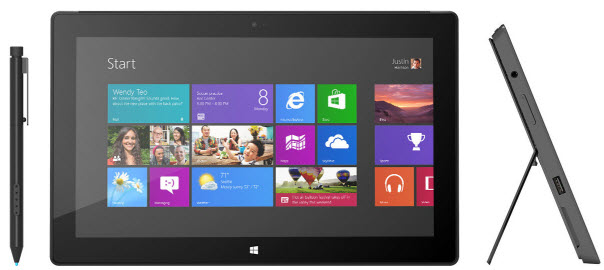
Four months ago I bought my daughter a Microsoft Surface RT tablet for her birthday as a laptop replacement. Last month I got a Surface Pro to use at work (also as a laptop replacement). Having now used both versions of Microsoft’s first tablet I wanted to jot down a few of my own observations about the Pro and how it compares to the RT version.
Expired TiVo cookie causes Galleon ToGo transfers to fail
On February 16, 2013, TiVo owners everywhere suddenly found that they were unable to transfer recordings off of their DVRs. Third-party applications like kmttg and even TiVo’s own TiVo Desktop were suddenly broken. The problem was tracked down to an expired server-side cookie which, inexplicably, was hard-coded into the TiVo software to expire on 02/16/13.
TiVo’s workaround was to set your computer’s clock back to before February 16, but obviously that’s not a great solution. TCF user morac found a way to fix TiVo Desktop by making a change to the curl.conf file and other application developers made similar changes to their software to essentially use a “dummy” cookie to get around the expired one … much better than changing your system’s date/time.
When someone filed a bug in SourceForge that Galleon was affected by the same problem, I decided to see if I could fix it. It turned out to be a simple, 1-line addition to ToGo.java. Before the fix, after selecting a recording to transfer, I would see this in the log:
20:47:28,196 DEBUG [DownloadThread] DownloadThread - Picked: org.lnicholls.galleon.database.Video@c1d7d2 20:47:28,746 DEBUG [DownloadThread] ToGo - Status code: 400
And after the fix:
21:08:47,684 DEBUG [DownloadThread] DownloadThread - Picked: org.lnicholls.galleon.database.Video@1e00f69 21:08:51,977 INFO [DownloadThread] ToGo - Downloading: The Tonight Show With Jay Leno (Recorded Wed Feb 27 2013 11 35PM WFLADT).TiVo 21:18:13,890 INFO [DownloadThread] ToGo - Download rate=4372.78033848837 KBps
Galleon development has been dead for some time (the last official release was back in 2009), so although my code change has been checked into CVS on SourceForge there won’t be a new install you can download. If you need the patch, you can grab my revised jar file here. Rename it to galleon.jar and drop it into the lib directory of your Galleon installation (you might want to make a backup of the original and your configure.xml file first). Restart Galleon and your ToGo downloads should work again.
Hopefully TiVo will fix this soon, but initial indications seem to point to them “fixing” it in TiVo Desktop and not in the TiVo codebase itself, which means workarounds like this one will still be necessary for third-party apps.
Jailbreaking my iPhone 4S with evasi0n
Like nearly 4 million other iPhone users, I had been waiting for iOS 6 to be jailbroken for a long time. I’ve had my iPhone 4S for almost a year and have been “stuck” on iOS 5.1.1 since last May because I didn’t want to lose my jailbreak by upgrading to iOS 6. This past Monday, the evad3rs came through and released evasi0n, making it possible to jailbreak Apple’s newest iOS 6.1 release on just about every iDevice available, including the iPhone 5 for the first time.
It was no secret that evasi0n was coming (although initial rumors had it coming out on Super Bowl Sunday) so I was prepared to take the plunge right away: I had a current iTunes backup, used PkgBackup to backup all of my Cydia apps, took screenshots of all my springboard screens and folders, etc. I was ready!