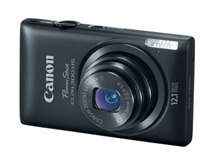
Canon PowerShot Elph 300HS

Six years after buying me a Canon PowerShot SD600, my wife got me a new Canon PowerShot Elph 300HS for Christmas. I’d been having battery issues with my old camera, and even the cheap replacements I had bought were starting to wear out, causing frustration when I’d miss shots due to “low battery” messages.

The 300HS is a 12.1MP camera with 5x optical zoom, a 2.7″ LCD screen (no viewfinders anymore!), and shoots 1080p HD video. The controls are almost identical to my SD600, so the learning curve was pretty flat and I was almost immediately comfortable with using the camera. It’s slightly thinner and wider than the SD600 and I like the matte black, textured metal casing.

HD video is recorded in MOV (QuickTime) format, which is a pain since I like to keep all of my video in MP4 (but it’s nothing WinFF can’t take care of, just an extra step). My only gripe with video recording is that the microphones are on the top of the case (near the power button) so you tend to hear more audio closer to the camera than what you’re actually pointing at. The video quality, however, is excellent. I don’t see why I would use my mini DV camcorder anymore when I have HD video capabilities in such a small, portable package (and no tapes!).
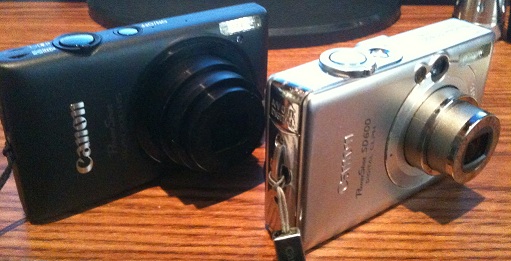
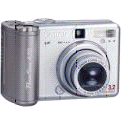
This is now the third Canon PowerShot model I’ve owned in a row and it seems like every time I get a new one the megapixels have doubled: my A70 was 3.2MP, the SD600 was 6.0MP, and now the 300HS is 12.1MP. I guess that means around 2017 or so I should be getting a new 24.0MP PowerShot. 😉 (Update: actually, at the end of 2015 I ended up with a 20.3MP Canon SX710 HS, close!)

I do need to get a new SD card now, however, because the old 2gb one I had isn’t a Class 6 so it can’t handle the recording of HD video. It’ll do about 45 seconds and then stop as it can’t keep up with the amount of data being thrown at it.
ZoneMinder

Last summer, my mini-tech project was installing some wireless internet cameras inside and outside the house so I could keep tabs on things while I was away. For the past year I’d just been using the built-in features of each of the cameras (motion detection, e-mail alerts, etc.) which was hit-or-miss since each manufacturer offered different features, some better implemented than others, and none of them perfect.

This setup was fine, but I wanted to be able to better manage the system and maybe even store more history of events (or “live” video) without having it be all e-mail messages with static image attachments. That’s what prompted me to search for open source camera management software, and I that’s how I found ZoneMinder.

Read more

Foscam FI8904W outdoor internet camera

I’ve been pleased so far with my in-house internet cameras and decided I’d like to be able to keep tabs on the outside of the house as well. TRENDnet sells weatherproof enclosures for their cameras but they won’t work with the night-vision models because the IR just reflects off of the glass. I started looking at other models of outdoor cameras and chose the Foscam FI8904W.

Read more

Alas, poor Firewire, we hardly knew ye

It seems like just yesterday (ok, last decade!) when I got my first digital video camera and then purchased a Firewire card for my PC so I could download and edit my home movies. Since then I’ve owned a multitude of laptops and PCs with IEE 1394 built in. It was aimed primarily for high-speed data transfer situations, like digital video and hard drives … and it was king for a little bit, until USB 2.0 came out.

It’s sad, though not surprising, that Firewire’s creator, Apple, seems to have given up on the technology, admitting that USB 2.0 won the “war” for the low-end, high-speed connectivity standard. The latest round of MacBooks don’t have Firewire ports (although the higher-end MacBook Pro still includes an FW800 jack). When announced, this lack of Firewire caused quite a tizzy in the Mac community. Steve Jobs’ response: deal with it: he simply pointed out that most HD camcorders shipping today include a USB 2.0 port.

When I was shopping for a new PC last month, I was originally looking for a machine with Firewire since my current PC had it, used in conjunction with my Panasonic PV-GS250. Then the MacBook announcement and the subsequent flurry of coverage about Firewire missing happened. That prompted me to double-check my camcorder and sure enough, it had USB 2.0 connectivity (and I bought it 3 years ago this month). So I dropped the Firewire requirement from my new PC and now I’m Firewire free (not to mention PS/2, serial, and parallel port free too). Ah, legacy connections …

Canon PowerShot SD600

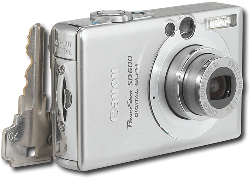
Canon PowerShot SD600My trusty three-year old Canon Powershot A70 had been sent back to Canon for CCD repair twice (under recall) and was still working relatively well, but my wife surprised me this Christmas with the new Canon Powershot SD600 Digital Elph. The 6-megapixel SD600 is officially the smallest digital camera I have owned (even smaller than my Treo 650) and has all the great features I’m used to from the A70, plus a few new ones.

I’ve only been playing with it a few days, but so far I like it a lot. The smaller size took some getting used to (the A70 was very easy to use one-handed due to the hand grip (battery compartment) on the right side), and I still end up holding it to my face in the slightly wrong position to look through the view-finder, but being able to slip it in a pocket is worth the trouble. I usually don’t bother with digital zooms, but the 12x digital zoom (3x optical) seems to work very well and my pictures looked very clear.

Panasonic PV-GS250 miniDV camcorder

PV-GS250While filming the holiday party movie for work, my 7-year old Sony miniDV camcorder‘s CCD finally gave out. In a rush to replace it, I picked up the Samsung SC-D353 on the cheap at Circuit City. Well, you get what you pay for: the camera’s autofocus was horrible, it had a black-and-white internal viewfinder, and poor sound quality … so back it went.

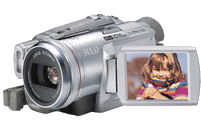
After a little more research (and less rush), I decided to graduate to a 3 CCD camera and chose Panasonic’s PV-GS250. Three sensors means very accurate color reproduction and this camera delivers. It’s chock full of options and connections (S-Video, Firewire, etc.), includes a 3.2 megapixel still camera with a built-in flash (which saves photos onto an SD card), color viewfinder and screen, and is overall a slick looking piece of equipment (very sturdy). Included accessories included a corded microphone which also doubles as a remote control, an actual remote, and the various necessary cables. Hopefully this lasts me another 7 years like my Sony did.

Canon PowerShot A70

Canon A70

Two-year olds and technology just don’t mix: my daughter recently dropped my Kodak DX3600 and broke it. After hearing from Kodak that I could either send it in along with $125 to repair it, or trade it in for a discount on a newer Kodak digicam, I decided to shop around and get a new camera altogether. Magazine and peer reviews convinced me to get the Canon PowerShot A70. Smaller than my Kodak (but heavier due to 4 AA batteries), this little guy packs a 3.2 megapixed CCD, 3x optical zoom, 5-point auto-focus, and all of the other normal functions you’d expect to find on today’s modern digital camera. It has 12 (!!) different shooting modes, which cover just about everything. When I’m daring enough, I can switch into manual mode to play with f/stops, shutter speeds, white balances, etc. If I don’t want to mess with that, I just leave it on auto. It also records movies (with sound) in AVI format, with a maximum resolution of 640×480.

One thing I do miss about the Kodak is the EasyShare docking system. It was great to drop the camera into the dock, press the button, and have the pictures transferred onto my PC. The Canon, despite its USB connection, doesn’t show up as another storage device in Windows Explorer, and requires some fiddling with the included software to transfer pictures. It does have a TWAIN driver though, which allows me to import the pictures directly into Paint Shop Pro for editing. Another missing piece: built-in memory. The Canon requires a CF card (the Kodak took CF cards, but also had 8mb of internal memory in case my cards got full or I forgot them altogether). Now that I’ve got a 128mb CF card in the camera, though, space shouldn’t be an issue.

Logitech QuickCam Pro

Logitech QuickCamOnce I got broadband access, I decided to try out one of those eyeball-shaped Internet cameras. I chose Logitech’s USB QuickCam Pro. It was a snap to connect and configure: install the software, plug in the USB cable, and you’re up and running. Using SpyCam I was able to set up my own WebCam! It can also work as a motion-detector (recording video for a few seconds when it detects movement), an interface for immersive video games (something I’ve never tried), and useful for video conferencing (I personally use Eyeball Chat).