Stream, Baby, Stream

Over the past few months I’ve dabbled with tivostream to send MP4-encoded video to my HD TiVo boxes, but usually I rely upon pyTivo to watch my video library.

Tonight, kearygriffin over on the TiVo Community Forum announced streambaby (Stream, Baby, Stream) which builds on and extends what moyekj started with tivostream. As with its predecessor, streambaby can stream MP4 video to a Series3 platform TiVo (S3, THD, THD-XL), but by using ffmpeg it can also stream other video formats (like WMV or MKV). You can also fast-forward to points in the video that have not been buffered yet and it will show you a preview screenshot while the buffer loads and the stream picks up … true random access! It will even remember where you left off and allow you to resume the stream later. Very cool!

After a quick test run on my Ubuntu server to confirm the basic functionality, I turned to getting streambaby to run through Galleon. I posted my quick and dirty results here (there may be a more elegant way of doing this, but for now this works for me).

You can download streambaby yourself here … check it out.
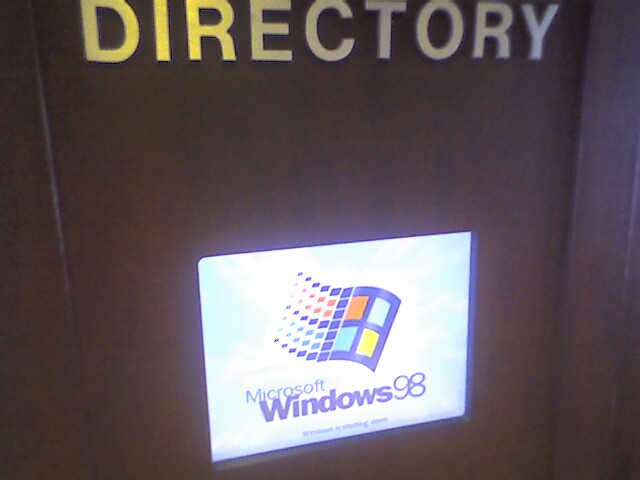
Windows 7 Beta

win7-712425

Last Friday Microsoft released the public beta of their next operating system, Windows 7. I tried several times over the weekend but was unable to download it (and I wasn’t alone). Finally this morning I was able to grab the 2.1gb ISO, and the download was surprisingly fast.

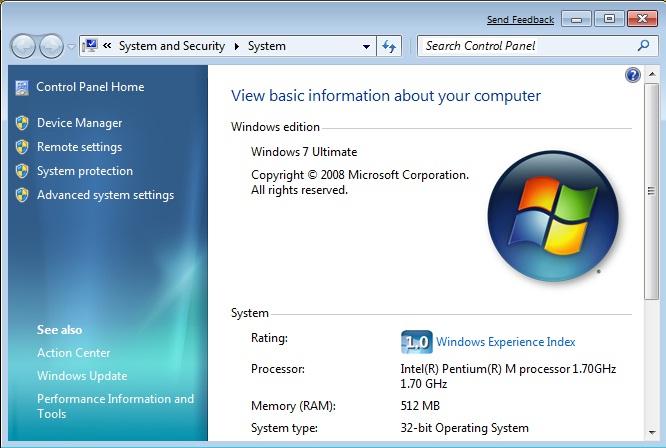
I did a clean install of Windows 7 on an old spare laptop here at work (which was below the minimum requirements as it only had 512mb of RAM). The install was just like Vista: answer a few initial questions and then the OS is installed from the DVD, relatively painless.

As expected, after the initial boot into the new OS, I found quite a few components not working properly. Windows Update installed a driver for the ATI Mobility Radeon 9200 video card so I could up the screen resolution. Windows Update also tried to install a new audio driver but it keeps failing, so I have no sound. Worse, I can’t get the wireless to work. Sony never produced Vista drivers for this old S Series unit and the drivers I downloaded directly from Intel didn’t work either. These kind of problems I expected, though, running beta software on older hardware (a colleague at work installed the beta on a newer Sony SZ series laptop and everything worked just fine, including his wireless).

Most of the corporate apps we use at work installed without any problems (Office 2007, Reflections, pcAnywhere, Citrix, etc.). One notable exception was McAfee Antivirus 8.0i which was blocked “due to compatibility issues.” This could be another beta thing, but I recall Vista had a lot of antivirus and firewall problems initially as well. AVG installed just fine.

Except the new, improved taskbar (and the neat new boot animation), Windows 7 looks a lot like Vista (and IE8 looks a lot like IE7). I need to play around some more and maybe check out the release notes to see what else is new and different.

Netflix on TiVo

Announced in the current issue of the TiVo newsletter, Netflix integration will be available on the Series3 and THD boxes next month! If you’re a Netflix subscriber, you’ll be able to “instantly” stream movies from Netflix to your TiVo … for free.

I was a Netflix subscriber back in 1999 when I was still a traveling consultant. I would take the DVDs on the road with me to watch on my laptop and drop them in the mail as I finished each one. In those early days, you could go into your account on the Netflix web site and mark the movie as “I’ve mailed it back” and they would immediately ship the next one in your queue. That way when I got back home on Friday, a new set of DVDs would be waiting for me for my trip the next week. Once they switched to the “your next DVD doesn’t ship until we receive one back”-model, the service became less useful as there could be a week when I had no discs to take with me because they didn’t arrive by Saturday.

Once I switched jobs and stopped travelling, I just didn’t have the time to watch all of those movies, so I ended up cancelling my subscription and went back to the traditional Blockbuster rental method. Once Amazon Unbox (now called Amazon Video on Demand) appeared on TiVo, I started using that for the occasional movie rental. With Netflix coming to TiVo in December, though, I might have to consider re-subscribing.

Galleon 2.5.4 is out

John has released Galleon 2.5.4. Here’s what’s new, from the release notes:

  • Fix ToGo looping bug on null recording date (1811137)
  • Added user-selectable range for local radar image (100, 300, 600 miles) in Weather app
  • auto-subdirectory publishing for GoBack, avoids the need to do it yourself and also avoids bugs in TiVo folder navigation in older TiVo service releases (Series 3 and HD should be OK without this). (Probably needs some work to handle DOS shortcuts; should be OK on UNIX and OS X.)
  • XML parsing of recording meta-data for non-Galleon-created video files in GoBack areas. e.g. if you post-process .TiVo files into .mpg, just put the XML output containing the show details, in the same format as it comes from the TiVo, into a .xml file with the same prefix. If you use tivodecode to unwrap .TiVo files, the metadata are in the -02-0002.xml file generated with the -D (dump-metadata) option.
  • Enabled store-by-show handling in GoBack server (available on GoBack preferences pane).
  • Fix for linux Makefile (1815568) and init script for distro independence

The items in bold are things I’ve personally contributed to this release, like the user-selectable radar range.

Experimenting with virtual machines

I’ve been playing around with Microsoft’s free Virtual PC 2007 product at work lately in an attempt to keep an old Visual FoxPro 3.0 application running on newer hardware. This particular application refuses to run on any machine with more than 256mb of physical RAM. That’s right, 256 megabytes. Needless to say this is not really feasible in today’s computing environment, but legacy apps need to be supported. Placing the app into a virtual machine seemed to be a good solution: the VM runs on the user’s current modern hardware, but can simulate the 256mb of RAM required by FoxPro.

Setting up a Virtual PC is incredibly easy. The wizard walks you through the initial setup (location of the virtual hard drive file, memory allocation, etc.) and then it “boots” and you install the OS like you would on a fresh PC. For my FoxPro app, I installed Windows XP SP3 from our slipstreamed CD. All of the hardware (CPU, network adapters, USB devices, etc.) from the local machine running Virtual PC are available to the VM. Once the install was done, I configured the VM like any other PC on the corporate network: joined it to the domain, installed the basic corporate utilities, and then finally copied over FoxPro. It works great and is a lot faster than running it on the old Pentium II 350MHz machine the user was running the app on before.

For fun, I even created a VM running the latest Ubuntu 8.10 release:


This has got me thinking … what other cool things could I do with virtualization? Hmmm …

Impeccable Intrepid Ibex Installation

Tonight I did another in-place upgrade on my server, this time from Ubuntu 8.04 (Hardy Heron) to 8.10 (Intrepid Ibex). Like last time, I did the upgrade through PuTTY over an SSH connection and it was flawless. I just had to clean up a few configuration files and put back my installation of Gallery 2.3 (since Intrepid comes with a slightly older release). I love it when upgrades go smoothly.

Pointless side note: I upgraded to Hardy on 6/11 and upgraded to Intrepid on 11/6. 🙂

Second pointless side note: an ibex is a species of wild mountain goat.

One way to fix Vista: buy a new PC

I’ve complained about my Vista woes here before since I upgraded from XP back in April. Well, apparently the solution to my Vista problems was just to buy a new PC.

Thanks to a 20% off coupon found through my slickdeals.net RSS feed, I purchased a “built-for-new” (i.e., not refurbished) Dell Inspiron 530 desktop from the Dell Outlet. For under $450 I got a system with an Intel Core2 Quad 2.4GHz processor, 3gb of RAM, 640gb hard drive, 16x DVD+-RW dual layer burner, 19-in-1 media card reader, built-in wireless, keyboard, mouse, Vista Home Premium, and MS Office 2007 Home/Student edition. Not a bad deal!

Once I had the new box running, I moved over my ATI Radeon 2600HD video card from my old PC so I could still have my dual-monitor setup. Then I spent a few hours over the weekend copying over gigabytes of files, documents, music, photos, videos, etc. from the old PC (via crossover cable) and also re-installing and configuring my applications and utilities.

Ok, so I have to admit that Vista runs a lot nicer on my new PC. I haven’t run into any of the problems that plagued me before (especially the annoying disconnect my iPod, lose the wireless network one) and the OS has been running pretty smoothly so far. Only time will tell for sure, but at least for now I’m happy again!

One small thing I didn’t plan for: the 530 has no PS/2-style keyboard or mouse ports. As a result, I was unable to connect my old Logitech Cordless Elite Duo wireless keyboard/mouse combo as the charging base/receiver used a PS/2 connector for the keyboard. I didn’t have a PS/2-to-USB converter handy so I ended up just using the Dell-supplied keyboard and mouse for now. The keyboard is actually a lot smaller than my old one (due to the lack of all the various multimedia buttons, none of which actually worked under Vista anyway) and a lot quieter, so I’ll probably end up sticking with it.

TiVo on your PC

TiVo and Nero today announced LiquidTV, a package that brings the TiVo experience to your Windows-based PC available on October 15.

There are plenty of great blog articles covering this new product, like Megazone’s over on Gizmo Lovers.

It looks pretty slick … it’s basically the TiVo interface on your PC, something (some) people have wanted for quite while. It looks like it will still require a subscription to the TiVo service (you get a year free when you purchase the software), so that’s one thing against it when competing against the other media center software out there. Hopefully the superior interface and features will separate it from the pack. Personally this is not something I’m interested in since I already have plenty of TiVo boxes but it’s good to see TiVo branching out.

My enhancement to Galleon’s weather app (officially, this time)

Last month I added a small enhancement to Galleon’s weather app that allowed for a user-selectable range for the radar image (instead of using the default 600-mile one). I published my source code changes and the new jar file here on my blog.

Now earlier this month, jtkohl released Galleon 2.5.3 which contained a fix for the original radar image bug in that started back in July (one I had also attempted to fix on my own). Well, since I didn’t put my code changes into the SourceForge project, my range selection enhancement was obviously not included in the new release and my modified jar file didn’t work properly anymore. After pointing this out to John, he was nice enough to add me to Galleon’s developer list on SourceForge which gave me access to make changes to the code repository.

I hadn’t used CVS in a long while, so I took some time this evening to re-familiarize myself with it and how SourceForge uses it for repository control. Once I was comfortable with that, I checked out a copy of the code, re-applied my changes, and checked them back in. I didn’t rebuild the entire package, but now the next time a new version is built, my changes should be included.

In the meantime, you can download my weather.jar to replace the one that comes with 2.5.3 or check out my code changes directly in CVS:

  • Weather.java rev 1.27
  • WeatherConfiguration.java rev 1.4
  • WeatherData.java rev 1.25
  • WeatherOptionsPanel.java rev 1.7