Stream to your TiVo

The 9.4 software release for the TiVo Series3 and HD boxes included the ability to stream YouTube videos in H.264 format and the community quickly started re-engineering the feature. pyTiVo developer wmcbrine was the first one to get a basic stream working in his HME for Python framework.

Now, TiVo Community user moyekj has released a small java HME app called tivostream that allows you to stream MPEG and H.264 content directly to your box without the need for transcoding (which is what pyTivo does via ffmpeg).

You drop the jar file into your high-level video directory and run it. A new ‘videostream’ menu item will appear on your TiVo’s Music, Photos, Products, & More menu through which you can browse your video hierarchy and then select a file to stream. Playback starts almost instantaneously. Since it’s a stream, the file isn’t actually copied to the TiVo so there’s no disk space taken up. Also, if you drop out to Live TV or go back into the TiVo menus, the stream is cancelled. So what if you want to pick up where you left off? moyekj has written the ability to jump x minutes into the stream. Just start the stream again, enter a number (in minutes) and press the skip-to-tick button. Pretty slick. Overall, tivostream is still in very early development, but it works and shows promise of cool things to come. You can read this thread on TCF for more details.

One note: if you’re going to run tivostream alongside Galleon, start tivostream first. Both apps try to grab port 7288 but Galleon is smart enough to try 7289 (or the next available port) if 7288 is in use already.
Another enhancement to Galleon’s weather app

Last month after fixing a problem in Galleon’s weather application it was pointed out to me that my fix displayed the 100-mile radar map whereas originally Galleon had shown the 600-mile map.

Well, I decided to take a crack at coming up with a solution for that as well. This gave me an opportunity to dive a bit deeper into the java code and also learn how to use the TiVo HME SDK simulator. It was a fun little project (even though I hate regular expressions sometimes ;-)). The end result?

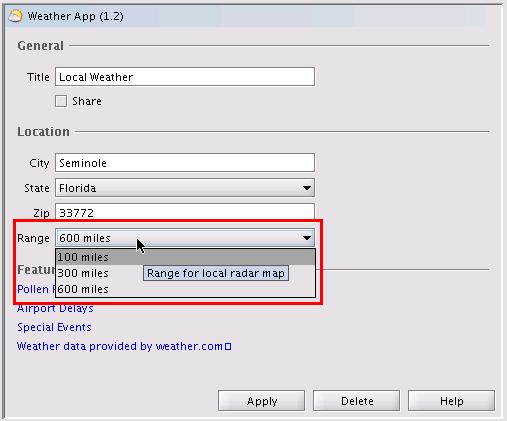
weather-app-12-786646

As you can see from the screencap above, I added a new control to the configuration dialog that allows you to select the range of local radar image displayed based on the three major maps available from weather.com for a location.

Note that some locations don’t have all three ranges available (90210, as an example, doesn’t have a 100-mile range map). If you select an unavailable range, the default range map will be displayed instead (whatever you would get by going to www.weather.com/weather/map/zip).

At a high level, here’s what my enhancement (to determineLocalRadar() in WeatherData.java) does:

  • grabs the HTML page at www.weather.com/weather/map/zip
  • searches the text and looks for “Doppler_Radar_range“
  • builds a new URL to get the proper page with the local radar image (www.weather.com/weather/map/zip/?mapdest=Doppler_Radar _range_Mile:location)
  • grabs the HTML for that second page and finds the URL of the actual map image
  • downloads the map image like before

Additionally, I had to make small related changes to Weather.java, WeatherConfiguration.java, and WeatherOptionsPanel.java (in order to add the control to the page, retrieve the settings from configure.xml, etc.). I also fixed a bug that (I think) was causing the current weather and 5-day forecast data to not always refresh properly (at least for me during my testing).

Known issue: apparently the weather app only loads its values from configure.xml when it first starts up. As a result, if you make a change to any of the settings (city, state, zip, etc.) it won’t take effect until you restart Galleon. The same goes for the new range setting: if you change it in the GUI be sure to restart the application so you’ll see the new range map on your TiVo.

Since this was an actual enhancement to the application, I took the liberty of bumping the version number to 1.2. To install, just download my new weather.jar file, put it in Galleon’s apps directory, and then restart Galleon. If you prefer to compile it yourself, you can grab a zip file with my code, or check out the diff results.

If you run into any problems, or have anything else to say about this enhancement, let me know in the comments section!

TiVo releases 9.4 software update

My Series3 box upgraded to the new 9.4 software release yesterday. The Summer 2008 Service Update is for Series3 and TiVo HD DVRs only and includes the following new features:

  • the ability to play (or delete) an entire folder at once (which is helpful if you want to queue up a bunch of SpongeBob for the kids)
  • the on-screen Guide is now available even when you’re watching a recording (before, if you pressed Guide while watching a recording it would dump you out to Live TV)
  • you can jump forward and back 24 hours in the Guide by using the Instant Replay and Skip-to-Tick buttons on the remote
  • there’s now a “search by callsign” option in the Guide as well (if, for some reason, you can remember your FOX affiliate’s callsign, but not the channel number, I guess)
  • one-click closed captioning toggle from the channel banner (my personal favorite new feature!)
  • your Thumbs Ratings can now be refined via a separate screen under TiVo Suggestions

This update also added a new application to stream YouTube videos to television through the TiVo. It’s been known for a while that the decoder in the S3 and THD boxes supported H.264, but this is the first time (to my knowledge) that functionality has been used. Work is already underway in the community to reverse engineer this so that H.264 video can be sent directly back to the TiVo without the need to transcode it into MPEG-2 first.

The discussion thread about 9.4 on TCF is here, and the pyTivo folks are talking about the H.264 stuff here.

Know Your Stuff – inventory your home

For years I’ve used the home inventory feature of Microsoft Money to track important items in the house, along with purchase dates, replacement amounts, serial numbers, etc. Even when, starting with Money 2005, it was no longer a supported piece of the application, I continued to use it just because I had so much information in there (and there was no easy way to get it out).

This week I came across a post on Lifehacker pointing to the Insurance Information Institute’s free Know Your Stuff home inventory application and decided to give it a shot. I liked what I saw, so I began the laborious process of manually re-entering all of my home inventory information into Know Your Stuff, copy/pasting from MS Money … but I think it was worth it.

KYS organizes your items by rooms: first you create the rooms of your house, then create the items in those rooms. You enter basic information like the item name, location (room), category, purchase date and price, serial number, descriptive information, etc. You can also attach a photo and/or receipt. Once you’ve done all the data entry, you can generate reports, or even export the data to Excel (in CSV format). If you want a secure, offsite backup solution for your inventory data, KYS integrates with Vault24.

Overall, I like the organization aspect of KYS. It has the flexibility to let me create my own rooms, and even asset types. I like how you can attach multiple photos of a room, but am a little frustrated you can only attach a single picture to an item. Also, for the receipt field, only images are allowed (no PDFs, which would seem to make more sense, especially for multi-page documents). The search function is a bit limited too, allowing you only to search on the item name (instead of say, Make or Model). As for secure backup, I’ll just put a copy of my inventory file in my Amazon S3 account for a lot cheaper than the $15/year fee for storing a single inventory file on Vault24. 😛

At least now I’ve got all of that information out of MS Money and into a separate application where I can do better reporting and easier updating.

I love my iPod. I #$%@ HATE iTunes!

I love my 30gb iPod Video … I really do. The interface is simple and elegant; the hardware is a marvel; its changed how I listen to music, and what I listen to: I don’t listen to radio at all anymore, I listen to podcasts (or when the podcasts run out, music!).

So why, why, WHY does Apple ruin such a perfect device with the millstone-around-the-neck that is iTunes? Where do I start?

  • iTunes is slow: my main desktop that I use for iTunes is a 3.0GHz P4 with 2gb of RAM running Vista Home Premium. Ok, yes, it’s a few years old and doesn’t have dual cores, but it’s not exactly slow. And yet iTunes runs like molasses: switching between views in the library is slow, typing into the search box is slow, right-clicking on my iPod under Devices to get to the context menu is slow. The entire thing is just sloooooow.
  • iTunes is bloated: why do I have a Apple TV tab in my iTunes preferences when I don’t have an Apple TV? Why does it install the Apple Mobile Device Support service and the Syncing tab under Preferences when I don’t have an iPhone?
  • iTunes is broken: this drives me nuts … I update the tags on my MP3s, add album art, etc. Then I’ll notice, while a track is playing on my iPod, that the cover art is gone. I check iTunes, and sure enough, the art has been removed. Sometimes it even seems to update the Album Artist tag for me. I’ve spent a lot of time tagging everything the way I want it … don’t mess with my tags! (And before you ask, yes, I have “automatically download missing album artwork” turned off).
  • iTunes is sneaky: remember a few months ago when Apple tried to slip in their Safari browser through their Windows updater? Well, if you’ve upgraded to iTunes 7.7 recently, you’ll find a new MobileMe icon in your control panel! Yep, they did it again. I’m not going to use MobileMe, don’t mess around and put icons for stuff I don’t want on my PC (for steps on how to remove it, see here).

There are a few things I like about iTunes: the podcatcher functionality, Smart Playlists, the ability to organize my music library hierarchy on my PC, etc. I only use it, though, because I have to. I stopped buying tracks from the iTunes Music Store once Amazon launched their DRM-free music store so I don’t need it for that. If you know of a good iTunes replacement that will work with my iPod, please let me know!

A new music player for TiVo: Harmonium

I’ve been using Galleon for a long time (since its JavaHMO roots) to play my music library on my TiVos. Now there’s nothing wrong with it, but development has pretty much come to a complete halt.

Enter a new HME music application: Harmonium by Charles Perry. It’s still in early beta (only up to version 0.3.1) but shows promise. It has a sharp, high-definition interface, allows creation of playlists on-the-fly, is easy to use, and its free.

For now, I’ve shut off my Galleon music applications and am checking out Harmonium. I’ve run into a few snags and one thing it’s missing is the ability to parse my iTunes library directly (which means not having to export playlists into separate files) but like I said, it’s still an early beta. Now that it’s up and running my next mini-project will be to get it to run through Galleon so I don’t have two separate java processes hogging resources on my Ubuntu server (they both use the java service wrapper, so this should be possible). Stay tuned.

Fix for local radar image in Galleon’s weather app

A few weeks ago, the Local Radar screen in Galleon‘s weather application started showing “N/A” instead of the image from weather.com. Galleon has been dormant, development-wise, for a while. It was updated late last year with some bug fixes and HD support by s2kdave and jtkohl, but has lapsed into the realm of unsupported (but really useful) applications.

s2kdave pointed me in the right direction as to which piece of the code contained the URLs for the local radar image (WeatherData.java). I’m not really a java programmer, but I can code, so I decided to take a look and see if I could figure out the problem. It took me a while, but the fix ended up being rather simple.

In the determineLocalRadar function there are two try blocks. The first section grabs the weather page for the user’s specified ZIP code:

GetMethod get = new GetMethod("http://www.weather.com/weather/map/" + mZip);

It then parses through that HTML looking for the following strings:

String REGEX = "var mapNURL = \"(.*)\";";

or

REGEX = "src=\"/maps/local/local(.*)\"";

This was used to detemine the URL of the web page containing the local radar image. The second try block then grabbed that page:

get = new GetMethod("http://www.weather.com"+ radarurl);

and parsed it for the URL of the image itself:

String REGEX = "NAME=\"mapImg\" SRC=\"([^\"]*)\"";

What I found is that the first web page (the ZIP code-specific one) now contained the local radar image, so there was no need for the first try block anymore (the one creating the radarurl variable). I removed the block and re-compiled the code.

It worked! I tested with three different area codes in Galleon and the proper local radar image was retrieved each time. Of course, I can’t stop weather.com from changing their layout again, but this should work for now.

You can download my new weather.jar file and place it in the apps directory where Galleon is installed. I also posted about my fix on the TiVo Community Forum here.

Vista SP1 “reliability” update

Microsoft has released “a reliability and performance update for Windows Vista SP1-based computers.” According to the KB article, the update specifically addresses a problem with e-mail clients and ZoneAlarm, so maybe it will fix my Vista woes (no mention of a VPN fix, though).

I’ve downloaded and applied the patch, but I’m in no rush to attempt running ZoneAlarm again just yet.

Vista search broken after SP1

I ran into another Vista SP1 problem this evening.

Whenever I used Start-Search, or the Win+F shortcut, I got the following error:

search: This file does not have a program associated with it for performing this action. Create an association in the Set Associations control panel.

Google to the rescue again! Apparently something in SP1 can cause registry permission errors on certain keys, which breaks Vista’s search feature. Wonderful.

Using the instructions in this post from the Winhelponline blog, though, I was able to fix the problem!