I upgraded my iPhone 3GS to iOS4 when it first came out two weeks ago and since then have been running into small annoyances/bugs.
ipod
Running with Toadies
While driving home from work this evening I had my iPhone on a random playlist and these two songs played back-to-back: “Pretty Fly for a Rabbi” by Weird Al Yankovic and “Possum Kingdom” by the Toadies.
Ok, yes, an interesting combination but that’s to be expected in a random playlist. What caught my eye was the similarity of the cover art for those two tracks:

Strange!
Apple iPhone 3GS
After over 13 years of using (mostly) PalmOS and (some) Windows Mobile devices as my PDA and/or cell phone, I now own my first device that runs … OS X. Yep, I got an iPhone.
We’re in the early stages of testing the iPhone with our corporate e-mail infrastructure: Microsoft Exchange and GoodLink. Since my AT&T account has been upgrade-eligible for some time (the last time I “officially” upgraded was when my Treo 650 was the hot new device), my boss told me to go ahead and get an iPhone (16gb model, but I paid a little out-of-pocket to get the 32gb one since my current iPod is 30gb). I need to start learning how to use it so I can eventually support it as we roll the device out to other users in the office. It’s been two weeks now since I abandoned my trusty Treo 680 and I had some free time while on vacation last week to really spend some time with the iPhone. Here’re some of my thoughts …
What I Like
- the design and form factor: the iPhone is truly a beautiful thing to look at given it’s mostly screen and a single home button. Even with my Otterbox impact case on, it still fits comfortably in my pants pocket. I miss having a physical keyboard (see “What I Don’t Like” below) but the buttons that are present make sense.
- it’s a widescreen iPod: when music is playing and a call comes in, the music fades away and then the phone rings. When you’re done with the call, the music fades back in, picking up where you left off. One minor nit here, though, is that if you have the e-mail notification sound enabled, your music will fade briefly to play the mail sound, which isn’t necessary (the notification should just be suppressed). I replaced my old Belkin Tunebase FM with the new version for the iPhone so I can charge the device in my car and still listen to podcasts while driving. It includes a speakerphone for handsfree and a single button that works like the home button on the phone: click once to pause/play, twice to go forward a track, twice and hold for fast forward, three times to back a track, thrice and hold for rewind. I like being able to turn the phone sideways and watch video podcasts in widescreen too (although scrolling through podcasts is uncharacteristically choppy).
- the GPS: using the built-in GPS and compass for location-based/direction-based services is really slick. Pulling up Google Maps and watching the blue dot move along a highway as I drive is like a scene out of a spy movie. Check out Yelp’s monocle feature for a perfect example of augmented reality using these features.
- the camera: I’ve been stuck with the VGA (640×480) camera in my PalmOS devices for so long! It’s great to finally have a mega-pixel camera (with video even!) that takes pretty good pictures. I love the geo-tagging feature too.
- the speaker: being able to play music without headphones or external speakers is a definite plus.
- oh yeah, it’s a phone: when held up to your ear, the screen turns itself off. Take it away from your ear, and the screen fades back into view. You don’t have to navigate through a voice response system to record your voicemail message or retrieve your messages, just tap the buttons on-screen. It’s those little things that continue to impress me. Of course, I haven’t actually used it a lot as a phone since it does so much other cool stuff.
What I Don’t Like
- the keyboard: no one can argue that the iPhone’s virtual keyboard is better than then Treo’s. Typing on glass just isn’t the same. I’m getting better at two-thumbing it, but I still find typing (quickly) a frustrating exercise.
- iTunes: I haven’t looked into this much yet, but having to use iTunes to sync and customize the phone is a pain, especially if you’re using more than one computer. For example I sync my iPhone with my main desktop machine at home. While travelling over Thanksgiving, I had my laptop with me, but could not use iTunes on it to manage my phone. This is really going to be a pain at work when I’m trying to configure multiple iPhones for people in the office. I found the iPhone Configuration Utility but still need to read up on enterprise deployments.
- syncing (or lack thereof): requiring iTunes also makes it difficult for applications to sync their data for backup. Palm had HotSync and conduits which allowed third-party developers to create custom “tunnels” in HotSync that were basically transparent to the user. To sync my eWallet desktop with my iPhone data, I have to open each application (on my PC and the phone), and then start the sync over WiFi (totally outside of iTunes). A kludgy workaround due to Apple’s control freak design. Even the photos and videos you take on the iPhone don’t sync down to your PC through iTunes, instead you have to use the built-in features of your PC since the device appears as a plain storage device (although you can sync certain folders of photos back to the iPhone from your PC if you want to carry a certain collection around).
- I miss the clickwheel: using my iPod in the car without looking was pretty easy with the clickwheel. I was even pretty good at skipping most commercials (half a turn on the wheel was about 30 seconds). The iPhone isn’t as easy since it doesn’t have a lot of buttons. Yes, you can use the home button to skip tracks, or FF/RW, but for more accurate positioning you have to use the on-screen scrubber with your finger, which is pretty dangerous to do while driving.
- lack of customization options: sure I can drag the app icons around to different pages, but I can’t rename them, can’t leave empty spaces on the grid, can only assign a few different options to the home button, etc. Sure, I could mess around with jailbreaking and probably address some of those concerns, but I need to be able to support this device at work so I can’t deviate too much from the delivered experience.
- battery life: forgive me … I’ve been using a Treo on the Edge network for almost 4 years and battery life was pretty darn good. I’d only have to charge it overnight and it was good for all day. 3G and all the other cool stuff I can do on my iPhone really sucks the battery dry quickly. When I had my separate iPod and Treo, it didn’t matter if my iPod died while listening to music during the day since my phone still worked. Now that I have this single device I need to be more careful about making sure I keep it charged. The lack of a user-replaceable battery is a downer too. It’d be nice if I could just buy a new battery and put it in myself instead of having to send the whole phone back to Apple for a “repair.”
- fingerprints: it really sucks that 5 seconds after taking this beautiful shiny piece of technology out of the box it’s covered in my greasy fingerprints. The matte finish screen protectors I got at the AT&T store do a decent job of hiding them, though, and make the screen a lot less reflective and not so glassy to the touch.
- it’s delicate: this will take some time to play out, but the Treos were solid. Not that I drop my phone a lot, but when I do, it’s usually in a bad way. The Treo might have gotten scratched or scuffed, but it kept on working. Little plastic tanks. I’m not so sure about the iPhone. I already dropped it once onto concrete but luckily I have that impact rubber case and it landed screen up. The folks in the office are pretty hard on their devices (based on the drawer full of broken phones in my desk) so it’ll be interesting to see if the iPhone is up to their abuse.
What Apps Do I Use?
There’s an app for everything, right? Another of the big draws of the iPhone is the thousands of applications available in the iTunes App Store. One of the first things I had to do was find iPhone equivalents of the applications I used on a daily basis on my Treo. Here’s what I’ve got so far.
- What I used on the Treo: eWallet
- What I switched to for the iPhone: eWallet ($10 for iPhone, or $20 usable on multiple devices including PC)
Like anyone, I have a lot of passwords, logins, and various personal private information I need to carry around with me. To keep all of this sensitive information secure and portable, I’ve used Ilium Software’s eWallet application for many years. Luckily this switch was easily since Ilium has PalmOS, Windows Mobile, PC, and iPhone versions of eWallet, and now I’ve used them all. Migrating my data was simple, although synchronization between the desktop and iPhone versions is a little cumbersome since you have to initialize the sync on both devices at the same time over WiFi. Still, being able to access all of my passwords, accounts, and other stuff I store in my wallet on the iPhone is great.
I also keep a lot of random information on my handheld: gift ideas, vacation days, clothes sizes, various house information/measurements, lists of all sorts! So Ilium Software’s ListPro was another application I relied heavily on, using it both on my Treo and desktop PC. Unfortunately, Ilium hasn’t produced an iPhone version of ListPro yet so I had to search for alternatives. I ended up trying Evernote, which has iPhone and PC versions (in addition to many more, including via a web browser). Evernote requires you to create an account on their website, so technically your notes are being stored on their servers and then synced with your different devices. You can store text, images, documents, etc. but keep in mind the only notes you can actually edit on the iPhone have to be plain, unformatted text (so no checkboxes, bullets, etc.). Creating notes on the iPhone has the benefit of automatic location tagging, using the phone’s GPS. The basic free service has a limit on how much you can upload a month, so there’s a premium service you can pay for without those limits and also includes things like extra security. I had to manually copy/paste all of my lists out of ListPro into Evernote, which was a bit of a pain, but it did give me the opportunity to clean up and re-organize some of my lists.
- What I used on the Treo: Tasks (GoodLink)
- What I switched to for the iPhone: iMTasks (no longer available, replaced by iMExchange 2)
With GoodLink on my Treo, my e-mail, contacts, calendar, tasks, and notes from Outlook were all synchronized in near real-time. The iPhone handles the e-mail, contacts, and calendar, but not the to do list or notes. I am a heavy user of Outlook tasks so I really wanted those synced to my iPhone. For whatever reason, Apple decided not to bake that in. Instead, I had to purchase RERLSoft’s IMTasks app. Once I entered my Exchange information, the app downloaded my to do list and keeps it synchronized (although only while the app is open). Hopefully the forthcoming GoodLink client for the iPhone will include this (update, 07/2012: almost three years later and it’s still not part of the Good app), but for now this was a must-purchase function for me. RERLSoft has a version that includes Outlook notes synchronization (and also allows you to manage your out-of-office setting), but since I’m using Evernote now I decided to stop using Outlook notes altogether.
- What I used on the Treo: TealAuto
- What I switched to for the iPhone: Gas Cubby ($5, free lite version available)
Some other data I keep on my phone is car information: gas mileage, repair history, etc. On my Treo I used TealPoint’s TealAuto application to store and track fill-ups, repairs, maintenance, etc. Without an iPhone version, I tried out a few of the vehicle apps in the App Store, including the free “lite” version of Gas Cubby and eventually ended up purchasing the full version. Using the Windows version of TealAuto, I was able to export all of my data from my Treo into a CSV file. Then, using App Cubby’s unsupported import feature, I was able to load it all into Gas Cubby. The import only supports gas events, though, not maintenance, so I manually entered our 2009 maintenance events into the app later (not a big deal since there were a lot less of those compared to fill-ups). If you’re a multiple iPhone home and purchase multiple copies of Gas Cubby, you can even keep the data synchronized across devices, which is a cool feature.
- What I used on the Treo: iSilo
- What I switched to for the iPhone: Stanza (free)
If you read this blog you know I do a lot of reading on my PDA. There’s not a version of iSilo for the iPhone so I had to try out a few free e-readers. I settled on Stanza. Using the desktop version, I was able to convert the book I’m reading from the Baen free library from HTML into a format for the Stanza reader and transfer it to my iPhone. Having the larger, higher resolution screen on the device is great for reading. Plus you can change font sizes, colors, and themes (black on white, white on black, textured, etc.). I’ve also installed Amazon’s Kindle Reader (free), in case I decide to purchase some new e-books. No need for a Kindle now! Interesting, though, that Stanza is actually owned by Amazon. I wonder if eventually they’ll combine these apps?
Why do I like remoting into my Linux server from my phone? Because I can, of course! iSSH let’s me login to my Ubuntu box at home via command-line or tunnelled VNC. The free iRdesktop utility lets me connect to my Windows servers at work when I have my iPhone connected to the VPN. Amazing. There’s even a free Citrix client (but I haven’t gotten it to work properly yet).
My daughter loves playing iRogue on my Treo and I like it too, so of course I needed the iPhone version! 😀
Some other apps I’ve purchased/installed include:
- iEmergency+ ($1) allows you to store your emergency contact information (phone numbers, medical info, etc.) in a single place and also has a helpful utility for adding ICE information to your iPhone’s lock screen.
- Using VIP Access (free) means I don’t need to carry around my PayPal football or VeriSign Secure Card since my iPhone can now act as my security token.
- The iPhone doesn’t allow for multiple e-mail signatures when you use multiple e-mail accounts. JohnHancock ($2) lets you create and switch between as many as you need. There doesn’t seem to be an elegant solution, but this app at least provides one.
- RedLaser ($2) is an amazing barcode scanning application. Point your iPhone’s camera at any barcode and the app will pull up a list of prices from other stores. The latest update even uses the GPS to find local prices. If nothing else, it’s fun to play with.
- Chess with Friends (free) and Words with Friends (free) from New Toy, Inc. are basically chess and Scrabble games you can play “online” with other iPhone users. Really cool for playing with friends or relatives who live far away. We used both of these games in the car on our recent Thanksgiving holiday trip to play games without having to pass a single iPhone back and forth. 😉
What Do I Think?
The iPhone is a really slick device. The first few days were rough for me, since I was really set in my ways with my Treo and doing things in a certain way. Over the past two weeks, though, as I’ve had time to get better acquainted with my new shiny toy business tool, I have to admit it is a well engineered piece of hardware and software. Now I have a single device that really covers all the bases. Pretty incredible.
Got any other must-have/must-try apps for me, or other iPhone advice, tips, or tricks? Leave me a comment!
I love my iPod. I #$%@ HATE iTunes!
I love my 30gb iPod Video … I really do. The interface is simple and elegant; the hardware is a marvel; its changed how I listen to music, and what I listen to: I don’t listen to radio at all anymore, I listen to podcasts (or when the podcasts run out, music!).
So why, why, WHY does Apple ruin such a perfect device with the millstone-around-the-neck that is iTunes? Where do I start?
- iTunes is slow: my main desktop that I use for iTunes is a 3.0GHz P4 with 2gb of RAM running Vista Home Premium. Ok, yes, it’s a few years old and doesn’t have dual cores, but it’s not exactly slow. And yet iTunes runs like molasses: switching between views in the library is slow, typing into the search box is slow, right-clicking on my iPod under Devices to get to the context menu is slow. The entire thing is just sloooooow.
- iTunes is bloated: why do I have a Apple TV tab in my iTunes preferences when I don’t have an Apple TV? Why does it install the Apple Mobile Device Support service and the Syncing tab under Preferences when I don’t have an iPhone?
- iTunes is broken: this drives me nuts … I update the tags on my MP3s, add album art, etc. Then I’ll notice, while a track is playing on my iPod, that the cover art is gone. I check iTunes, and sure enough, the art has been removed. Sometimes it even seems to update the Album Artist tag for me. I’ve spent a lot of time tagging everything the way I want it … don’t mess with my tags! (And before you ask, yes, I have “automatically download missing album artwork” turned off).
- iTunes is sneaky: remember a few months ago when Apple tried to slip in their Safari browser through their Windows updater? Well, if you’ve upgraded to iTunes 7.7 recently, you’ll find a new MobileMe icon in your control panel! Yep, they did it again. I’m not going to use MobileMe, don’t mess around and put icons for stuff I don’t want on my PC (for steps on how to remove it, see here).
There are a few things I like about iTunes: the podcatcher functionality, Smart Playlists, the ability to organize my music library hierarchy on my PC, etc. I only use it, though, because I have to. I stopped buying tracks from the iTunes Music Store once Amazon launched their DRM-free music store so I don’t need it for that. If you know of a good iTunes replacement that will work with my iPod, please let me know!
“WALL-E” is great!
We took my daughter to see Disney Pixar’s latest animated feature, WALL-E, tonight, and it was great. For a film with only a few characters and almost no dialog, it tells a story anyone can follow and understand. It’s not as cartoonish or cutesy as Pixar’s previous fare but will still reach out to all ages (there were several over-55 couples in the theater we went to).
For a box with tank treads and a pair of binoculars stuck on top, WALL-E himself is amazingly expressive. EVE was obviously designed by someone (Jobs?) at Apple with her smooth, white, iPhone-ish appearance (in other nods to Apple, WALL-E’s boot-up sound is the same one used on the Mac, an iPod video makes a cameo, and according to IMDB the voice of AUTO was done by MacInTalk, Apple’s text-to-speech program). My personal favorite was MO, the little cleaning robot who is just trying to keep the Axiom clean despite WALL-E tracking dirt everywhere.
There are plenty of sci-fi references in the film for the older crowd. AUTO, the Axiom star cruiser’s auto-pilot has a HAL-like red eye; Sigourney Weaver is the Axiom’s computer voice; “Also sprach Zarathustra” (also known as the theme from “2001: A Space Odyssey“) is used at one point. I’m sure there were others I missed but there was a lot to take in with just a single viewing.
Oh, and the magic hat/rabbit short at the beginning was hilarious too.
Two thumbs way up … I highly recommend it.
Road Trip 2008: Day 4
We spent today in the City of Brotherly Love: Philadelphia, PA … our first day without any serious driving since last Saturday.
 The day started at the Independence Visitor Center after which we just started walking around the historic downtown area. Check out this great ad (to the let) for an iPod-assisted walking tour of Signers’ Hall in Constitution Center. In the gift shop of the museum, I found t-shirts sporting four black presidential silhouettes (Franklin, Lincoln, Washington, and Jefferson I think) rocking out with their distinctive white earbuds. I wonder if Apple is aware of that? 😉
In the Christ Church burial ground we saw Benjamin Franklin’s grave and my daughter went on a scavenger hunt to find the seven signers of the Declaration of Independence buried there. Four more (besides Franklin) were in the cemetary: Francis Hopkinson, Joseph Hewes, George Ross, and Dr. Benjamin Rush. We had to walk over to the church proper to find the other two: Robert Morris and James Wilson.
Next was the Liberty Bell, of course. In its new location in the Liberty Bell center, it rests with a beautiful backdrop of Independence Hall viewed through a massive glass wall. Very cool.
Our final stop was at the U.S. Mint. Unfortunately, no cameras (or camera phones!) are allowed in the building so we had to go back to the car to drop everything off before heading back for the tour. After a long hallway of historical information and objects, you’re suddenly looking through windows down into the huge factory-like area where the coiled sheets of metal are loaded into huge machines that stamp out the blank coins. The blanks are whisked away in little buckets on conveyor belts to the stampers where they are imprinted with the proper signage. It was amazing to see what looked like millions of blank copper pennies shooting by below us.
After all of this walking we were starved, so we drove over to the Reading Terminal Market for lunch. My daughter and I split a cheese steak at Rick’s (her first one) … mmmm! After dining we shopped around in the market, picking up some fresh fruit and seafood for dinner back at my brother-in-law’s and sister-in-law’s 1887 Victorian home in Cheyney, PA (during our visit, I learned that my brother-in-law runs a blog about Victorian furniture called Rare Victorian, neat!)
Tomorrow: more driving.
Philips DCP850/37 portable DVD player
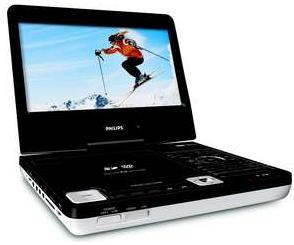 Our old Polaroid portable DVD player wouldn’t work off of just battery anymore since a tiny plastic latch had broken off. After researching the cost for a new battery, I decided to just sell the whole thing on eBay and get a brand new player.
At Best Buy, I found the Philips DCP850/37 portable DVD player and was really impressed with it after just a few minutes of playing with the demo model.
The unit sports an 8.5″ tilting/rotating LCD screen, an SD card slot, dual headphone jacks, a remote control, and an iPod dock. It supports all of the various DVD formats and will even play DivX files.
Having all of those different options for playing media on the go was a big plus. Before going on a trip, I’ll download a bunch of recordings from my TiVos, convert them into DivX format, and burn them onto a DVD. That way we have to carry fewer discs. Or I can put them into my iPod Video and then dock that on the player and show them on the larger screen. If I happen to have a few videos on an SD card (which I usually carry in my Treo for more portable video playback via TCPMP) I can pop that in as well. It’s a really well-designed video playback device.
5th gen iPod Video
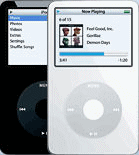 My luck continues … I was the winner of a random drawing for a customer satisfaction survey I filled out some months back. My prize: a 30gb 5th generation Apple iPod with Video!
Now, there was nothing really wrong with my trusty Archos Jukebox Studio 20 that has served me well for close to four years, but it’s not as sexy as the iPod. I’ve only had it a couple of days, and am still in the process of learning iTunes and copying my 4000+ tracks to the new device, but it is one sweet little gadget.
The color screen is amazingly crisp and bright (I love the movie theater-style fade in/out of the backlight). The click/scroll wheel is fun to use and the interface and controls are much more intuitive than the Archos (hey, it’s made by Apple after all!).
Archos Jukebox Studio 20
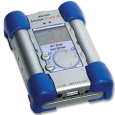 I found out quick that using the Microdrive along with my iPAQ to play MP3s on the road wasn’t a perfect solution. The Microdrive would only hold about 50 songs, suck the iPAQ’s batteries dry, and using Windows Media Player is not exactly my idea of fun. At the same time, I was looking at portable hard drives so I could actually carry around large files and applications, more than I could fit on CompactFlash.
Enter the Archos Jukebox Studio 20. This little gizmo has a 20gb hard drive in it and doubles as a USB hard drive and a portable MP3 player. It’s a little on the heavy side, and the user interface needs work, but it’s usable and the battery life is pretty good (rechargeable, too). It even has a line out so I can connect it to my home stero and have hours of music. I’ve got a little over 1,000 tracks on it now and still have gigs left over. There’s even an open-source project to write new firmware for it, called RockBox. Had the Windows-compatible iPod been available when I bought the Jukebox, I might have gone for that, but I am very happy with the device.