Tiny Bluetooth dongle

The $3 tiny Bluetooth adapter for my Eee PC finally arrived! I guess I didn’t realize it was coming from Hong Kong directly to me, which is why it took 10 days. I love the typos on the packaging due to translation. Apparently this will make a PC “Bluelooth” enabled is “supporting vioce data” as well. 😀

It’s a lot smaller than my old Kensington Bluetooth adapter, as I’d hoped:


My only complaint is that it doesn’t connect flush with the side of my Eee PC. The metal plug part is a little too long, so it sticks out a little further than I like:

But it’s still better than what I had. Now I can put my Eee PC into its neoprene slipcover without having to remove the dongle.

I had a little trouble re-pairing the new device to my Treo. I spent about an hour fiddling with scripts and PINs and hcitool/hciconfig commands and then finally installed eee-control. After that, it was a snap and I’m able to tether my Eee to my Treo again.

Palm’s new handheld is Pre-tty cool

Today at CES, Palm unveiled its new smartphone: the Pre, running webOS (formerly code-named Nova).

The Pre has a 320×480 high-resolution touchscreen display, built-in 3G/GPS/WiFi/Bluetooth, a 3 mega-pixel camera, 8gb of user storage (the most on any Palm handheld ever), an accelerometer (for screen rotation), and the Treo’s familiar keyboard (it slides down from under the screen, or rather, the screen slides up). Though I hate to say it, it’s basically Palm’s version of the iPhone. The market seemed to like what it saw … shares of PALM jumped 34% today!

webOS looks slick … and finally Palm has a multi-tasking operating system! I just hope it’s faster than Windows Mobile (my Treo might not have 3G or be able to run two applications at once, but the user-interface speed blows away any WM6 device).

So, any bad news? First, the Pre will initially be available only on Sprint (CDMA), in the first half of 2009. Hopefully other carriers (like AT&T) will follow. Next, and I couldn’t confirm this, it doesn’t look like there’s any backward compatibility with PalmOS. There is a huge library of third-party applications out there and none of them will run on the Pre. I’m sure developers will jump on the platform relatively quickly, though, and it’s probably better to leave the legacy of PalmOS behind (how about a PalmOS emulator for webOS? 😉 ). No Flash support either. I’ll bet it has cut-and-paste though!

There’s a lot more good information over on Engadget (except pricing, which hasn’t been announced yet) and some videos of the Pre in action from Gizmodo. For now I’ll have to wait and hope that my next smartphone is going to be a member of the Pre family.

Heh, there’s already a wiki page.

Is AT&T quietly downgrading its EDGE network?

I manage a lot of AT&T mobile phones at work, mainly Treos (plus a few Centros) and Windows Mobile devices like the Tilt. Starting about a month ago, the Treo users (myself included) started having data coverage issues. Areas of the office that were fine before were suddenly dead zones and phones would drop data coverage (even while outside!) and not automatically reconnect.

Since this was only affecting the Treos, it seemed obvious that it was a problem with AT&T’s older EDGE network (the current generation of Palm OS-based devices can’t do 3G). When I called AT&T Mobility’s technical support earlier last month, I was just told there were “network issues” in the area and they were being worked on. But a month later, the strange coverage problems persist.

Then today I came across this article on Open for Business, via Engadget:

In an act affecting owners of 2G cell phones on AT&T Mobility’s network, including the highly visible, and originally highly expensive first generation iPhone, Open for Business has learned that AT&T has been quietly sacrificing 2G signal strength in an effort to speed up the build out of its next generation 3G network.
…
While previously the company had been primarily relying on the 850 MHz band that offers a more robust signal, including superior indoor reception, company technicians confirmed to OFB that transmitters for the 2G signal used by the original iPhone and most other handsets, including most AT&T offered BlackBerry and RAZR models, have been shifted to the weaker 1900 MHz band in some areas.

Are you kidding me? It makes sense, from a conspiracy standpoint (get people to upgrade to newer, more expensive 3G devices like the iPhone) and could explain our current coverage problems, but from a business standpoint it seems like you’d end up with a lot of angry customers who suddenly have non-working data connections on their phones, not to mention a looming PR nightmare.

Now this whole thing could be heresy, so as usual don’t believe everything you read on the internet (just check out the comments to the OFB post and you’ll see what I mean).

Fortunately, my desk at work seems to be a “good” area because usually when someone brings their phone to me, it’ll start working. Then I take it back to their own desk and it drops the network connection again. sigh

Santa’s gone Centro!

I’m a long-time Palm user: I’ve owned four different Palm OS devices over the past 12 years from the original Pilot 1000 to my Treo 680.

Palm is finally starting to do some advertising, and the latest round of Santa’s Gone Centro videos are pretty funny.

I’m looking forward to CES next week as Palm will finally be unveiling it’s new Linux-based Nova OS and supposedly a new smartphone to run it. Nova will be the first new version of Palm OS since Garnet was originally released in 2002! I love my Treo but sometimes wish I had some of the cooler features that other phones have, like 3G, WiFi, GPS, etc. The new Nova devices might be the answer to that prayer.

TiVo Mobile … finally!

New TiVo Mobile web site allows TV fans to browse, search, discover, and record television shows on the go, adding another great value to the already invaluable TiVo service

Announced by TiVo this morning (and picked up by most of the gadget blogs I read), you can now schedule recordings and browse TV listings from your mobile device. Yes, you could do this before by accessing TiVo Central Online from your browser-enabled phone, but it was clunky and not easy to navigate. I was able to use it a few times from my Treo to schedule a recording in a pinch, but it wasn’t my first choice.

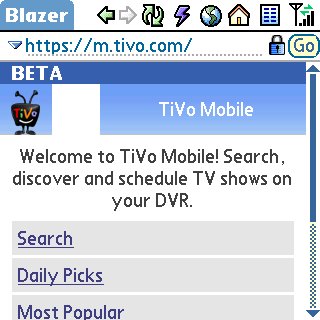
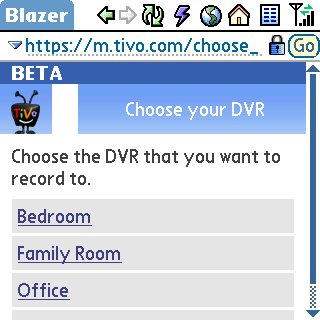
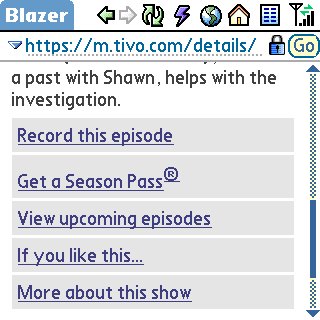
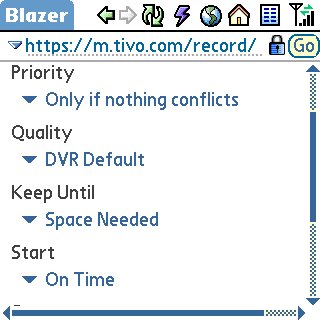
Available in beta form today, simply point your mobile browser to m.tivo.com (it may or may not work for you, based on my experience and its beta status). Once I got the page to load, I was able to login with my TCO credentials and see my list of TiVos:

snap-c5518e9a-752397snap-c5518e62-798447

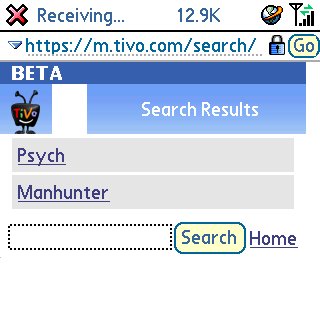
Then I was able to search for a show:

snap-c5518edd-766032snap-c5518f03-766081

snap-c5518f22-703971

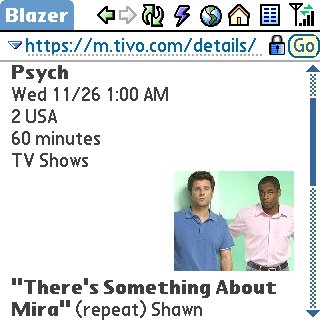
And schedule a recording:

snap-c5518f6a-704162snap-c5518ff0-714437

I ran into a few problems while trying out the new site. For example I had to sign in again after selecting “Record this episode,” Blazer (the Treo browser) kept complaining about an invalid security certificate, and my attempt to schedule a recording actually failed saying the show did not appear in my DVR’s guide data. But hey, it’s still beta, right?

Anyway, TiVo Mobile seems to have all the same functionality as TCO packaged in a nice-looking, usable mobile format, finally! Thanks, TiVo!

Tethering the Treo 680 and Eee PC

Next week I’ll be taking a road trip vacation up the east coast which means a lot of time in the car. I thought it would be cool to be able to use my Eee PC in conjunction with my Treo 680’s data connection to get on the ‘net while (literally) on the road (instead of having to stop and find an open wireless access point). And no, I wouldn’t be doing this while driving. 🙂

Normally mobile broadband would involve some sort of cellular modem for your laptop in conjunction with an expensive data plan (like AT&T’s solution). Most of those products don’t take Linux into account, however, and I already have an unlimited data plan on my Treo.

I came across a thread on the eeeuser forums that got me started: using Mobile Stream’s USBModem utility on the Palm allows the Eee to see it as a normal modem when connected via its USB sync cable. Then I created a new dial-up networking connection on the Eee, fired it up, and wallah! Internet access through my cell phone.

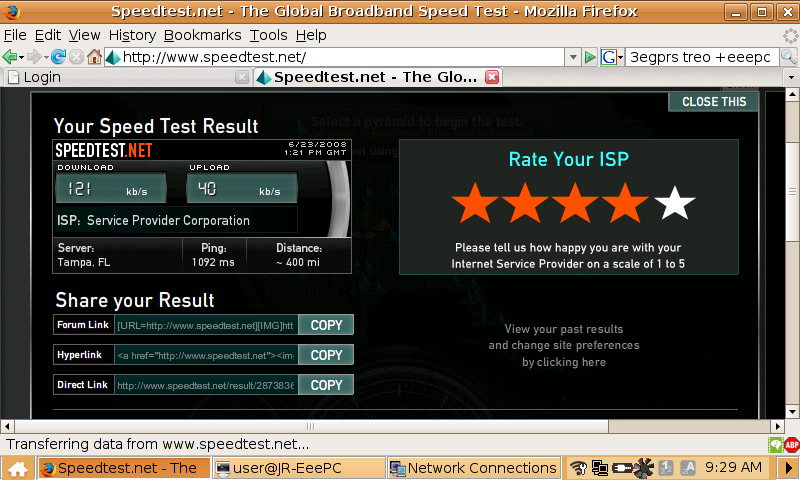
Granted, the Treo is not a 3G device, which means Edge speeds (see the screenshot below) but I’m not expecting to stream video off of YouTube, just check my mail and browse the internet.

gprs-speedtest-751999

It didn’t work right away, though. I had to do some tinkering to get the settings just right. You can find the details in my reply to that thread on the eeeuser forums.

Take your apps with you

I bought a Corsair 2gb Flash Padlock last August after hearing Steve Gibson and Leo Laporte talk about it on the Security Now! podcast (episode #106). I use it primarily for shuttling files back and forth between my home and work computers (in a TrueCrypt container), but have also configured it as a bootable device so I can run the Ultimate Boot CD from it (which is handy when I’m asked by friends or family to work on their broken computers).

Some other neat things I keep on it are the portable applications from PortableApps.com. You simply download the PortableApps Suite (or the individual applications you want) and then install them onto your USB flash drive. No information is written to your local PC’s hard disk … everything is encapsulated on the flash drive. You can now plug your flash drive into any PC and run your applications without worrying about having to install them locally, or leaving any personal information (say, browsing history) behind when you’re done.

I keep the usual portable suspects on my Corsair: Firefox for web browsing, Thunderbird for e-mail, Pidgin for instant messaging, PuTTY for SSH connections, etc. Those are all available for download and install from the PortableApps site. However, you can also add your own portable applications and have then run from the PortableApps custom start menu.

For example, I’ve added TrueCrypt, JungleDisk, Bucket Explorer, and mRemote to my personal portable utility arsenal.

Keep in mind that not every application is automagically portable: it needs to be specifically coded to not use any local PC resources (like .ini files, the registry, etc.). So you can’t just dump a program into the PortableApps directory on your flash drive and expect it to work. Do your homework (i.e., search Google) though, and you’ll find plenty of portable applications out there.

Start building your own utility belt today!

Palm Treo 650

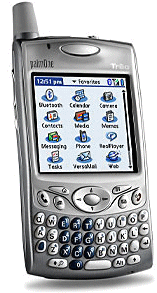
Palm Treo 650After starting out in the Palm camp back in 1996, then switching to Pocket PC and hp’s iPAQ line in 2001, I’m now a Palm user again. I got a Palm Treo 650 through work, and I love it … finally I don’t have to carry my PDA, cell phone, and G100 (e-mail device). I’ve got all three in a small, cellphone sized package.

hp iPAQ h1945

hp iPAQI’m a long-time PDA user. I got my first Pilot 1000 back in 1996, then eventually upgraded to the Palm III. Over the summer of 2001 I left the Palm world for the Pocket PC, or Windows Mobile as it’s referred to now. My first iPAQ was the 3135 (black-and-white version) and then I inherited an older color 3760 model from a colleague.

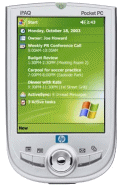
Currently I have the hp iPAQ h1945, which is smaller and cooler than any PDA I’ve had before. The high-resolution, 64,000 color screen is still the best in the industry, it runs Windows Mobile 2003, and has built-in Bluetooth connectivity. The newer iPAQs forgo the old expansion sleeves (to add on Compact Flash support) for an integrated Smart Media slot (which I’ve never used, actually). This means I don’t really have a need for my IBM MicroDrive anymore, but oh well … it’s not the first time I’ve bought something for the “cool” factor and then never used it. 🙂