ThrEee weeks later

So it’s been three weeks since I got my Eee PC. Is the honeymoon over? Nope!

I’ve spent the past three weeks carrying (and using) the Eee almost everywhere: taking it to work, having it in the car (in case I’m somewhere with free WiFi), etc. Even now I’m kicking back on the couch watching “CSI” and using it to write this. I’ve pored over the wiki at eeeuser.com, read and posted in the forums (the community there is awesome), and spent time customizing and tweaking the Asus-installed Xandros Linux to my liking. Thus far I’ve:

  • upgraded to 1gb of RAM: it took me longer to order the 1gb DDR chip than it did to actually install it (see here for a video of just how easy it is).
  • customized the interface: using tools like Theeemer, Tweakeee, and EMEditor, I’ve changed the default look-and-feel to something a little slicker looking (see the screen capture at the top of this post).
  • installed more applications: I’ve got TrueCrypt so I can access the encrypted volume on my thumb drive, JungleDisk to get to my files backed up with Amazon’s S3 service, and Maelstrom for a little entertainment.
  • configured it for work purposes: using the PPTP Client I can VPN into the corporate network and then login to my servers with rdesktop or run applications through Citrix.
  • gotten pretty good at accurately typing on the keyboard
  • played around with eeecontrol: this utility lets you increase the front-side bus speed (and thus get the CPU back to its normal 900MHz speed instead of the Asus-underclocked 630MhZ). I really haven’t had a problem with the Eee’s performance so I’ve left it alone for now. I still run eeecontrol in the tray, though, so I can watch the fan speed and temp.

It wasn’t all smooth, though. I had a real problem initially getting onto my wireless home network. It turned out that the default wireless driver/script doesn’t like spaces in the WPA key. Once I removed the spaces, the Eee connected just fine (and then I had to fix the WPA key on every other wireless device on the network). After that, I still had problems connecting to the wireless at work (which also uses WPA). Switching to the madwifi driver seemed to finally help in that regard (though I still get the dreading “Pending” status now and then).

The other difficulty was getting wireless printing to my Epson AcuLaser CX11NF working. The test page would “print” according to the Eee, but nothing would happen on the printer. It took some research, but I finally got it working (see my thread on the eeeuser forum for details).

My other minor nit is with the screen size. The 800×480 resolution means sometimes having to drag windows around with the Alt-left click trick in order to see portions that won’t fit on the screen. This also means that web sites that are designed for larger resolutions (like my daughter’s WebKinz site which is all Flash) involve a lot of dragging back and forth.

Overall, I’m pretty happy with my Eee. Asus has come pretty close to a hitting a home run with the cost, form factor and out-of-the-box usability. The new 900 model adds the 9″ screen with a slightly larger footprint but at the cost of a slightly larger price tag, so the original 701 series still seems like the better deal that hits the sweet spot.

(more photos of my Eee are posted here)

Vista woes

This one’s going to be long, so grab something to drink …

About two months ago, the CompUSA near my office was a few days from closing its doors for good so some colleagues and I headed over to scope out any remaining deals. The pickings were slim at that point, but I walked out with an upgrade copy of Microsoft Windows Vista Home Premium Edition for $80 (50% off). What the heck, I thought, we were going to start using Vista at work at some point, so why not get a head start on learning the ins and outs of the new OS? I also picked up a new ATI HD2600 Pro 256mb video card an extra gig of RAM for my PC to make sure everything would run smoothly on my older Gateway 831GM desktop PC.

To keep everything on the level, I did a clean install of Vista and then spent a few days re-installing, re-configuring, and re-copying (from the resulting Windows.Old directory) everything back to my liking. I ran into the normal issues everyone knew about in Vista (like extremely slow network copy times) but knew SP1 was just around the corner which would hopefully fix these annoyances. Unable to wait, I used the registry hack trick to grab the RC of SP1 early.

SP1 fixed a few problems, then gave me a few new ones:

  • ZoneAlarm would randomly crash Vista’s tcpip.sys. I had to use the crash dump analysis tools to figure this one out because instead of blue-screening like XP, Vista would just reboot. I had to uninstall ZA and go back to the built-in Windows Firewall.
  • After awaking from Sleep mode, both of my optical drives (DVD burner and DVD-ROM) would be missing. Doing some searches on the net, this seems to be a very common problem, but none of the registry hacks (like removing the Upper/LowerFilter keys) would fix it. The only remedy was to disable Sleep (one of Vista’s cooler features IMHO) and go back to the normal shutdown/boot routine.
  • Every time I disconnect my iPod (connected via USB), I lose my wireless network connection. It doesn’t matter if I just unplug it, or eject it through iTunes first. I have to unplug and re-plug my USB wireless network adapter to get back on the network. The same thing happens sometimes when I unplug a USB flash drive or SD card, or CF card from the multi-card reader. Granted this could be some sort of USB controller issue in my PC, but this didn’t happen with XP!

Now recently Vista has started just freezing, and freezing solid. In XP when this would happen you could kill the explorer.exe process and start it again. But in Vista, it seems like once I get that dreaded “not responding” dialog, nothing I can do will unfreeze the system. Yesterday, I had Vista lock up four times in a row after clean reboots. It’s a disaster!

The latest problem happened tonight (which prompted this post). I was trying to dismount a TrueCrypt volume located on my 2gb Corsair Padlock USB drive and the truecrypt.exe process stopped responding. In true Vista fashion, the “end this program” option did nothing so I couldn’t get TrueCrypt to close. Then Explorer stopped responding and everything froze up again. I had no choice but to hold down the power button and hard shutdown the system like I’ve been having to do more and more recently. When the system boots again, and I log in, I can tell immediately something is wrong: there’s a “null error” dialog from Trillian on my desktop, and the JungleDisk Monitor configuration GUI opened without any settings in it. Something went wrong and I lost a large swath of configuration settings such as:

  • no homepage set and all bookmarks missing in Firefox (thank god for XMarks!)
  • profile gone from Thunderbird (had to restore the prefs.js file from my JungleDisk backup on Amazon AWS)
  • all JungleDisk settings lost (luckily my automated backup settings were preserved)
  • Trillian corruption (a .dtd file in the stixie directory was 0 bytes, but I managed to find a good backup copy)
  • a corrupted UltraMon shortcut on the Start Menu
  • DVD-ROM drive disappeared (even from the BIOS … this was probably a side-effect of the hard shutdown. I had to manually eject the tray to get the disc out and also switched power connectors internally to get it working again)

And that’s just what I found (and fixed) before I decided enough was enough for today. Who knows what other settings might be messed up? Ok, yes, something like this is a risk when you don’t shut down a (Windows) machine cleanly, but again, I don’t remember having problems like this with XP (at least, not recently).

I’m seriously tempted to go back to XP, but I know Vista (or at least Windows 7) is the future and I’m going to have to use it eventually. Hopefully these experiences will just make me a better troubleshooter in the future (can you tell I’m trying to put a positive spin on this?).

My Eee PC

I’ve been following Asus’ Eee PC since it was first released late last year and was finally no longer able to resist its siren call. I purchased the Galaxy Black 4G Surf, deciding that the extra $50 over the 2G Surf was worth a) double the storage capacity (4gb vs. 2gb), b) user-upgradeable RAM, and c) a slightly faster CPU (you can see the model comparisons here).

My initial observations:

  • It’s tiny! The photo to the left shows the Eee on top of my Sony VAIO SZ340P. Of course, with the smaller size comes a few compromises: the 7″ screen doesn’t give you a lot of real estate and the keyboard is a bit cramped for my big hands. When at home, these problems could be solved by connecting an external monitor, keyboard, and mouse, but that would diminish the coolness factor of how small it is.
  • It’s quiet. No moving parts except for the fan (and I haven’t heard that kick on yet).
  • It’s fast (but not too fast). The 4G Surf uses a 900 MHz Intel Celeron M processor (but it’s underclocked to just 630 MHz!) and has 512mb of RAM. The system boots the customized Xandros Linux distro from the solid-state hard drive in just a few seconds and seems snappy enough even with a few applications open.

I haven’t had a lot of time to play with it yet, but I’ll post my observations here as I learn more about it. On my To Do List is “over”-clocking the CPU back to 900MHz, possibly upgrading to 1gb or 2gb of RAM, and possibly attempting to install Windows XP. Check back later for more!

Funny segment on TWiT: Bob the TSA Blogger and the MacBook Air

There’s a great segment on this week’s TWiT podcast where the gang is talking about Bob the TSA Blogger screening the MacBook Air. The video is hilarious by itself, but when you add the commentary of Leo, Dvorak, Wil Harris, and Jason Calacanis … well, let’s just say I haven’t laughed that hard during a TWiT episode (while driving home from work no less) in a long time.

The segment starts at 1:06:15 and goes through 1:16:16. Check it out.

TiVo MyDVR Expander

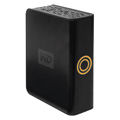
WD MyDVR ExpanderI got my hands on the TiVo-verified Western Digital My DVR Expander. It’s an external 500gb drive that connects to my THD’s eSATA port. Setting it up was as easy as turning off the TiVo, connecting the drive with the supplied eSATA cable, and then powering up the TiVo again. The box recognized the external storage and now I have 94 HD hours (or 888 SD hours) of recording capability.

The drive itself is relatively quiet and has a soft orange circular LED on the front. This box is in my office, so extraneous noise/light isn’t an issue, but this unit should even be fine in a bedroom environment.

If you have questions, check out the eSATA FAQ on the TiVo Community Forum.

TiVo HD

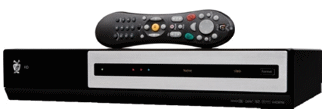
TiVo HDI’m back up to four TiVos. 🙂 I couldn’t resist the new TiVo HD to go in my office with my Sony LCD TV. It’s time to retire my trusty old TX20. The THD is sometimes referred to as the “S3 Lite.” It doesn’t have the OLED display, isn’t THX certified, only has a 160gb hard drive, and doesn’t come with the premium Glo remote (I got one anyway, thanks to TiVo Rewards), but it supports a single M-Card for dual-tuning capabilities, the CableCARD slots have been moved to the front, and it does all the other HD-goodness its bigger brother does. Now that MRV (multi-room viewing) and TTG (TiVoToGo) have been enabled for the HD boxes in the 9.1 software release, it’s all good!

Philips DCP850/37 portable DVD player

Philips portable DVD playerOur old Polaroid portable DVD player wouldn’t work off of just battery anymore since a tiny plastic latch had broken off. After researching the cost for a new battery, I decided to just sell the whole thing on eBay and get a brand new player.

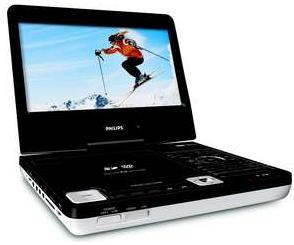
At Best Buy, I found the Philips DCP850/37 portable DVD player and was really  impressed with it after just a few minutes of playing with the demo model.

The unit sports an 8.5″ tilting/rotating LCD screen, an SD card slot, dual headphone jacks, a remote control, and an iPod dock. It supports all of the various DVD formats and will even play DivX files.

Having all of those different options for playing media on the go was a big plus. Before going on a trip, I’ll download a bunch of recordings from my TiVos, convert them into DivX format, and burn them onto a DVD. That way we have to carry fewer discs. Or I can put them into my iPod Video and then dock that on the player and show them on the larger screen. If I happen to have a few videos on an SD card (which I usually carry in my Treo for more portable video playback via TCPMP) I can pop that in as well. It’s a really well-designed video playback device.

Buffalo WHR-HP-G54 wireless router

Buffalo WHR-HP54I recently bricked my Linksys WRT54GS router while playing around with the DD-WRT firmware (it wasn’t DD-WRT’s fault … the v6 router I had was one of the “crippled” ones with less NVRAM running VxWorks so it was a risky undertaking to begin with). I really like the DD-WRT firmware, so I went shopping for a new router with that (and the fact that I’m done playing the hardware version release game with Cisco/Linksys) in mind.

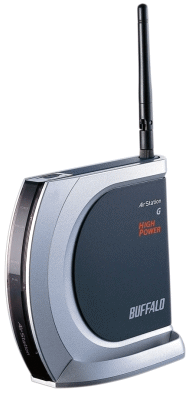
I selected the Buffalo WHR-HP-G54 Wireless-G MIMO Performance Broadband Router and Access Point (listed as the router with the “best range” on the DD-WRT wiki). It was quite easy to set up, using the supplied CD, but as soon as I confirmed it was working I re-flashed it with DD-WRT. So far, so good.

Garmin StreetPilot c340 GPS receiver

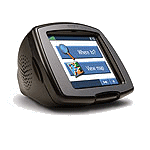
StreetPilot c340Another one of my new Christmas toys is the Garmin StreetPilot c340 GPS. Times have really changed since the days (i.e., 1999) when I would connect my Delorme Tripmate to the serial port on my laptop and drive around using Street Atlas. The c340 is the shape of a small tube television set and has a color touchscreen. It comes pre-loaded with maps of the entire United States and has an SD card slot for loading other maps (like Europe). It does text-to-speech recognition (a feature that separates it from the slightly cheaper c330) so it will actually read out the street names when speaking directions (instead of just “turn right in 500 feet”). You can download different voices as well. The c340 is very easy to use and view in the car and comes with a very sturdy windshield suction cup mount.

While it’s not flat and PDA-sized, and doesn’t have some of the fancier “kitchen sink” features of the higher priced units (like widescreen format, MP3 playback, photo viewing, Bluetooth, customizable icons, etc.) it’s the perfect device for me. I was looking for an in-car navigation system, not a portable navigation/entertainment/PDA system (check out Garmin’s Nuvi line if you’re looking for something like that).

Time to do more driving!

Canon PowerShot SD600

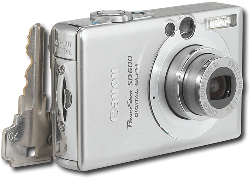
Canon PowerShot SD600My trusty three-year old Canon Powershot A70 had been sent back to Canon for CCD repair twice (under recall) and was still working relatively well, but my wife surprised me this Christmas with the new Canon Powershot SD600 Digital Elph. The 6-megapixel SD600 is officially the smallest digital camera I have owned (even smaller than my Treo 650) and has all the great features I’m used to from the A70, plus a few new ones.

I’ve only been playing with it a few days, but so far I like it a lot. The smaller size took some getting used to (the A70 was very easy to use one-handed due to the hand grip (battery compartment) on the right side), and I still end up holding it to my face in the slightly wrong position to look through the view-finder, but being able to slip it in a pocket is worth the trouble. I usually don’t bother with digital zooms, but the 12x digital zoom (3x optical) seems to work very well and my pictures looked very clear.