Google’s Chromium OS is, uh, a browser

Google’s forthcoming Chromium OS has gotten a lot of buzz recently. My trusty old EeePC 4G Surf has become quite the sandbox for trying out different netbook operating systems, so of course now it is running Chromium. I downloaded the latest of Hexxeh’s Chrome builds, copied the image onto a 1gb thumb drive, and then installed the image onto the SSD in my EeePC. It boots to the signon screen in about 15 seconds:

You login using your Google/Gmail credentials, since this is an OS for the cloud (of course, I had to login with the default ‘facepunch’ from Hexxeh’s FAQ first so I could join the netbook to my wireless network before it could authenticate my Google login).

As you can see from the login screen in my video above, it’s not well suited for the smaller 7″ screen on my EeePC. The settings dialog, for instance, goes off the bottom of the screen and the usual Alt+mouse to drag a window doesn’t seem to work. Also, since this was installed as an image, the SSD drive looks like just a 1gb drive so I’m missing out on the other 3gb for storage. Graphics performance isn’t that great either.

Other than that, I’ve successfully turned my netbook into a almost fully functional Ubuntu machine into a device that only runs a browser. 😮 Hmmm. I guess this is the simplicity Google is shooting for, but it’s almost too simple for me.

Oh, and while I’m talking about Google … why won’t they let me put my iGoogle tabs back on top of the page instead of on the left? It’s a ridiculous waste of space, and it’s even worse on the smaller screen of my EeePC.

WIJFR: Green Mars

The sequel to Red Mars details an early 22nd-century Mars controlled by Earth’s metanationals, gigantic corporations intent on exploiting Mars. Debate among the settlers–some native-born, some the surviving members of the First Hundred–is divided between the minimalist areoformists, who have come to love Mars in all its harshness, and the terraformists, who want to replicate Earth. As the surface of Mars warms and is seeded with genetically altered plants, the settlers await Earth’s self-destruction, which they hope will give them a chance to claim their independence.

It took almost two months since finishing the prior book (I haven’t had a lot of free reading time lately) but I just finished “Green Mars,” the second installment of Kim Stanley Robinson’s Mars trilogy.

“Green” starts roughly 14 (Earth) years after the end of “Red.” To the new generation of native-born children, Mars is the only home they’ve known, and due to the effects of growing up in the lower gravity of Mars, they’ll never be able to go there. But they don’t care about Earth … these children (the ectogenes) are splintering off into more semi-political groups like the Reds or Marsfirsters as the planet continues to struggle with the metanational corporations back home. Meanwhile, the terraforming efforts continue to change the face of the red planet: algaes, lichen, and moss are being joined by stunted trees, shrubs, and flowering plants. The surface temperature, atmospheric pressure, and oxygen levels are slowly rising, as the CO2 levels are getting lower. Pumps all over the planet continue to fill the lower basins with water from below the surface. It’s all broken ice now, but eventually it will melt and become the new Martian seas.

Jumping forward about 50 years, the majority of the book takes place in the early 2120s, and the reader is reunited with several of the First Hundred who originally landed on Mars nearly 100 years earlier. The space elevator is back, and the latest massive construction project is the soletta: a 10,000 kilometer wide “magnifying glass” orbiting halfway between the sun and Mars, intensifying the sun’s rays providing more light and heat.

Some things never change, though. The remaining members of the First Hundred are still in hiding, as fugutives since the first attempt at revolution. Political and cultural pressures continue to pull everyone in different directions. Will the future see an independent Mars? Or will history repeat itself with another deadly revolution like ’61? Read the wiki article for a better summary. 😉

Robinson’s writing is incredibly detailed, both at the scientific, cultural, and political levels. Just like in the first book, each major part of the story is seen from a particular character’s point of view. Even though I read these two books back-to-back, it was like being reunited with old lost friends from the first novel: Maya, Nadia, Sax, or Ann. I’m looking forward to starting the final book, “Blue Mars” over the upcoming holiday.

Now on my iPod: Nerdcore hip hop

Ever since I started playing Kingdom of Loathing a few months ago, I’ve been listening to the “120 Minutes of Jick and Mr. Skullhead” podcast/radio show. Through them, I was introduced to Nerdcore hip hop since the Asymmetic crew are friends with MC Frontalot, the artist who coined the term.

I’m not actually new to Geeksta rap … I’ve had MC Hawking and Minibosses tracks in my collection since at least 1998 (and of course a few specific songs by “Weird Al” Yankovic like “It’s All About the Pentiums“).  This is first time I’ve heard it categorized into a specific genre (other than parody), however. Now I’ve been listening to new (to me) stuff by groups like Optimus Rhyme.

Want a quick introduction to nerdcore hip hop? Check out the NerdcoreNow compilations.

WIJFR: Wizard’s Bane

It all began when the wizards of the White League were under attack by their opponents of the Black League and one of their most powerful members cast a spell to bring forth a mighty wizard to aid their cause. What the spell delivers is master hacker Walter “Wiz” Zumwalt. With the wizard who cast the spell dead, nobody can figure out what the shanghaied computer nerd is good for — because spells are not like computer programs.

“Wizard’s Bane” by Rick Cook was my latest iSilo/Treo e-read, which I downloaded for free from the Baen Library.

Computer programmer Walter “Wiz” Zimwalt is mysteriously transported from his job in California to a different world, summoned by a powerful spell cast by the wizard Patrius with the assistance of Moira the hedge witch. Patrius is killed during the summoning so no one knows why Wiz was chosen by Patrius. Stuck on a world with no computers, no technology, no pizza, caffeinated sodas, or even coffee, Wiz is completely out of his element. But the dark wizards of the South don’t realize Wiz is powerless and will stop at nothing to capture him and prevent him from helping out the League of the North.

As the story progresses, Wiz begins to learn that magic is similar to coding: anyone can really do it, but without proper training it can cause serious problems (or, in the case of a miscast spell, be deadly). Using his analytical and programming skills, Wiz begins to build a framework for writing spells as if he were writing code … a programming language for magic! Can he really use his spell-casting programs to take on the dark League? Or is he putting everyone, even the whole world, in danger by messing with a power he doesn’t completely understand?

Being a programmer myself, this book was a fun “fish out of water” story. I could relate to Wiz’s situation (what would I do if there were no computers?) and the programming, coding, and development references were cool. It’s not exactly Tolkien-level fantasy, but a good leisurely read.

Ubuntu 9.10 netbook remix

Jolicloud just wasn’t cutting it for me, so now that the beta of Ubuntu 9.10 (Karmic Koala) has been released, I’ve put it on my EeePC 4G Surf (the fourth distro I’ve run on that netbook this year). Ooooo, pretty:

Ubuntu 9.10 netbook remix

I haven’t had a lot of time to play/tweak, but so far all the important stuff (wireless, Fn keys, sound, etc.) is working.

Toy Story double feature

What could be better on a Saturday afternoon than a family trip to the movie theater for the Toy Story double feature? Seeing these classic Pixar films on the big screen again (and in 3D!) was great. It was also a fun first-time experience for my daughter who wasn’t even born when the movies were originally released.

You get the same pair of polarized 3D glasses Disney used for “Up,” which got a little annoying after almost three hours, but the resulting visuals were great. Since the original films weren’t animated with 3D in mind, there are no in-your-face-make-you-jump-out-of-your-seat gimmicks, just enhancements to the original film which make it a joy to watch.

In between the two films there’s a 10 minute intermission during which they show some Toy Story trivia. A clock in the corner counts down the minutes so you know exactly how much time you have to go to the bathroom, grab some new refreshments, etc.

The one thing that surprised me was the lack of a new trailer for “Toy Story 3.” I had read that a new trailer would be shown in theaters only, but the place we went to only showed the teaser trailer we had already seen before “Up.” 🙁

If you get the chance in the next two weeks to see the double feature, do it! Both movies for the price of one? It’s a no-brainer.

WIJFR: Red Mars

For eons, sandstorms have swept the barren desolate landscape of the red planet. For centuries, Mars has beckoned to mankind to come and conquer its hostile climate. Now, in the year 2026, a group of one hundred colonists is about to fulfill that destiny.

John Boone, Maya Toitavna, Frank Chalmers, and Arkady Bogdanov lead a mission whose ultimate goal is the terraforming of Mars. For some, Mars will become a passion driving them to daring acts of courage and madness; for others it offers and opportunity to strip the planet of its riches. And for the genetic “alchemists, ” Mars presents a chance to create a biomedical miracle, a breakthrough that could change all we know about life…and death.

While traveling last weekend I finally finished “Red Mars,” the first book in Kim Stanley Robinson’s Mars trilogy. While first and foremost an SF novel (it is about Mars colonization after all, and even includes an incredible space elevator) it broaches some interesting scientific, technological, environmental, cultural, and political subjects. The novel follows the first colonists on Mars and over a span of 40 years tells the story of how the small scientific expedition becomes embroiled in a miasma of issues they did not expect.

The problems begin shortly after The First Hundred arrive on the red planet. It becomes quickly apparent that everyone did and said what they had to in order to pass through the rigorous process back on Earth to get selected for the expedition to Mars. Three different factions begin to emerge: those who think Mars should be left in its pristine state for study and research (the Reds), the terraformers who want to start transforming Mars into a human-habitable planet as quickly as possible (without regard for the current environment), and the “new Martians” who believe that a new culture, religion, and way of living in harmony with the planet needs to be established.

As the years pass, more and more people start arriving on the planet as conditions back on Earth continue to worsen. Most are sent by the huge transnational corporations back on Earth who want to exploit the planet (in blatant disregard of the international treaty set by the United Nations) for its wealth of natural resources that are running out back home. Mars becomes the new frontier with towns and cities being established all over, but due to the environmental constraints of having to live inside domes and tents, they quickly become overcrowded and start to exhibit the same problems as Terran cities. Shortly, whole groups of people start disappearing, supposedly joining a faction of the First Hundred known as the Areophany that are living somewhere in a hidden colony.

Will human history repeat itself on Mars, or can the First Hundred manage to keep the peace on their new home? Can a middle ground be found for all interests involved, or will revolution and war consume the red planet?

I really enjoyed this first book of the trilogy and have already started the second book, “Green Mars.”

Garmin nüvi 265WT

Garmin nuvi 265WTA couple of weeks ago, I discovered that my trusty Garmin StreetPilot c340 wouldn’t run on battery power anymore. As soon as it was disconnected from the power cable in the car (or from the USB cable when connected to my PC) it would just turn off. When plugged in, the screen would show it was “charging,” but after trying multiple hard resets and even opening a ticket with Garmin it became apparent the internal Li-on battery was dead. The Garmin rep told me it would cost a flat $89 to fix it! I did a little research and determined that it would be cheaper to attempt to replace the battery myself, as long as I didn’t mind purchasing a replacement battery, cracking open the case, and doing a little soldering. Other than the lack of battery power and some minor map problems the unit was working perfectly fine so I wavered back and forth (repair or replace?) for a bit. Eventually I decided to just sell the StreetPilot on eBay and put the proceeds towards a newer unit.

My new GPS is the Garmin nüvi 265WT which has a 4.3″ widescreen touch display, voice directions (with text-to-speech), Bluetooth, a built-in FM Traffic receiver, and a few other cool features.

Navigation and General Usage

The thing I liked the best about my StreetPilot was the user interface. It was simple, clean, and good looking. The nüvi sports that same simplicity and shiny UI that makes it easy and fun to use:

The large buttons make it easy to navigate using your finger and the touchscreen, and the widescreen format allows the nüvi to show more information on the screen without it getting in the way of actually seeing the map as your driving. One new feature I like is the indicator of the current road’s speed limit (although as you can see above I was going slightly over that on my way home from work this evening ;-)). Another benefit of the widescreen model is a QWERTY keyboard layout instead of the alphabetical one used on the StreetPilot, which makes text entry a lot faster.

The standard text-to-speech voices are present so the unit will read out street names when giving directions. You can also download other voices (and car icons) from the Garmin Garage. There’s not as wide a variety of voices available as there are for my sister’s TomTom unit though (even NavTones only has a total of 3 voices compatible with Garmin units).

In addition to the normal method of entering destinations (by address, by name, by coordinates, etc.) you can upload geotagged photos to the nüvi and have it calculate the directions to that location. I don’t see myself using this feature very often unless I’m just looking for some random place to go. I may, however, introduce my daughter to geocaching, as using the Garmin Communicator plugin for my browser in conjunction with the Geocaching.com website makes it really easy to send cache locations to the GPS (and there are apparently quite a few caches near my house).

Bluetooth

The built-in Bluetooth radio lets you use  your mobile phone with the nüvi for hands-free calling. I had no issues pairing my Treo with the GPS and then using the touchscreen to place a call.

You can answer incoming calls too, of course, and even “transfer” the call to your phone if you don’t want to use the speakerphone. Voice quality was pretty good on both ends. The nüvi even downloads your call log and address book from your phone allowing you to browse and dial from the device instead of looking at your phone (although the address book part didn’t work for me since I don’t use the Treo’s native contacts application). If your phone supports voice dialing, you can do that through the nüvi as well. Another neat feature of pairing your phone is that every phone number on the display turns into a hyperlink you can use to place a call. So if you’re stuck in traffic on your way to your dinner reservation, you can simply tap your destination’s phone number on the screen to call and inform them you’re going to be slightly late.

Traffic

Of course, you should have been able to avoid that traffic in the first place! 🙂 My StreetPilot supported traffic information, but you had to purchase a separate receiver and pay for a subscription. The nüvi comes with an integrated FM Traffic Message Channel receiver and a free lifetime subscription to the service (but there’s a catch, see the next section below!). My minor nitpick here is that the receiver is not “integrated” into the GPS unit itself but is part of the power cord. Thus, you can’t get traffic information unless your unit is plugged in with the car lighter adapter. I guess this makes some sense (you don’t need traffic information if you’re hiking or riding a bike), but I was disappointed that I have to have that bulky cable plugged in as I usually just have the GPS mounted to the windshield without the cord.

That aside, the service is a neat add-on. The traffic indicator on the map screen (see the upper left-hand corner of my first screenshot) will change color (green, yellow, red) to indicate the level of traffic ahead. If the nüvi detects heavy traffic along your way, it may automatically adjust your route around it. You can also get an overview of all of the traffic in your area:

And then see where it is in relation to your current location:

Advertising!

The nüvi 265WT comes with a free lifetime subscription to the FM traffic service, but “free” in this case means “ad-supported.” That’s right, spam on your GPS! 🙁

Tapping on the “offer” will show you a list of nearby locations associated with the coupon. Tap on the location and you’ll be routed there. It wouldn’t be so bad if these only appeared on the traffic screen shown above, but these little pop-ups will also appear on the main map screen while your navigating! Ugh! The only way to disable them is to disable the traffic receiver, so if you want traffic information you’re going to have to deal with the ads. So far I’ve only seen these two Best Western ones, so it’s possible I might change how I feel about this depending on what kind of ads I see. It’s not like these are targeted to my preferences, though, so I’m guessing they’re going to be more annoying than useful.

Other Misc. Features

ecoRoute is Garmin’s new addition to their software  aimed at increasing awareness of how driving habits affect things like your gas mileage. You can set up your vehicle profile (city/highway estimated mileage, gas type, and local cost-per-gallon) and then get detailed usage reports, like this:

This trip information is also stored in a CSV file you can download from the device and then load into your favorite spreadsheet to do some more analysis if you want. ecoRoute also adds a “Less Fuel” option to the traditional “Fastest Time” or “Shortest Distance” routing options. There’s even an ecoChallenge game that tracks your driving during a trip (how fast you accelerate, brake, keep a constant speed, etc.) and then rates and scores you at the end with the hope that you’ll try to beat your top score by changing the way you drive. That part reminds me of my wife’s Toyota Camry hybrid which has similar driver feedback mechanism to encourage eco-friendly driving habits.

I also like the nüvi’s built in screenshot feature (which I used to capture all of the images in this post), and the ability to easily change the boot screen. No more using xImage!

Finally, when connected to your PC via USB, the nüvi shows up as a 1.8gb flash drive making it extremely easy to transfer files to and from the device. 1.2gb of that is taken up by the system software and maps, but that leaves roughly 518mb on-board for custom vehicle icons, voices, POI files, photos, etc. The nüvi has an SD slot as well, but with all of that free space I probably won’t need to use it as much as I did with my StreetPilot.

We’re going on a quick weekend trip up to Atlanta this weekend (to see Good Eats Live!) so I’m sure I’ll have some more comments after I put the nüvi through its paces on a real road trip. So far, though, I’m really impressed with it.
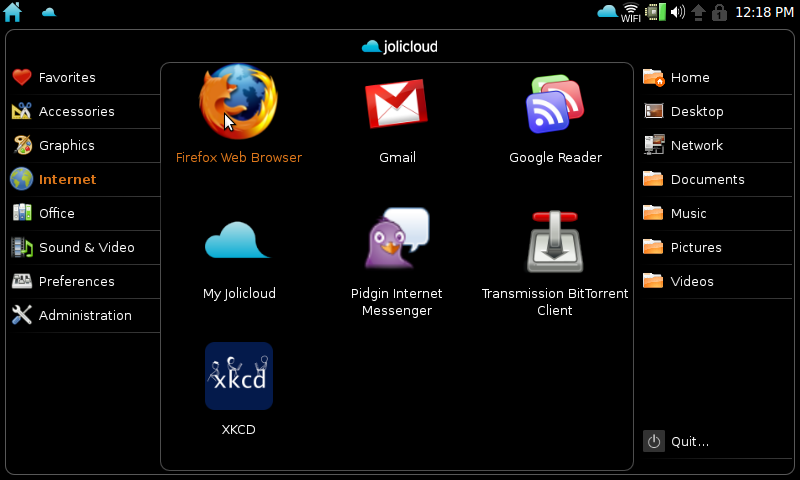
Jolicloud on my EeePC

Jolicloud transforms your netbook into a sophisticated web device that taps into the cloud to expand your computing possibilities. The web already hosts a significant part of our lives: mails, photos, videos, and friends are already somewhere online. Jolicloud was built to make the computer and web part of the same experience.

I’ve been playing around with Jolicloud, which touts itself as an “internet operating system,” on my EeePC 4G Surf for the past few days. Here’s a brief review.

Installing Jolicloud on your netbook is pretty straightforward: you download the ISO image and then use their USB Creator tool to “burn” that image onto the install media of your choice (ex., a USB thumb drive or SD card). I did have some issues with the USB Creator not recognizing my 1gb thumb drive (running under Windows 7) so I ended up using unetbootin instead (it looks like a newer version of the USB Creator has since been released which might address that problem, plus there are the older manual instructions). Next, you boot your netbook from that thumb drive, click through a few setup screens, and before you know it you’re logging into your fresh new Linux distro. There’s a good overview of the installation process (including screenshots) here.

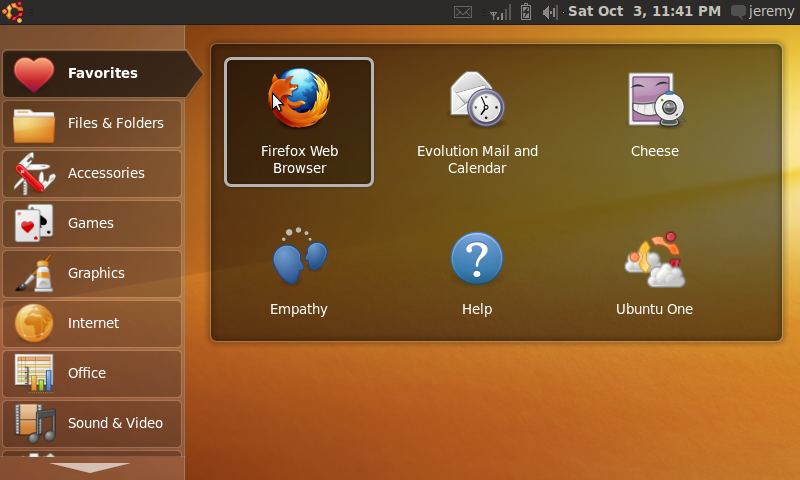
Jolicloud is based on Ubuntu 9.04 and uses the default Netbook Remix interface:

the netbook remix desktop

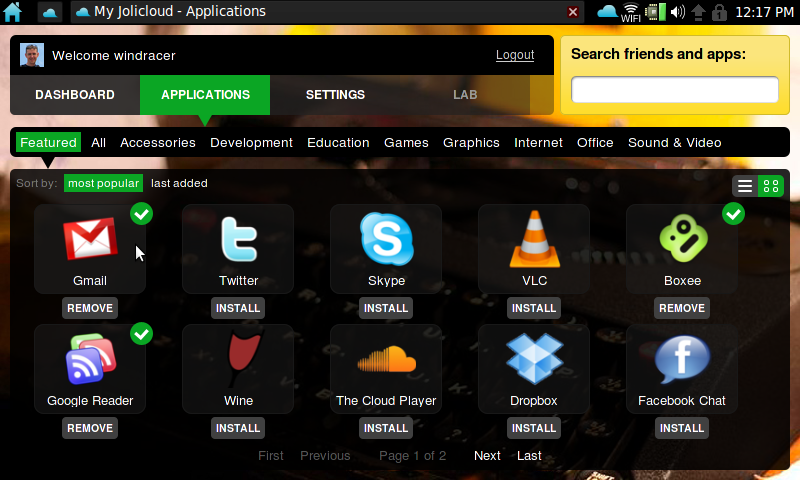
Fire up the Jolicloud application, however, and the “internet operating system” portion kicks in:

Jolicloud desktop

From here you can easily install other applications, most of which are “web apps” like Gmail, Google Reader, Twitter, Facebook, etc. What’s a little strange to me is that when you “install” one of these apps (like Gmail), you get an icon back on the netbook remix desktop to launch it (notice the xkcd icon on my first screenshot above). All it’s really doing is opening a web browser directly to that particular site, but Jolicloud (via Mozilla’s Prism) makes it look like an actual app instead of a web page. Thus, you won’t see the normal Firefox menu or toolbars, no browser favorites, etc. I’d rather just use Firefox directly with multiple tabs open, but I can see how this approach might make a netbook more user-friendly for the non-techie type (not to mention freeing up some valuable screen real estate on smaller netbooks).

I even managed to get Hulu running, which was impressive considering the problems I’ve had with Flash-based video on my Eee in the past. To be honest, though, I had never tried the Hulu site on my Eee before. At any rate, I watched the pilot episode of “Alf” on my tiny 7″ screen without any problems. Not exactly a 10-foot interface. 😉

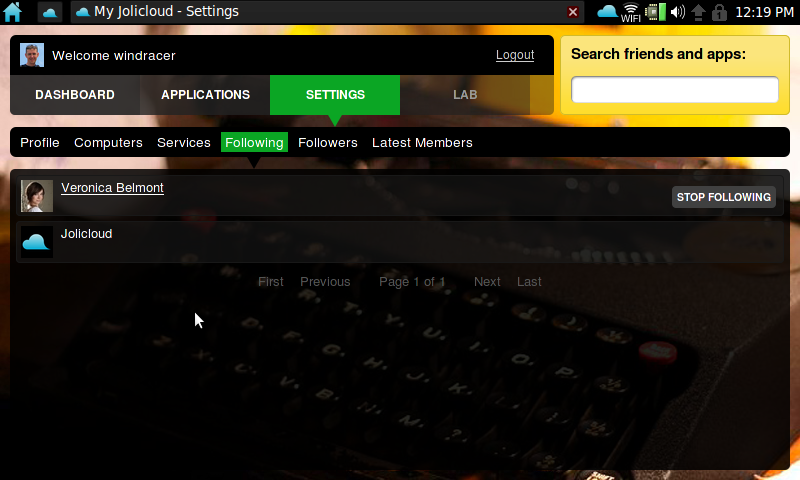
Jolicloud has a big focus on social networking, so you can “follow” other Jolicloud users and see updates on what they’ve installed or are doing with OS:

following other Jolicloud users

Personally, I’m not into the whole social networking culture (i.e., I don’t have a Facebook page and don’t use Twitter) so this part of Jolicloud’s interface doesn’t really appeal to me. I don’t want people “following” me or seeing what apps I’ve installed, but I can’t find any privacy settings that allow me to turn that stuff off, either.

Which brings me to documentation: Jolicloud is still in private alpha testing but there seems to be a lack of any documentation, and there’s no depth to the wiki (which seems to only be one page). For support you’re just directed to Twitter, Facebook, IRC, or their GetSatisfaction page. That being said, when I sent an e-mail to [email protected] about my trouble with the USB Creator, I did get an actual response relatively quickly.

So it still has a little ways to go, but Jolicloud is shaping up to be a great alternative cloud operating system for your netbook.

Indiana Jones Wii is fun, but annoying

Since we finished Lego Star Wars last month, my daughter and I have moved onto Lego Indiana Jones on the Wii. It’s a fun two-player cooperative game just like the Star Wars version, but just going through the first two sections (“Raiders of the Lost Ark” and “Temple of Doom”) we’ve run into quite a few annoying problems.

Twice we hit a spot where we were unable to continue and had to start the entire level over: The first was during the chase of the ark on the military trucks near the end of “Raiders.” You have to jump from truck to truck, fighting the soldiers until the driver of the truck hops out. Once you beat him, you jump in the truck (using the C button) and drive forward to the next set of trucks. Well, on the first set of trucks we defeated the driver but the prompt to press the C button would not appear, so we couldn’t get into the truck. It just kept driving on, without a driver. Since we couldn’t get in to accelerate up to the next set of trucks, we had to start all over (and that second time, the C button worked). The next time we got stuck was near the beginning of “Doom” when you’re working your way up to the palace from the devastated village. You need all three characters (Indy, Short Round, and Willie) to step on switches at the end to open the palace doors. The problem was, we accidentally moved Willie (who was riding an elephant) into a pit she could not get out of. She kept re-spawning and then immediately dying over and over again. So we had the start that level over as well. Apparently we’re not the only ones who have run into these glitches, and others.

Another annoying thing is that you can’t skip the long cutscenes. After you seen it once, you just want to get past it and start playing. Well, you can’t. The same goes for the Video Room in the college: once you start watching one of the cutscene videos, you’re stuck watching the whole thing. When you have to play a few levels over, this gets annoying very quickly. In a similar vein, the animations on the map as you switch from level to level take a long time, something else you can’t skip. Each movie has 6 levels. If you’re at the college and want to play level 5, you have to sit and wait for the little red travel line on the map to draw its path through levels 1 to 5 first.

Oh well, it’s still a fun game to play …