One way to fix Vista: buy a new PC

I’ve complained about my Vista woes here before since I upgraded from XP back in April. Well, apparently the solution to my Vista problems was just to buy a new PC.

Thanks to a 20% off coupon found through my slickdeals.net RSS feed, I purchased a “built-for-new” (i.e., not refurbished) Dell Inspiron 530 desktop from the Dell Outlet. For under $450 I got a system with an Intel Core2 Quad 2.4GHz processor, 3gb of RAM, 640gb hard drive, 16x DVD+-RW dual layer burner, 19-in-1 media card reader, built-in wireless, keyboard, mouse, Vista Home Premium, and MS Office 2007 Home/Student edition. Not a bad deal!

Once I had the new box running, I moved over my ATI Radeon 2600HD video card from my old PC so I could still have my dual-monitor setup. Then I spent a few hours over the weekend copying over gigabytes of files, documents, music, photos, videos, etc. from the old PC (via crossover cable) and also re-installing and configuring my applications and utilities.

Ok, so I have to admit that Vista runs a lot nicer on my new PC. I haven’t run into any of the problems that plagued me before (especially the annoying disconnect my iPod, lose the wireless network one) and the OS has been running pretty smoothly so far. Only time will tell for sure, but at least for now I’m happy again!

One small thing I didn’t plan for: the 530 has no PS/2-style keyboard or mouse ports. As a result, I was unable to connect my old Logitech Cordless Elite Duo wireless keyboard/mouse combo as the charging base/receiver used a PS/2 connector for the keyboard. I didn’t have a PS/2-to-USB converter handy so I ended up just using the Dell-supplied keyboard and mouse for now. The keyboard is actually a lot smaller than my old one (due to the lack of all the various multimedia buttons, none of which actually worked under Vista anyway) and a lot quieter, so I’ll probably end up sticking with it.

TiVo on your PC

TiVo and Nero today announced LiquidTV, a package that brings the TiVo experience to your Windows-based PC available on October 15.

There are plenty of great blog articles covering this new product, like Megazone’s over on Gizmo Lovers.

It looks pretty slick … it’s basically the TiVo interface on your PC, something (some) people have wanted for quite while. It looks like it will still require a subscription to the TiVo service (you get a year free when you purchase the software), so that’s one thing against it when competing against the other media center software out there. Hopefully the superior interface and features will separate it from the pack. Personally this is not something I’m interested in since I already have plenty of TiVo boxes but it’s good to see TiVo branching out.

Interesting analysis of Gates/Seinfeld commercial

By now you’ve probably seen the new Microsoft commercial featuring Bill Gates and Jerry Seinfeld which premiered during Thursday Night Football last week.

When I first saw it, I wasn’t impressed. “The future. Delicious.” Seriously? This is Microsoft’s counter to Apple’s hilarious “I’m a Mac. I’m a PC” ads? Churros, shoes, and moist, edible PCs? What? (Ok, I did laugh at Bill’s mugshot on his Shoe Circus Membership card).

That being said, Ryan Block (formerly of Engadget and now part of gdgt) had an interesting analysis and breakdown of the different elements of the commercial on this week’s episode of TWiT (#159). Some of it actually made sense to me, though it still sounds like a bit of a stretch. The gang starts the analysis at the 1:10:13 mark. Judge for yourself … I’ll wait for the next one.

I love my iPod. I #$%@ HATE iTunes!

I love my 30gb iPod Video … I really do. The interface is simple and elegant; the hardware is a marvel; its changed how I listen to music, and what I listen to: I don’t listen to radio at all anymore, I listen to podcasts (or when the podcasts run out, music!).

So why, why, WHY does Apple ruin such a perfect device with the millstone-around-the-neck that is iTunes? Where do I start?

  • iTunes is slow: my main desktop that I use for iTunes is a 3.0GHz P4 with 2gb of RAM running Vista Home Premium. Ok, yes, it’s a few years old and doesn’t have dual cores, but it’s not exactly slow. And yet iTunes runs like molasses: switching between views in the library is slow, typing into the search box is slow, right-clicking on my iPod under Devices to get to the context menu is slow. The entire thing is just sloooooow.
  • iTunes is bloated: why do I have a Apple TV tab in my iTunes preferences when I don’t have an Apple TV? Why does it install the Apple Mobile Device Support service and the Syncing tab under Preferences when I don’t have an iPhone?
  • iTunes is broken: this drives me nuts … I update the tags on my MP3s, add album art, etc. Then I’ll notice, while a track is playing on my iPod, that the cover art is gone. I check iTunes, and sure enough, the art has been removed. Sometimes it even seems to update the Album Artist tag for me. I’ve spent a lot of time tagging everything the way I want it … don’t mess with my tags! (And before you ask, yes, I have “automatically download missing album artwork” turned off).
  • iTunes is sneaky: remember a few months ago when Apple tried to slip in their Safari browser through their Windows updater? Well, if you’ve upgraded to iTunes 7.7 recently, you’ll find a new MobileMe icon in your control panel! Yep, they did it again. I’m not going to use MobileMe, don’t mess around and put icons for stuff I don’t want on my PC (for steps on how to remove it, see here).

There are a few things I like about iTunes: the podcatcher functionality, Smart Playlists, the ability to organize my music library hierarchy on my PC, etc. I only use it, though, because I have to. I stopped buying tracks from the iTunes Music Store once Amazon launched their DRM-free music store so I don’t need it for that. If you know of a good iTunes replacement that will work with my iPod, please let me know!

Vista SP1 “reliability” update

Microsoft has released “a reliability and performance update for Windows Vista SP1-based computers.” According to the KB article, the update specifically addresses a problem with e-mail clients and ZoneAlarm, so maybe it will fix my Vista woes (no mention of a VPN fix, though).

I’ve downloaded and applied the patch, but I’m in no rush to attempt running ZoneAlarm again just yet.

Vista search broken after SP1

I ran into another Vista SP1 problem this evening.

Whenever I used Start-Search, or the Win+F shortcut, I got the following error:

search: This file does not have a program associated with it for performing this action. Create an association in the Set Associations control panel.

Google to the rescue again! Apparently something in SP1 can cause registry permission errors on certain keys, which breaks Vista’s search feature. Wonderful.

Using the instructions in this post from the Winhelponline blog, though, I was able to fix the problem!

Vista SP1 + ZoneAlarm = no VPN

When I wrote about my Vista woes I mentioned how ZoneAlarm would keep causing Vista’s tcpip.sys driver to BSOD, which forced me to go back to the Windows Firewall. Well, a month had gone by so I figured that I would give ZoneAlarm on Vista SP1 another try. I installed the free version (7.1.254.000) and went a whole week without a single crash! I was happy in thinking the problem had been resolved.

Then on Wednesday I needed to VPN into work to fix a problem … and couldn’t connect. At first I thought that I had just forgotten to configure ZoneAlarm’s trusted zones properly, but the settings all checked out. There was nothing in the firewall logs about any connections being blocked either.

A few Google searches later, I learned that apparently SP1 and some third-party firewalls (like ZA) have broken the VPN client in Vista. There are a lot of posts on Checkpoint’s forums and even MS TechNet about the issue, but there’s no resolution yet.

Well, no resolution except uninstalling ZoneAlarm. 🙁

So that was it … I’ve removed ZA and my VPN connection is working again. It’s back to the Windows Firewall for me until I can find a suitable replacement.

Vista woes

This one’s going to be long, so grab something to drink …

About two months ago, the CompUSA near my office was a few days from closing its doors for good so some colleagues and I headed over to scope out any remaining deals. The pickings were slim at that point, but I walked out with an upgrade copy of Microsoft Windows Vista Home Premium Edition for $80 (50% off). What the heck, I thought, we were going to start using Vista at work at some point, so why not get a head start on learning the ins and outs of the new OS? I also picked up a new ATI HD2600 Pro 256mb video card an extra gig of RAM for my PC to make sure everything would run smoothly on my older Gateway 831GM desktop PC.

To keep everything on the level, I did a clean install of Vista and then spent a few days re-installing, re-configuring, and re-copying (from the resulting Windows.Old directory) everything back to my liking. I ran into the normal issues everyone knew about in Vista (like extremely slow network copy times) but knew SP1 was just around the corner which would hopefully fix these annoyances. Unable to wait, I used the registry hack trick to grab the RC of SP1 early.

SP1 fixed a few problems, then gave me a few new ones:

  • ZoneAlarm would randomly crash Vista’s tcpip.sys. I had to use the crash dump analysis tools to figure this one out because instead of blue-screening like XP, Vista would just reboot. I had to uninstall ZA and go back to the built-in Windows Firewall.
  • After awaking from Sleep mode, both of my optical drives (DVD burner and DVD-ROM) would be missing. Doing some searches on the net, this seems to be a very common problem, but none of the registry hacks (like removing the Upper/LowerFilter keys) would fix it. The only remedy was to disable Sleep (one of Vista’s cooler features IMHO) and go back to the normal shutdown/boot routine.
  • Every time I disconnect my iPod (connected via USB), I lose my wireless network connection. It doesn’t matter if I just unplug it, or eject it through iTunes first. I have to unplug and re-plug my USB wireless network adapter to get back on the network. The same thing happens sometimes when I unplug a USB flash drive or SD card, or CF card from the multi-card reader. Granted this could be some sort of USB controller issue in my PC, but this didn’t happen with XP!

Now recently Vista has started just freezing, and freezing solid. In XP when this would happen you could kill the explorer.exe process and start it again. But in Vista, it seems like once I get that dreaded “not responding” dialog, nothing I can do will unfreeze the system. Yesterday, I had Vista lock up four times in a row after clean reboots. It’s a disaster!

The latest problem happened tonight (which prompted this post). I was trying to dismount a TrueCrypt volume located on my 2gb Corsair Padlock USB drive and the truecrypt.exe process stopped responding. In true Vista fashion, the “end this program” option did nothing so I couldn’t get TrueCrypt to close. Then Explorer stopped responding and everything froze up again. I had no choice but to hold down the power button and hard shutdown the system like I’ve been having to do more and more recently. When the system boots again, and I log in, I can tell immediately something is wrong: there’s a “null error” dialog from Trillian on my desktop, and the JungleDisk Monitor configuration GUI opened without any settings in it. Something went wrong and I lost a large swath of configuration settings such as:

  • no homepage set and all bookmarks missing in Firefox (thank god for XMarks!)
  • profile gone from Thunderbird (had to restore the prefs.js file from my JungleDisk backup on Amazon AWS)
  • all JungleDisk settings lost (luckily my automated backup settings were preserved)
  • Trillian corruption (a .dtd file in the stixie directory was 0 bytes, but I managed to find a good backup copy)
  • a corrupted UltraMon shortcut on the Start Menu
  • DVD-ROM drive disappeared (even from the BIOS … this was probably a side-effect of the hard shutdown. I had to manually eject the tray to get the disc out and also switched power connectors internally to get it working again)

And that’s just what I found (and fixed) before I decided enough was enough for today. Who knows what other settings might be messed up? Ok, yes, something like this is a risk when you don’t shut down a (Windows) machine cleanly, but again, I don’t remember having problems like this with XP (at least, not recently).

I’m seriously tempted to go back to XP, but I know Vista (or at least Windows 7) is the future and I’m going to have to use it eventually. Hopefully these experiences will just make me a better troubleshooter in the future (can you tell I’m trying to put a positive spin on this?).
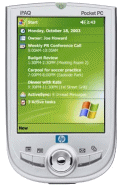
hp iPAQ h1945

hp iPAQI’m a long-time PDA user. I got my first Pilot 1000 back in 1996, then eventually upgraded to the Palm III. Over the summer of 2001 I left the Palm world for the Pocket PC, or Windows Mobile as it’s referred to now. My first iPAQ was the 3135 (black-and-white version) and then I inherited an older color 3760 model from a colleague.

Currently I have the hp iPAQ h1945, which is smaller and cooler than any PDA I’ve had before. The high-resolution, 64,000 color screen is still the best in the industry, it runs Windows Mobile 2003, and has built-in Bluetooth connectivity. The newer iPAQs forgo the old expansion sleeves (to add on Compact Flash support) for an integrated Smart Media slot (which I’ve never used, actually). This means I don’t really have a need for my IBM MicroDrive anymore, but oh well … it’s not the first time I’ve bought something for the “cool” factor and then never used it. 🙂