Alas, poor Firewire, we hardly knew ye

It seems like just yesterday (ok, last decade!) when I got my first digital video camera and then purchased a Firewire card for my PC so I could download and edit my home movies. Since then I’ve owned a multitude of laptops and PCs with IEE 1394 built in. It was aimed primarily for high-speed data transfer situations, like digital video and hard drives … and it was king for a little bit, until USB 2.0 came out.

It’s sad, though not surprising, that Firewire’s creator, Apple, seems to have given up on the technology, admitting that USB 2.0 won the “war” for the low-end, high-speed connectivity standard. The latest round of MacBooks don’t have Firewire ports (although the higher-end MacBook Pro still includes an FW800 jack). When announced, this lack of Firewire caused quite a tizzy in the Mac community. Steve Jobs’ response: deal with it: he simply pointed out that most HD camcorders shipping today include a USB 2.0 port.

When I was shopping for a new PC last month, I was originally looking for a machine with Firewire since my current PC had it, used in conjunction with my Panasonic PV-GS250. Then the MacBook announcement and the subsequent flurry of coverage about Firewire missing happened. That prompted me to double-check my camcorder and sure enough, it had USB 2.0 connectivity (and I bought it 3 years ago this month). So I dropped the Firewire requirement from my new PC and now I’m Firewire free (not to mention PS/2, serial, and parallel port free too). Ah, legacy connections …

Experimenting with virtual machines

I’ve been playing around with Microsoft’s free Virtual PC 2007 product at work lately in an attempt to keep an old Visual FoxPro 3.0 application running on newer hardware. This particular application refuses to run on any machine with more than 256mb of physical RAM. That’s right, 256 megabytes. Needless to say this is not really feasible in today’s computing environment, but legacy apps need to be supported. Placing the app into a virtual machine seemed to be a good solution: the VM runs on the user’s current modern hardware, but can simulate the 256mb of RAM required by FoxPro.

Setting up a Virtual PC is incredibly easy. The wizard walks you through the initial setup (location of the virtual hard drive file, memory allocation, etc.) and then it “boots” and you install the OS like you would on a fresh PC. For my FoxPro app, I installed Windows XP SP3 from our slipstreamed CD. All of the hardware (CPU, network adapters, USB devices, etc.) from the local machine running Virtual PC are available to the VM. Once the install was done, I configured the VM like any other PC on the corporate network: joined it to the domain, installed the basic corporate utilities, and then finally copied over FoxPro. It works great and is a lot faster than running it on the old Pentium II 350MHz machine the user was running the app on before.

For fun, I even created a VM running the latest Ubuntu 8.10 release:


This has got me thinking … what other cool things could I do with virtualization? Hmmm …

Impeccable Intrepid Ibex Installation

Tonight I did another in-place upgrade on my server, this time from Ubuntu 8.04 (Hardy Heron) to 8.10 (Intrepid Ibex). Like last time, I did the upgrade through PuTTY over an SSH connection and it was flawless. I just had to clean up a few configuration files and put back my installation of Gallery 2.3 (since Intrepid comes with a slightly older release). I love it when upgrades go smoothly.

Pointless side note: I upgraded to Hardy on 6/11 and upgraded to Intrepid on 11/6. πŸ™‚

Second pointless side note: an ibex is a species of wild mountain goat.

One way to fix Vista: buy a new PC

I’ve complained about my Vista woes here before since I upgraded from XP back in April. Well, apparently the solution to my Vista problems was just to buy a new PC.

Thanks to a 20% off coupon found through my slickdeals.net RSS feed, I purchased a “built-for-new” (i.e., not refurbished) Dell Inspiron 530 desktop from the Dell Outlet. For under $450 I got a system with an Intel Core2 Quad 2.4GHz processor, 3gb of RAM, 640gb hard drive, 16x DVD+-RW dual layer burner, 19-in-1 media card reader, built-in wireless, keyboard, mouse, Vista Home Premium, and MS Office 2007 Home/Student edition. Not a bad deal!

Once I had the new box running, I moved over my ATI Radeon 2600HD video card from my old PC so I could still have my dual-monitor setup. Then I spent a few hours over the weekend copying over gigabytes of files, documents, music, photos, videos, etc. from the old PC (via crossover cable) and also re-installing and configuring my applications and utilities.

Ok, so I have to admit that Vista runs a lot nicer on my new PC. I haven’t run into any of the problems that plagued me before (especially the annoying disconnect my iPod, lose the wireless network one) and the OS has been running pretty smoothly so far. Only time will tell for sure, but at least for now I’m happy again!

One small thing I didn’t plan for: the 530 has no PS/2-style keyboard or mouse ports. As a result, I was unable to connect my old Logitech Cordless Elite Duo wireless keyboard/mouse combo as the charging base/receiver used a PS/2 connector for the keyboard. I didn’t have a PS/2-to-USB converter handy so I ended up just using the Dell-supplied keyboard and mouse for now. The keyboard is actually a lot smaller than my old one (due to the lack of all the various multimedia buttons, none of which actually worked under Vista anyway) and a lot quieter, so I’ll probably end up sticking with it.

MLB Gameday … how do they do it?

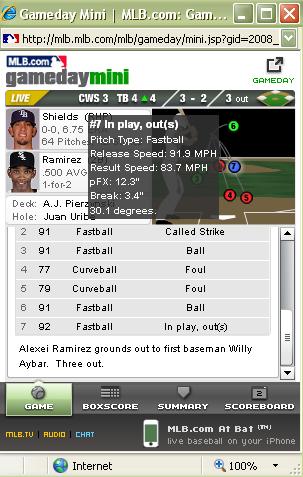
mlb-mini-770037A friend pointed me to MLB’s Gameday application this afternoon during Game 1 of the ALDS between the Rays and White Sox (the Rays are up 4-3 as I write this). This thing is amazing … how do they do it?

The mini version is shown to the left. It gives you the pitch-by-pitch details, shows the location, trajectory, and speed of each pitch, and then the play-by-play details … for free and in near real-time.

The full-blown 3D version lets you use your mouse to change the camera angle and zoom in/out while viewing the graphic pitch overlay. I didn’t try this but apparently after a play you can click on a hyperlink and see the actual video footage of the play.

That’s some seriously cool technology … I would love to know how it works. They have a blog and it appears that they just launched this 3D version back in June.

Shaping up

Ever since getting the Wii Fit back in May and having the balance board pronounce me “overweight” I’ve been more focused on my personal fitness: I’ve been watching what I eat, eating less, and exercising more.

When my eyes were opened by the Wii balance board, my BMI was 26 and I weighed 200lbs. Earlier this month, after working hard for the past 5 months, I finally got my BMI back into the “normal” range (below 25), am down to about 182lbs and am still working on losing more. If nothing else, Wii Fit has given me an easy, fun way to track my daily exercise and keep me motivated. I’ve lost count the number of times I’ve wanted to eat something and then thought “man, the Wii is going to yell at me if I do this.” πŸ˜‰

Yesterday I placed a pre-order for the $99 Fitbit that is coming out in the late-December/early-January timeframe. I had heard Leo Laporte and Jason Calacanis discussing this new company on a recent episode of TWiT and seemed to vaguely remember hearing/reading about it shortly after the company announced its product at the TechCrunch50 conference earlier in September. I have a thing for gadgets, and since the Wii Fit started me on this path of weight loss and general fitness (and has kept my interest so far) I figured this little gadget might help keep me going.

It’s basically a souped up pedometer that you can wear unobtrusively on your person. It tracks your steps and calculates how far you’ve walked and how many calories you’ve burned … nothing new there. Here’re the cool parts. You can also wear it at night and it will track your sleeping habits: when you fall asleep, how long you stay in deep sleep, how often you wake up, etc. It’s also wireless so you can sync the data it collects back to your PC (and from there to your account on the Fitbit website), and has a rechargeable battery which you charge via the included docking station.

Sounds cool, right? I can’t wait to try it out, but until it arrives early next year I’ll have to stick with my Wii Fit/Dance Dance Revolution exercise plan. πŸ™‚

Western Digital RMA snafu

So last night my RMA replacement for my failed WD Expander arrived. I opened the box and found … an internal 500gb SATA drive, just the bare drive.

So I called up Western Digital and spoke with a support rep. I explained that I had opened an RMA for my external MyDVR Expander and received an internal drive instead. The rep checked my ticket and told me that I had opened an RMA for an internal drive. I responded by saying I typed in the serial number on the back on my unit. He put me on hold for a few minutes. Then he had me read him the serial number again, which I did. He insisted again that it was an internal drive.

“Look,” I said. “I’m holding my external DVR Expander right now. It’s not an internal drive.” He then tried to tell me I purchased an internal drive and put it in an external case. No, I explained back (getting a little upset at this point) , I purchased this as a complete package … a MyDVR Expander for my TiVo. I finally got him to transfer me to a supervisor.

After some more time on hold I finally re-explained the situation to a supervisor. He was much nicer and understanding and acknowledged that it could be a mix-up in the RMA system, matching the serial number to the wrong product. He said they would e-mail me a return label to ship back the internal drive. Then he asked me to scan the label of my external drive and e-mail it to them so they could verify ownership. He said they would then open a new RMA and send me the proper replacement. So I did all of that … looks like I’ll be waiting a few more days to get this replaced. πŸ™

I think the serial number on the back of my expander is actually the serial number of the drive inside the case, which is probably the source of the mix-up. The internal drive they sent me was the same model I recall seeing show up on my TiVo’s System Information screen. If there was any discernible way of opening the external case, I probably could have swapped the drives, but that would definitely have voided my warranty. So I’ll just be patient and wait for the actual replacement.


My WD Expander has died

Last night I found my TiVo HD just showing a black screen and it was unresponsive to the remote. No big deal, I rebooted it and it came back up fine. Then I tried to play an HD recording and it spontaneously rebooted. This time it got stuck in a reboot loop. So I let it sit unplugged for a few minutes, tried again and it booted fine. I tried playing the recording again, bam, reboot.

It got stuck in a reboot loop again, so I tried leaving it uplugged for a while like before, but no luck, still the reboot loop. Sometimes it would get to the “almost there” screen, other times it would just keep repeating the “powering up” screen.

Then I remembered I had the Western Digital MyDVR Expander connected. So I checked all the eSATA cable connections and they were tight. I tried booting without the Expander connected and the TiVo got all the way to the “external storage not detected” screen so that pointed to the Expander as the issue.

I wasn’t ready to divorce the drive just yet, so I unplugged the THD and the Expander and let them sit off for a while … but was still unable to get the box to boot with the external drive attached.

When I power up the Expander, it makes a slight vibrating buzz (like a pager) then I can hear the drive spin up. Then I can hear a clicking noise (which doesn’t sound good) and then the drive sounds like it spins down. I also can’t get into any of the TiVo’s kickstart modes to run a drive check. I suspect the box is hanging when trying to read the Expander and thus not getting far enough in the boot process to look for kickstart codes from the remote.

I’m not sure this is the same problem described in this thread on the TiVo Community Forum … it could be an actual hardware failure. I don’t have an eSATA connector on my PC, so I can’t run any diagnostics on the drive without it being connected to the TiVo … unless I rip open the enclosure. I checked my drive’s serial number on WD’s warranty site and it’s still covered, so maybe I’ll just try the RMA route.

Luckily I don’t think there’s any real backlog of shows I wanted to watch on the box, so if I end up returning the drive it’s no big loss (it’s just TV after all, right?). Hopefully I’ll get the replacement drive before the new fall season really starts up.

Down(pour) and out in the Magic Kingdom

We’re in Orlando this weekend for our annual Labor Day mini-vacation at Walt Disney World.

The day started out great: blue sky, white clouds, nice temperature. We got up early and headed over the Disney’s Hollywood Studios (formerly MGM Studios) since it opened an hour earlier for resort guests. Once inside, we made a bee-line for the new Toy Story Mania attraction. It was only a 30-minute standby wait, so that was the first thing we did … and it was great! You sit in a four-person car (two on each side) and use a toy gun to shoot at targets in the Midway-themed ride. You rack up points as you go, and your score is tallied on a separate screen. I got the third-highest score of the day (177,000+ points) but since we were there first thing in the morning I’m sure that didn’t last long.
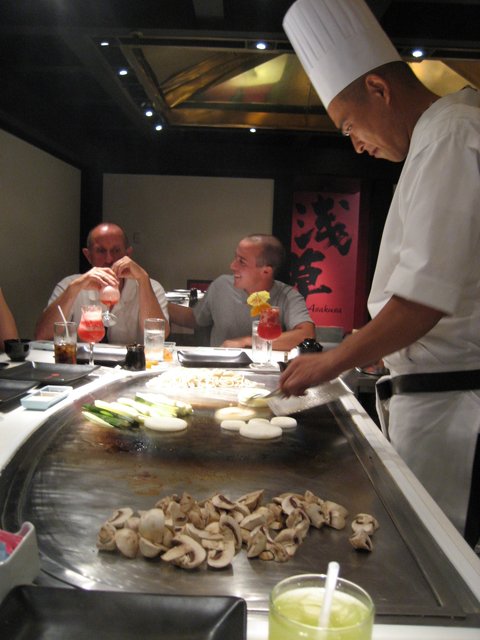
img_2352-sm-707691Eventually we took the ferry from Hollywood Studios over to Epcot, where we had lunch reservations at Tappan Edo in Japan. Mmmm … fantastic! Our chef, Akira (not the Akira), put on a good show and cooked some fantastic food.

Unfortunately, while we were inside at lunch, the rain moved in. Unbenownst to us, this was caused by the outer bands of Hurricane Gustav moving through Florida. Actually, by the time we left the restaurant, the rain had stopped and the day had turned overcast. We figured that would be the end of it. But no, the rain continued on and off during the rest of the day, meaning we spent most of it in our rain ponchos.

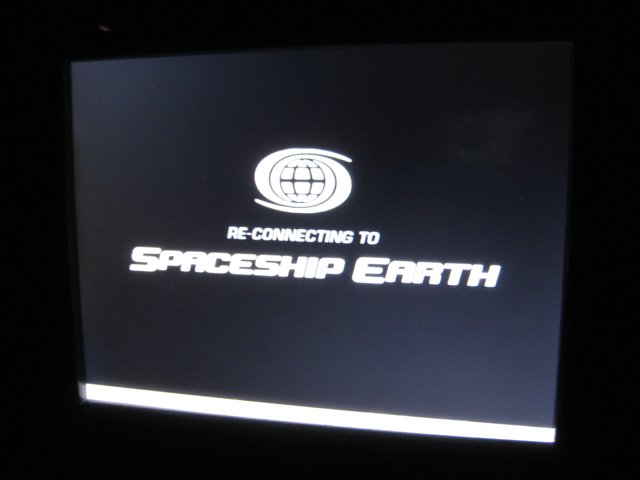
Disney is well known for the use of cutting-edge technology in their rides and attractions, and rarely do you see public breakdowns. Well, we ran into one on the newly revamped Spaceship Earth ride. The latest remodel has included touchscreens in each car. During the beginning of the ride, you can select your language, where you’re visiting from, etc. Your photo is also taken. Well, unfortunately the system in our car crashed shortly after we boarded, so I got to watch the system reboot … literally. The BIOS screen was first (with a customized Spaceship Earth logo), then strangely, the GRUB boot loader was used to boot Windows XP (Start menu and system tray on the bottom of the screen):
img_2360-smjpg-730345

I watched as the little wireless icon re-connected to the Spaceship Earth network and eventually the system started working again. Unfortunately, by then we were past the photo part of the ride. At the end, the system asks you questions about what you’d like to do in the future and then builds some sort of customized animation using your headshots in it. Since our system was rebooting and never took the photos, we didn’t get to experience our “customized future.” Oh well.

We finished the day at Magic Kingdom, riding Splash Mountain (we were already wet anyway) and Space Mountain, and visiting the Monsters, Inc. Laugh Floor (also highly recommended!).

Around 7:45 in the evening we decided to head back over to Hollywood Studios to see Fantasmic. After taking the monorail over to the Transportation Station, and then waiting for the bus, we were informed that the park had closed at 8pm (it was now 8:15pm) since the show was at 8:30 (we thought it was at 9). So we ended up just catching another bus from Hollywood Studios back to the hotel and calling it a night.

By the way, the title of this post is a play on a short story by Cory Doctorow.