Notes on the Natty Narwhal

April is almost over, which means it’s time for another Ubuntu release! Today Canonical released Ubuntu 11.04 Natty Narwhal. As I am wont to do (with Maverick, Lucid, Karmic, Intrepid, etc.) I upgraded my server right away. The entire process took about 7 hours start to finish, but most of that was waiting for the 722mb to download (the download servers were understandably overloaded).

Like my previous server upgrades, the process itself was easy and straightforward. After the ‘do-release-upgrade‘ was complete, I re-applied my customizations to various configuration files, rebooted, and I was back in business on the new version. Also like my previous upgrades, I ran into a few snags:

  • NUT 2.6.0 wouldn’t connect to my CyberPower UPS anymore: I found others reporting this issue and was able to compile 2.6.0 from source with a patch to get it working again.
  • something “broke” in postfix with the upgrade from 2.7.1 to 2.8.2: the system couldn’t send e-mail until I added the port number (:25) to the end of the relayhost parameter. I couldn’t get it to work either running in the chroot jail or not, so it wouldn’t seem to be a permissions thing but I haven’t figured out the root cause yet.
  • calibre wouldn’t run: python would throw a “magic number” error. I found a similar report in Launchpad but was able to fix this by simply removing calibre and then installing it again.
  • I had to ‘apt-get install’ lsscsi to remove a minor error in phpSysInfo

So now I’m set until October, when Oneiric Ocelot will be released!
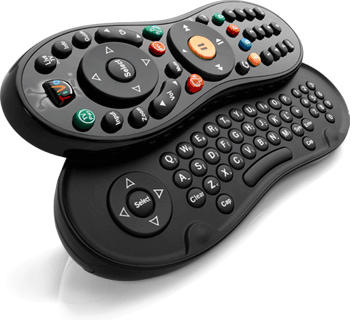
TiVo Slide remote

I guess I didn’t write about the TiVo Slide remote when I first got it last October but after going without it for a few days recently I realized how much I like it.

The Slide is a combination infrared and Bluetooth remote that works with the TiVo Premiere, TiVo HD, and TiVo Series 3 (OLED) boxes. The remote is the same familiar peanut shape as TiVo’s previous remotes, but smaller and heavier. Its shorter length allows for easier operation without having to shift the remote up and down in your hand to switch between the navigation D-pad and number buttons (my daughter thinks it’s a “cute” baby TiVo remote). The back of the remote is textured so you can figure out which way is “up” by feel. It comes with a small Bluetooth USB dongle that you plug into the back of your TiVo and then pair it with the remote.

The primary feature of the Slide is the slide-out QWERTY keyboard, as shown in the photo. The keyboard makes it a snap to enter long strings of text when searching for shows, creating WishLists, etc. The fact that the remote uses Bluetooth also means it’s more responsive (read: faster!) than the IR remotes. This is great for me because I was able to stop using my slow (but functional) IR extender since my TiVo is in an enclosed media cabinet (no line of sight for infrared signals). The Slide is a learning remote, like the Glo remotes, so you can program it to control other components like your TV, receiver, etc. It obviously uses IR for that, not Bluetooth. The little LED on the top of the remote above the TiVo button flashes orange when sending IR and blue when sending Bluetooth.

If you don’t want to get a whole new remote but still would like easier text entry on your TiVo, try a wireless USB keyboard! There are quite a few shortcuts available for navigating the TiVo interface with a keyboard. Or, of course, there’s TiVo’s own iPad app (which currently works with the Premiere only).

So, why was I without my Slide for a few days? Let’s just say it took a few too many accidental drops on the tile floor and had to be replaced. 🙁

WIJFR: FreedomTM

The computer program Daemon has taken over the Internet, and millions have joined its virtual world. Now the effect is spilling into the real world as Daemon assumes control of financial institutions, and the program’s real-life converts flock to small towns to re-create a sustainable lifestyle amid the agribusiness monoculture of the Midwest.

During my trip to Arizona last week for Spring Training ’11 I finished “FreedomTM,” Daniel Suarez’s sequel to “Daemon.”

Read more

You light up my life (and you’re toxic)

I came across this article on Computerworld about how all of those different little lights we have on our gadgets and home electronics can be harmful to our health. Mike Elgan writes:

I wrote a column in this space four years ago about how incredibly annoying all these gadget status lights are and demanded that device makers get rid of them.

I didn’t expect manufacturers to respond. And in fact, the problem is getting worse. The number of gadgets we use keeps growing, and each device seems to have more and brighter lights.

Since I wrote that column, new research has emerged that reveals how incredibly bad all of those lights can be for our health.

It’s a good read. This is exactly why, like Mike suggests at the end of his article, I have little squares of black electrical tape over all of the LEDs on the electronics in our bedroom and elsewhere around the house. It’s bad enough the alarm clock can light up the room (I really need to get one with a dimmer setting), do I really need a light on the TV to let me know it’s off?

I really like how my Netgear MoCA adapters have a button you can push to turn off all of the bright blue lights. My TiVos let me turn off the front indicator lights as well (although the network jacks on the back still have blinking traffic/connection lights I have to cover). Every piece of electronics should have an option to turn those status indicators off, or not bother with them at all.

Palm is dead, long live … hp?

Yesterday, hp announced a slew of new devices running WebOS (which they acquired last year). One thing was missing from their press event though … Palm. hp’s new devices are branded the hp TouchPad, the hp Pre 3, and the hp Veer

Yes, sadly, the Palm brand is now dead, almost two years after the death of PalmOS.

It’s been over a year since I put down my last Palm device and switched to the iPhone, so at this point I’m pretty much over PalmOS, but I’ll still remember it fondly.

Palm is dead …long live Palm!

MacBook Air(port) cleared by TSA

The original MacBook Air confused the TSA when it was introduced two years ago.

Now, CNN is reporting that the TSA has cleared the new MacBook Air so you don’t have to take it out of your bag for screening:

Apple may wish to avoid comparisons of the MacBook Air to similarly compact but underpowered netbooks. However, like netbooks, Apple’s new laptop is “smaller than a standard-size laptop,” meaning it can stay in a bag, said TSA spokesman Nicholas Kimball.

When I still had my Eee PCs I always had to remove them from my bag when going through security and they were a lot smaller than the new Macbook Air. Granted, they were thicker and that probably affected the x-ray photos, but it’ll be interesting to see how this plays out at the airport checkpoints.

Apple iPad

About a month ago I got a 16gb (WiFi only) Apple iPad from work so I’ve had about 30 days to mess around with Apple’s “magical” tablet. If I had to sum the iPad up in one word?

Slick.

I’m not going to bother with the specs, or a general overview of the iPad here. It’s been out for about 8 months and you can certainly read/find all the technical details you want fairly easily (just typing ‘ipad’ into Google yields “about 123,000,000 results”). Instead, I’ll talk about how I’ve been using it, the apps I’ve installed, and my overall impressions.

Read more

Help save Xmarks!

Earlier this week Xmarks, the cross-browser synchronization service, announced it would be shutting down in 90 days.

I’ve been using Xmarks for years, ever since it was known as Foxmarks, to keep my bookmarks in sync across multiple PCs and browsers (IE, Firefox, and more recently Chrome). It was usually one of the first add-ons I would install, so I was disappointed to hear that they would be shutting the service down in January. Apparently the “give it away free and figure out how to make money later” approach just wasn’t working (according to a recent blog post it costs $2M a year to run!).

Well now, due to the outpouring of sentiment like my own after the announcement, Xmarks is reconsidering turning into a pay service.

… we’re revisiting the idea of Xmarks as a premium service. We’ve set up a Pledgebank page where you can sign up if you’re willing to pay at least $10 a year for Xmarks. No credit card is required, but please only pledge if you are genuinely willing and able to pay:

www.pledgebank.com/XmarksPremium

This is not a scientific experiment to predict what % of our base will pay, but it’s a data point that will definitely help.

Would you be willing to pay $10-$20 a year (~$1.50/month) for the convenience of having your bookmarks synchronized everywhere? I would! Please try to save Xmarks by making a pledge with the link above. They’ve set a deadline of October 15 to get 100,000 pledges and as I write this they still need 95,820.

Are there free Xmarks alternatives? Sorta. There are browser-specific tools like Firefox Sync for Firefox, but nothing that does the cross-browser synchronization I’ve come to rely on with Xmarks. I’ve considered trying to use LastPass, which I use to securely store my website logins (check out episode #256 of Security Now for more details), but it’s meant for logins and not normal browser favorites. Have any other ideas for how I can replace Xmarks if it does go away? Leave ’em in the comments!

WIJFR: Makers

Covering the transformation of Kodacell (formerly Kodak and Duracell) into a network of tiny teams, journalist Suzanne Church goes to Florida and the inventors behind it all, Lester and Perry, who have more ideas than they know what to do with. The New Work takes off, with a mini-startup in every abandoned strip mall in America. But suddenly, it crashes, and things get really interesting. Lester and Perry build an interactive ride in an abandoned Wal-Mart, a nostalgia trip through their glory days, that catches the eye of a vicious Disney exec—and the old corporate giants fight their last battle against the new economic order.

Earlier this week I finished reading Cory Doctorow’s “Makers” (the e-pub version through Stanza on my iPhone). This is the sixth Doctorow novel I’ve read and the second one that has a lot of Disney stuff in it (the other being “Down and Out in the Magic Kingdom“). Since I live near Disney World and tend to go there a lot (we’ve had resident annual passes for the past few years), it’s fun to read Cory’s books that involve a place he obviously has a thing for as well.

Read more