A week without remote access … (the blog is back!)

In case you hadn’t noticed (and if not, why not? 😉 ), windracer.net was down for the past week. This was because my cable modem decided to lock up just hours after I left town for Christmas in north Florida with family. I called Spectrum (formerly Brighthouse Networks) from my in-laws’ house hoping they could reset the modem remotely, but the tech informed me the modem was fine, it must be my router. Grrr.

So this past week away from home was a real eye-opener to me on how reliant I am on internet access for the house. I couldn’t check on my cameras, my home automation schedules didn’t run (so no randomized indoor lights, no Christmas lights or landscape lighting, etc.), I wasn’t getting e-mails from my servers, couldn’t remote in to anything, my domains were down … the list goes on! So over the Christmas break I did some research on out-of-band access options that would allow me to get into the home network in case something like this happens again. I originally was looking at cellular devices like this, but they all seem to be GSM (2G) and most carriers are shutting down those older networks. So I decided to go with a “smart” power strip, the Web Power Switch 7, which can power cycle devices plugged into it based on network connectivity criteria. For example, if it can’t ping the internet, it can power cycle my cable modem (which would have fixed the problem I had this past week). I will, of course, write up a review once I receive it and have a chance to configure and set it up.

When I finally got home today, I checked my router and it was fine! But it was reporting a problem on eth0 (which is the cable modem). I rebooted the cable modem, and everything came back online! So it was the modem after all, despite what Spectrum had told me. Hopefully the Web Power 7 helps me to avoid these long-term internet outages in the future!
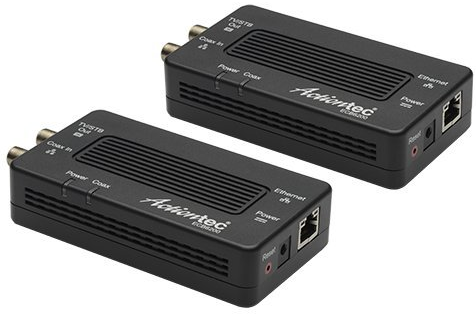
ActionTec ECB6200 MoCA adapters

ActionTec ECB6200

I was doing a bit of a network re-org and realized that the old MoCA adapter that connects my home office to the network was only a 100mbps ethernet connection. Since everything else on my network is now gigabit (except for the occasional exception like my PiDP-8), I decided to upgrade to ActionTec’s ECB6200 MoCA adapters.

These units support the MoCA 2.0 specification which allows for theoretical throughput of 800mpbs via two 400mpbs bonded channels (while still being backward compatible with MoCA 1.1 devices) and gigabit ethernet. I figured swapping out the two ECB2200s (one in my office, the other in the computer closet before the cable modem) with the ECB6200s would be plug-and-play easy.

Read more

Yelling at the Yakkety Yak (but it won’t talk back)

Ubuntu 16.10 (Yakkety Yak) was released almost two months ago, but I only just realized I hadn’t upgraded yet (this happened to me during the last .10 release as well). This upgrade was a little smoother than last time, but not without its hiccups.

The upgrade process uses screen to keep everything running separately in a separate shell in case you’re disconnected (I run a headless server, remember). The download of all the upgrade packages went just fine, but at the first configuration file difference (where you’re prompted to keep the maintainer’s version or your customized one), after I viewed the details of the change screen terminated and I wasn’t able to reconnect to the session! I tried sudo screen -list followed by sudo screen -d -r root/30719.ubuntu-release-upgrade-screen-window but that just reconnected me to the terminated screen session and dpkg wouldn’t resume because another process was already running. I had to manually kill all the upgrade processes and the use sudo dpkg --configure -a to resume the reconfiguration step. The rest of the upgrade went fine, luckily.

Post-upgrade, I re-applied my changes to the affected configuration files. Additionally, I had to update the Blowfish secret for phpMyAdmin to fix an error there. I also had an issue with wpa_supplicant (my server has wired and wireless NICs) that I had to fix to be able to re-connect to the WiFi network (hence the reference to “it won’t talk back” in my post title 😉 ).

Next year we’ll get 17.04 Zesty Zapus. Will Ubuntu then wrap around back to “A” names?