 A couple of weeks ago, I discovered that my trusty Garmin StreetPilot c340 wouldn’t run on battery power anymore. As soon as it was disconnected from the power cable in the car (or from the USB cable when connected to my PC) it would just turn off. When plugged in, the screen would show it was “charging,” but after trying multiple hard resets and even opening a ticket with Garmin it became apparent the internal Li-on battery was dead. The Garmin rep told me it would cost a flat $89 to fix it! I did a little research and determined that it would be cheaper to attempt to replace the battery myself, as long as I didn’t mind purchasing a replacement battery, cracking open the case, and doing a little soldering. Other than the lack of battery power and some minor map problems the unit was working perfectly fine so I wavered back and forth (repair or replace?) for a bit. Eventually I decided to just sell the StreetPilot on eBay and put the proceeds towards a newer unit.
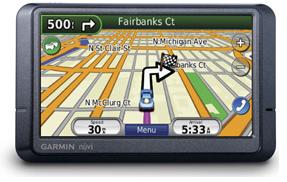
My new GPS is the Garmin nüvi 265WT which has a 4.3″ widescreen touch display, voice directions (with text-to-speech), Bluetooth, a built-in FM Traffic receiver, and a few other cool features.
Navigation and General Usage
The thing I liked the best about my StreetPilot was the user interface. It was simple, clean, and good looking. The nüvi sports that same simplicity and shiny UI that makes it easy and fun to use:

The large buttons make it easy to navigate using your finger and the touchscreen, and the widescreen format allows the nüvi to show more information on the screen without it getting in the way of actually seeing the map as your driving. One new feature I like is the indicator of the current road’s speed limit (although as you can see above I was going slightly over that on my way home from work this evening ;-)). Another benefit of the widescreen model is a QWERTY keyboard layout instead of the alphabetical one used on the StreetPilot, which makes text entry a lot faster.
The standard text-to-speech voices are present so the unit will read out street names when giving directions. You can also download other voices (and car icons) from the Garmin Garage. There’s not as wide a variety of voices available as there are for my sister’s TomTom unit though (even NavTones only has a total of 3 voices compatible with Garmin units).
In addition to the normal method of entering destinations (by address, by name, by coordinates, etc.) you can upload geotagged photos to the nüvi and have it calculate the directions to that location. I don’t see myself using this feature very often unless I’m just looking for some random place to go. I may, however, introduce my daughter to geocaching, as using the Garmin Communicator plugin for my browser in conjunction with the Geocaching.com website makes it really easy to send cache locations to the GPS (and there are apparently quite a few caches near my house).
Bluetooth
The built-in Bluetooth radio lets you use your mobile phone with the nüvi for hands-free calling. I had no issues pairing my Treo with the GPS and then using the touchscreen to place a call.

You can answer incoming calls too, of course, and even “transfer” the call to your phone if you don’t want to use the speakerphone. Voice quality was pretty good on both ends. The nüvi even downloads your call log and address book from your phone allowing you to browse and dial from the device instead of looking at your phone (although the address book part didn’t work for me since I don’t use the Treo’s native contacts application). If your phone supports voice dialing, you can do that through the nüvi as well. Another neat feature of pairing your phone is that every phone number on the display turns into a hyperlink you can use to place a call. So if you’re stuck in traffic on your way to your dinner reservation, you can simply tap your destination’s phone number on the screen to call and inform them you’re going to be slightly late.
Traffic
Of course, you should have been able to avoid that traffic in the first place! 🙂 My StreetPilot supported traffic information, but you had to purchase a separate receiver and pay for a subscription. The nüvi comes with an integrated FM Traffic Message Channel receiver and a free lifetime subscription to the service (but there’s a catch, see the next section below!). My minor nitpick here is that the receiver is not “integrated” into the GPS unit itself but is part of the power cord. Thus, you can’t get traffic information unless your unit is plugged in with the car lighter adapter. I guess this makes some sense (you don’t need traffic information if you’re hiking or riding a bike), but I was disappointed that I have to have that bulky cable plugged in as I usually just have the GPS mounted to the windshield without the cord.
That aside, the service is a neat add-on. The traffic indicator on the map screen (see the upper left-hand corner of my first screenshot) will change color (green, yellow, red) to indicate the level of traffic ahead. If the nüvi detects heavy traffic along your way, it may automatically adjust your route around it. You can also get an overview of all of the traffic in your area:

And then see where it is in relation to your current location:

Advertising!
The nüvi 265WT comes with a free lifetime subscription to the FM traffic service, but “free” in this case means “ad-supported.” That’s right, spam on your GPS! 🙁

Tapping on the “offer” will show you a list of nearby locations associated with the coupon. Tap on the location and you’ll be routed there. It wouldn’t be so bad if these only appeared on the traffic screen shown above, but these little pop-ups will also appear on the main map screen while your navigating! Ugh! The only way to disable them is to disable the traffic receiver, so if you want traffic information you’re going to have to deal with the ads. So far I’ve only seen these two Best Western ones, so it’s possible I might change how I feel about this depending on what kind of ads I see. It’s not like these are targeted to my preferences, though, so I’m guessing they’re going to be more annoying than useful.
Other Misc. Features
ecoRoute is Garmin’s new addition to their software aimed at increasing awareness of how driving habits affect things like your gas mileage. You can set up your vehicle profile (city/highway estimated mileage, gas type, and local cost-per-gallon) and then get detailed usage reports, like this:

This trip information is also stored in a CSV file you can download from the device and then load into your favorite spreadsheet to do some more analysis if you want. ecoRoute also adds a “Less Fuel” option to the traditional “Fastest Time” or “Shortest Distance” routing options. There’s even an ecoChallenge game that tracks your driving during a trip (how fast you accelerate, brake, keep a constant speed, etc.) and then rates and scores you at the end with the hope that you’ll try to beat your top score by changing the way you drive. That part reminds me of my wife’s Toyota Camry hybrid which has similar driver feedback mechanism to encourage eco-friendly driving habits.
I also like the nüvi’s built in screenshot feature (which I used to capture all of the images in this post), and the ability to easily change the boot screen. No more using xImage!
Finally, when connected to your PC via USB, the nüvi shows up as a 1.8gb flash drive making it extremely easy to transfer files to and from the device. 1.2gb of that is taken up by the system software and maps, but that leaves roughly 518mb on-board for custom vehicle icons, voices, POI files, photos, etc. The nüvi has an SD slot as well, but with all of that free space I probably won’t need to use it as much as I did with my StreetPilot.
We’re going on a quick weekend trip up to Atlanta this weekend (to see Good Eats Live!) so I’m sure I’ll have some more comments after I put the nüvi through its paces on a real road trip. So far, though, I’m really impressed with it.