Archos Jukebox Studio 20

Jukebox 20I found out quick that using the Microdrive along with my iPAQ to play MP3s on the road wasn’t a perfect solution. The Microdrive would only hold about 50 songs, suck the iPAQ’s batteries dry, and using Windows Media Player is not exactly my idea of fun. At the same time, I was looking at portable hard drives so I could actually carry around large files and applications, more than I could fit on CompactFlash.

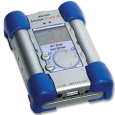
Enter the Archos Jukebox Studio 20. This little gizmo has a 20gb hard drive in it and doubles as a USB hard drive and a portable MP3 player. It’s a little on the heavy side, and the user interface needs work, but it’s usable and the battery life is pretty good (rechargeable, too). It even has a line out so I can connect it to my home stero and have hours of music. I’ve got a little over 1,000 tracks on it now and still have gigs left over. There’s even an open-source project to write new firmware for it, called RockBox. Had the Windows-compatible iPod been available when I bought the Jukebox, I might have gone for that, but I am very happy with the device.
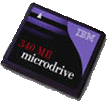
IBM Microdrive

IBM MicrodriveSince I have several gadets that use the CompactFlash standard for expansion media, I purchased a 340mb IBM Microdrive during a recent promotional offer ($50 rebate, so the hard drive, plus a USB CF reader, was only $100). This tiny, quarter-sized hard drive is amazing. Used with my Pocket PC, I can store a few hours of MP3s to take on the road. With the USB CF reader, I use it to shuttle large files back and forth between my work and home machines. Very convenient. I worry a little about damaging it, since, unlike regular CF cards it does have moving parts, but other than that, the technology is amazing.

Belkin USB hub

My USB hub was a Christmas present. With the digital camera, wireless network device, web cam, and iPAQ all vying for the two USB ports on my PC, I was getting a little sick of constantly switching cables around. This powered four-port hub from Belkin solved that problem and brought the ports up onto my desk for easier reaching at the same time.

RoadRunner broadband

When I moved from Ohio to Florida, my new house was not in range for DSL service and I had to switch to cable: RoadRunner. Installation was not nearly as smooth as DSL since the cable tech had to run a new, dedicated, cable line into my home office, but after that, everything was fine. It seems to be faster than the DSL I had in Ohio, and according to SpeedGuide.net and DSLReports.com, I am getting better throughput. Having sampled both DSL and cable, now, I’m hard-pressed to choose one over the other. They both seem to be excellent ways to get high-speed access to the internet.

Logitech QuickCam Pro

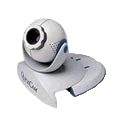
Logitech QuickCamOnce I got broadband access, I decided to try out one of those eyeball-shaped Internet cameras. I chose Logitech’s USB QuickCam Pro. It was a snap to connect and configure: install the software, plug in the USB cable, and you’re up and running. Using SpyCam I was able to set up my own WebCam! It can also work as a motion-detector (recording video for a few seconds when it detects movement), an interface for immersive video games (something I’ve never tried), and useful for video conferencing (I personally use Eyeball Chat).

Linksys KVM

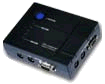
Linksys KVMHaving a home network is very cool and convenient, but having to switch back and forth between my main PC and my laptop on the same desk was getting to be a pain, literally. The placement of my laptop on my desk left no room for my legs and was causing me to hunch over … not very ergonomic. I decided it was time for a KVM (keyboard-video-mouse) switch and ended up with the Linksys KVM100SK: a two-port switch kit that contained the switch box and all the cables needed to hook up two PCs, all for under $100. It was a snap to setup and doesn’t need an external power supply (it draws power from the keyboard connection). You can switch between the two PCs using the button on the switch, or by pressing the CTRL key twice. It also supports autoscan. Now I can control both my PCs from my main monitor, keyboard, and mouse.

Pioneer Elite VSX-24TX receiver

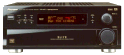
Pioneer Elite VSX-24TX receiverOver the Millenium New Year’s weekend I was bitten by the home theater (or HT) bug. Since at the time I already had a DVD player in my laptop (using Margi’s DVD-to-Go, now discontinued) and a decent big screen TV, I opted for a receiver. I chose the Pioneer Elite VSX-24TX. It’s a Dolby Pro-Logic/Dolby Digital/DTS/THX 90W receiver with component, optical, and S-video connections and still serving me well today.

ADS Tech PYRO1394DV firewire card

Since I have a digital video camera of course I want to be able to edit video on my PC. Since most digital camcorders have IEEE 1394 ports (also called Firewire (by Apple), or iLink (by Sony)), I also have a Firewire card: the inexpensive PYRO 1394DV card from ADS Tech. The PCI card provides two external (and one internal) Firewire ports, a cable to connect to your camcorder, and is bundled with Ulead’s VideoStudio SE which pretty easy to learn. Beware … you need a LOT of hard drive space to store all the digital video clips!

Sony DCR-TRV8 miniDV camcorder

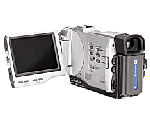
DCR-TRV8My digital camcorder is the Sony DCR-TRV8. It’s a miniDV camera complete with 10x optical zoom (120x digital zoom, but who uses that?), digital and picture effects, 12/16-bit PCM sound, audio/video output, 3″ flip out LCD screen, and a ton of other cool features. Since it’s now several years old, it’s been supplanted by much newer models in the DCR line (including ones with megapixel still image capture, MPEG movie modes, and even Bluetooth connectivity!) but mine still works perfectly and continues to help me document those memorable moments.

Delorme Tripmate GPS receiver

TripmateNow this is cool. The TripMate from Delorme is an inexpensive GPS (global positioning system) device that uses the government’s network of GPS satellites to pinpoint your position on the globe. Paired with Delorme’s Street Atlas software in your laptop, you can plan a trip, attach the Tripmate to the serial port of your laptop, place the Tripmate on your dashboard, and then watch yourself move on the map as you drive. The GPS calculates your heading and speed and even speaks when your next turn is approaching. Very, very cool.