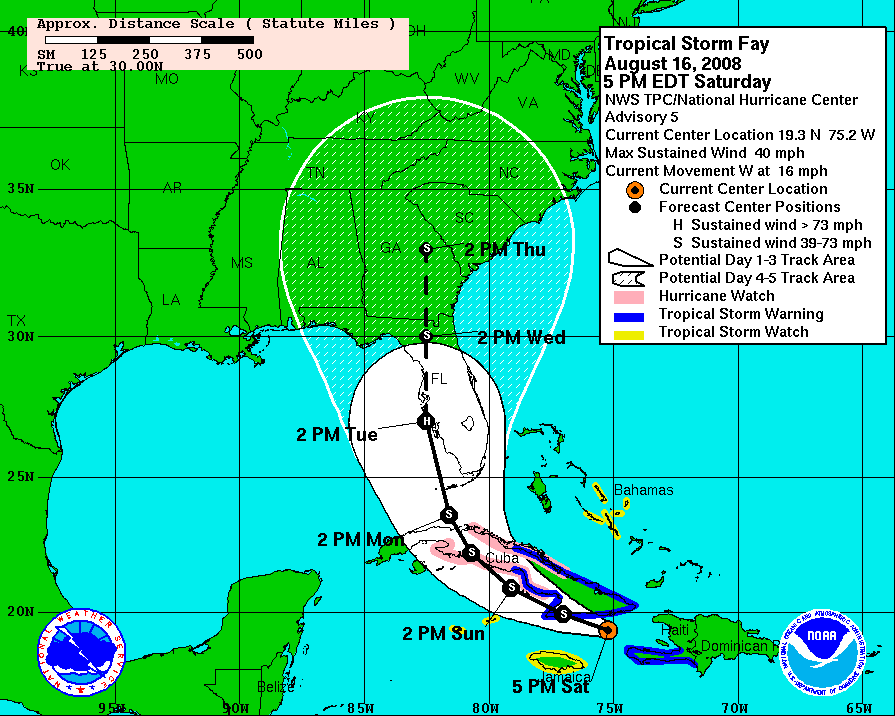
Looks like Fay is making a bee-line for the Tampa Bay area! This just figures since our new hurricane windows for the house aren’t scheduled to install for another two weeks. I might have to get the plywood out one last time …
World Readable: a personal blog about anything that comes to mind for anybody who cares to read it.
Looks like Fay is making a bee-line for the Tampa Bay area! This just figures since our new hurricane windows for the house aren’t scheduled to install for another two weeks. I might have to get the plywood out one last time …
Last month after fixing a problem in Galleon’s weather application it was pointed out to me that my fix displayed the 100-mile radar map whereas originally Galleon had shown the 600-mile map.
Well, I decided to take a crack at coming up with a solution for that as well. This gave me an opportunity to dive a bit deeper into the java code and also learn how to use the TiVo HME SDK simulator. It was a fun little project (even though I hate regular expressions sometimes ;-)). The end result?
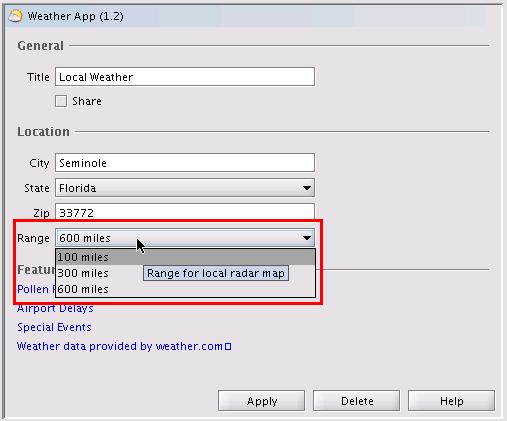
As you can see from the screencap above, I added a new control to the configuration dialog that allows you to select the range of local radar image displayed based on the three major maps available from weather.com for a location.
Note that some locations don’t have all three ranges available (90210, as an example, doesn’t have a 100-mile range map). If you select an unavailable range, the default range map will be displayed instead (whatever you would get by going to www.weather.com/weather/map/zip).
At a high level, here’s what my enhancement (to determineLocalRadar() in WeatherData.java) does:
Additionally, I had to make small related changes to Weather.java, WeatherConfiguration.java, and WeatherOptionsPanel.java (in order to add the control to the page, retrieve the settings from configure.xml, etc.). I also fixed a bug that (I think) was causing the current weather and 5-day forecast data to not always refresh properly (at least for me during my testing).
Known issue: apparently the weather app only loads its values from configure.xml when it first starts up. As a result, if you make a change to any of the settings (city, state, zip, etc.) it won’t take effect until you restart Galleon. The same goes for the new range setting: if you change it in the GUI be sure to restart the application so you’ll see the new range map on your TiVo.
Since this was an actual enhancement to the application, I took the liberty of bumping the version number to 1.2. To install, just download my new weather.jar file, put it in Galleon’s apps directory, and then restart Galleon. If you prefer to compile it yourself, you can grab a zip file with my code, or check out the diff results.
If you run into any problems, or have anything else to say about this enhancement, let me know in the comments section!
Driving home in the pouring rain with sunshine ahead. Summer in Florida … if you don’t like the weather, wait 20 minutes! 😀
A few weeks ago, the Local Radar screen in Galleon‘s weather application started showing “N/A” instead of the image from weather.com. Galleon has been dormant, development-wise, for a while. It was updated late last year with some bug fixes and HD support by s2kdave and jtkohl, but has lapsed into the realm of unsupported (but really useful) applications.
s2kdave pointed me in the right direction as to which piece of the code contained the URLs for the local radar image (WeatherData.java). I’m not really a java programmer, but I can code, so I decided to take a look and see if I could figure out the problem. It took me a while, but the fix ended up being rather simple.
In the determineLocalRadar function there are two try blocks. The first section grabs the weather page for the user’s specified ZIP code:
GetMethod get = new GetMethod("http://www.weather.com/weather/map/" + mZip);
It then parses through that HTML looking for the following strings:
String REGEX = "var mapNURL = \"(.*)\";";
or
REGEX = "src=\"/maps/local/local(.*)\"";
This was used to detemine the URL of the web page containing the local radar image. The second try block then grabbed that page:
get = new GetMethod("http://www.weather.com"+ radarurl);
and parsed it for the URL of the image itself:
String REGEX = "NAME=\"mapImg\" SRC=\"([^\"]*)\"";
What I found is that the first web page (the ZIP code-specific one) now contained the local radar image, so there was no need for the first try block anymore (the one creating the radarurl variable). I removed the block and re-compiled the code.
It worked! I tested with three different area codes in Galleon and the proper local radar image was retrieved each time. Of course, I can’t stop weather.com from changing their layout again, but this should work for now.
You can download my new weather.jar file and place it in the apps directory where Galleon is installed. I also posted about my fix on the TiVo Community Forum here.